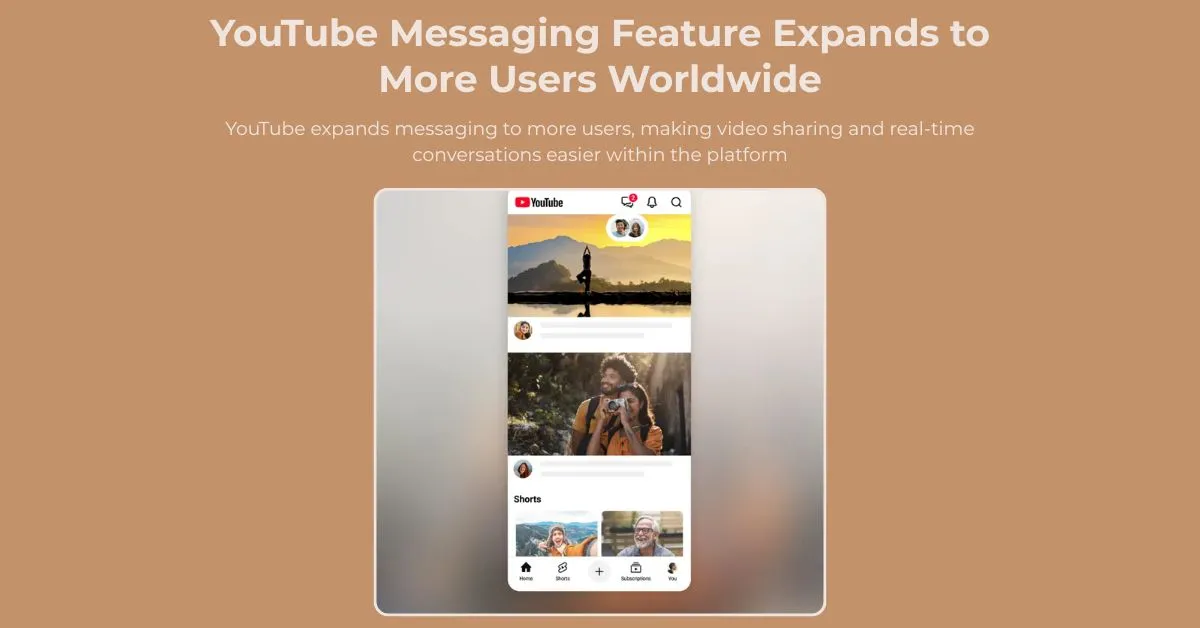

Sharing videos is now an integral part of how people communicate online. It is clear that users often switch between multiple apps to continue conversations, whether recommending a tutorial, discussing a creator's latest upload, or sharing a livestream. YouTube Messaging is expanding to more users worldwide. This will simplify the experience by allowing people to share videos and chat directly within the platform.
The feature's objective is clear, to centralise content discovery, sharing and discussion, fostering a more connected experience for viewers while eliminating the reliance on external messaging apps.
Key Takeaways
- YouTube Messaging is expanding to more users worldwide, allowing people to share videos and chat directly within the YouTube app.
- The feature introduces a dedicated new message system that supports sharing videos, Shorts, and livestreams in real time.
- Users in countries including the United States, Great Britain, Brazil, and Singapore are among those gaining access as the rollout expands.
- Built-in messaging icons make it easier to start conversations, share content, and discuss videos without switching to external apps.
- The update reflects YouTube's broader focus on improving YouTube video sharing, user engagement, and communication through new YouTube Features.
What Is YouTube Messaging?
YouTube Messaging is an in-app communication feature that allows users to share and discuss videos without leaving YouTube.
Don't waste time copying links into external messaging apps. Send content directly through YouTube and continue conversations in dedicated chat threads. The feature supports videos, shorts and livestreams, making content sharing more interactive and convenient.
Why YouTube Is Expanding Messaging
Video platforms are focusing on creating more engaging user experiences.
Recent YouTube updates have clearly shown that community interaction, content discovery and audience engagement are now the top priorities. Expanding messaging access allows users to communicate directly around the content they enjoy while remaining within the platform.
The update also reflects changing user expectations; many people prefer integrated communication tools that reduce the need to switch between multiple applications.
How the New Message System Works
The messaging experience is built around a dedicated new message interface within the YouTube app.
Sending Invitations
Users can invite others to connect through the messaging system.
Once you accept an invitation, you can start sharing content and discussing it in real time.
Sharing Content Directly
Users can send:
- Videos
- Shorts
- Livestreams
- Creator content
- Recommended channels
This undoubtedly makes YouTube video sharing more efficient, while keeping conversations connected to the content being discussed.
Real-Time Conversations
Messages appear within conversation threads, enabling users to react, comment and discuss content straight away.
Countries Included in the Expansion
The feature is expanding to additional markets, including:
- United States
- Great Britain
- Brazil
- Singapore
The messaging experiment has also been tested in several European countries, including Germany, Austria, and Switzerland.
The feature is still in experimental rollout, so availability varies and not all users in supported countries will have immediate access.
Eligibility and Safety Measures
YouTube has implemented a series of requirements and safeguards designed to protect messaging users.
Who Can Use the Feature?
Messaging is currently available only to:
- Adult users
- Users with verified age information
- Google account holders
- Users with a YouTube channel
Brand accounts are not eligible for the messaging feature.
Community Protection
YouTube will review messages to help maintain a safe environment and to ensure compliance with its policies and Community Guidelines.
These safeguards will reduce misuse and support meaningful conversations.
Benefits for Users
Easier Content Sharing
Share videos directly on YouTube. Don't waste time using third-party messaging applications.
Better Content Discussions
Conversations are happening alongside the content being shared, creating a more contextual experience.
Improved Discovery
Recommendations from friends are an excellent way to discover new creators and content.
Centralized Communication
Messaging and viewing happen within the same platform, reducing unnecessary interruptions.
Impact on YouTube Video Sharing
The expansion of messaging will undoubtedly lead to new opportunities for YouTube video sharing and audience engagement.
Faster Recommendations
Users can instantly send content to friends and communities.
More Organic Discovery
Personal recommendations are key to driving stronger engagement than algorithmic suggestions alone.
Increased Viewer Interaction
Discussing videos immediately after sharing is the best way to encourage deeper engagement with content.
Why YouTube Is Bringing Messaging Back
YouTube is making a second attempt at introducing direct communication tools through YouTube Messaging.
The platform previously launched an in-app messaging feature in 2017 before discontinuing it in 2019. YouTube clearly focused more heavily on public comments and community engagement features at the time.
The return of YouTube Messaging is a clear response to the growing demand from users for easier ways to share and discuss content without leaving the platform.
Many users currently copy links into external apps whenever they want to recommend a video. The new approach keeps those interactions inside YouTube itself, making content sharing more convenient and interactive.
Understanding Messaging Icons
The expansion introduces greater visibility for messaging icons throughout the YouTube experience.
Easier Access
Messaging icons help users quickly:
- Start conversations
- Share content
- Access message threads
- Manage interactions
Improved Navigation
Clear messaging icons make communication features easier to discover, particularly for new users.
Recent YouTube Features are clearly focused on simplifying user interactions and improving accessibility.
Technical Considerations
As messaging capabilities expand, several technical factors will continue to be crucial.
Mobile-First Experience
Since YouTube is mostly used on mobile devices, messaging functionality must remain responsive and easy to use on smaller screens.
Fast Performance
It is clear that quick message delivery and smooth loading experiences help to support user engagement.
Security and Privacy
HTTPS protection, account verification, and moderation systems are vital for protecting user interactions.
Why This Update Matters
The latest YouTube updates prove that video platforms are evolving beyond content consumption.
It is clear that users now expect communication tools to be integrated into the services they use every day. YouTube is expanding its messaging capabilities to create a more connected environment where discovery, sharing, and discussion can happen in one place.
YouTube's ongoing development of features centred on communication is clear evidence that social interaction will be a vital part of the platform's future.
As content sharing becomes more integrated into platform experiences, visual content continues to play an important role in audience engagement and content discovery. Resources such as FreePixel are among the platforms used for accessing images and other visual assets that support digital content workflows across different online channels.
Conclusion
The expansion of YouTube Messaging makes sharing and discussing videos more convenient. Users can send videos, shorts and livestreams directly within YouTube, creating a smoother and more connected experience.
YouTube is developing communication-focused features. Integrated messaging will help strengthen user engagement and content discovery. This update offers a simpler way to connect and interact around content for viewers who regularly share videos with friends.
FAQs
1. What is YouTube Messaging?
It is a feature that allows users to share videos and communicate directly within YouTube.
2. How does the new message feature work?
The new message system allows users to invite contacts, share content, and discuss videos through dedicated chat threads.
3. Who can use YouTube Messaging?
The feature is currently available to eligible adult users with verified Google accounts and active YouTube channels.
4. What content can be shared?
Users can share videos, Shorts, livestreams, creator content, and recommendations.
5. What are messaging icons used for?
Messaging icons provide quick access to conversations, content sharing, and communication features within the app.
6. How does YouTube video sharing benefit from messaging?
It simplifies recommendations and allows users to discuss content without leaving YouTube.


























Sign in to leave a comment.