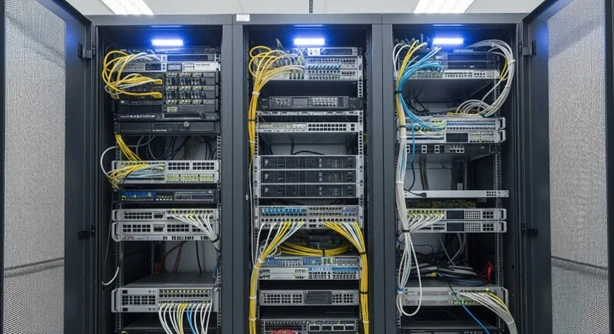

Your server setup works hard. Probably harder than anyone gives it credit for. But if it’s constantly overheating, tangled in cables, or taking too long to troubleshoot, something’s off. It’s not always the servers. Sometimes, it’s the little things around them that need attention. A well-assembled server rack is only as efficient as the tools you build around it.
Think of it this way: you don’t just want your servers to run. You want them to run safely, quietly, and smoothly, with fewer surprises and less downtime. That’s where a few simple, smart add-ons can make all the difference. If you're setting up a new rack or upgrading an older one in Singapore, you'll want to explore these practical enhancements.
Let’s walk through 10 server rack add-ons that help you work smarter, not harder, while keeping your systems protected, your workspace calmer, and your team far less frustrated.
1. Get Rid of the Cable Chaos Before It Bites Back
Messy cables don’t just look bad. They cause problems. Imagine tracing a power line during a network failure and finding a knot the size of your fist. That’s not where you want to be. Cable management arms can solve this fast. They guide your cables neatly as you move or slide hardware in and out of place.
This isn’t about perfectionism. It’s about making life easier when things go wrong. Good cable paths reduce the stress on connectors and stop airflow blockages that make heat worse. You’ll thank yourself the next time your team needs to act fast.
2. Tired of Overheating? Seal the Gaps with Blanking Panels
It’s tempting to leave unused rack spaces open. But those gaps do more harm than you might expect. Without blanking panels, warm air from your working servers swirls back into the empty areas. That heat recirculates and raises the temperature for everything else.
By closing those gaps, you force air to move properly from cool intake to hot exhaust without looping back. You’re protecting the gear that’s already doing heavy lifting. And you're not putting extra pressure on your cooling system, which already has enough to handle in Singapore's climate.
3. A Smarter Way to Power Up: Install Intelligent PDUs
You know you need electricity, but how you distribute it matters. Standard power strips work, but intelligent PDUs (power distribution units) take things further. They don’t just power your devices. They help you understand your power flow. How much you're using, where, and when something goes off balance.
These PDUs monitor voltage, temperature, and current. They’ll alert you before problems grow into full-blown outages. You’ll keep your servers safer and your energy costs more predictable. And the best part? You gain control without having to be physically present. It’s smart power with peace of mind.
4. Not All Equipment Fits? Use Rack Shelves to Catch the Odd Ones Out
Sometimes you’ve got tools or devices that simply weren’t made to slide neatly into rails. Maybe it’s legacy hardware. Maybe it's test equipment. Either way, it still needs a safe place to sit.
Rack shelves step in when standard slots don’t cut it. They give you flexibility to store those awkward items without risking damage or instability. And they make sure you’re using your vertical space wisely. That extra breathing room makes a big difference, especially if you’re dealing with tight IT equipment enclosures that aren’t always forgiving.
5. Singapore Heat Isn’t Playing: Use Cooling Fans That Keep Up
Singapore’s warm, humid environment doesn’t make server management easy. Even with passive cooling, heat builds quickly inside a closed rack. When airflow starts to choke, everything inside gets stressed. Fans aren’t a luxury. They’re a lifeline.
Rack-mounted fans or trays can push cool air where it's needed or pull hot air out before it cooks your hardware. If you go with variable-speed models, you can even reduce power and noise when things cool down. It’s one of those upgrades that quietly pays off every single day.
6. Clean Up the Vertical Mess Before It Slows You Down
Horizontal cable organisers do their part, but vertical cable managers take the load off your rack’s spine. They run top to bottom, letting you route your lines without tangles, strain, or confusion. The benefit? You save hours during maintenance. You reduce signal interference. And yes, you improve airflow too.
Pair this with a server rack that supports structured cable design, and suddenly your setup looks and works like it should. More room. More clarity. Less stress when something breaks.
7. Know What’s Happening Before Disaster Hits
Don’t wait until it’s too late. Environmental monitoring tools give you a quiet heads-up before things go wrong. Sensors can watch temperature, humidity, airflow, even water leaks, and send alerts when thresholds are crossed.
This isn’t just for big server rooms using data center rack solutions. Even a small office with sensitive systems benefits. One spike in heat or one unnoticed leak can undo hours of work or damage expensive gear. These sensors help you catch small problems early, when they’re still easy to fix.
8. One Screen. Total Control. Enter KVM Switches
When you’ve got multiple servers, plugging in a separate keyboard and monitor for each one wastes space and time. A KVM (keyboard, video, mouse) switch brings all that under one roof. With one set of controls, you can jump between systems without leaving your seat.
It’s not just convenient. It’s efficient. When time matters, like during updates or system checks, you won’t have to fumble through a tangle of screens and inputs. It simplifies your day and makes your job feel a little less hectic.
9. Protect Your Rack Like It’s Holding Your Business (Because It Is)
Digital security gets the spotlight, but physical security matters just as much. A misplaced hand, a curious visitor, or someone plugging into the wrong port could cost you dearly. Physical locks, card access panels, or even biometric locks can keep your rack safe from unwanted contact.
Whether you’re dealing with a compact network cabinet or a full-sized system, adding physical security sends a clear message: your data matters, and you're serious about protecting it.
10. Don’t Fight the Gear. Make It Glide with Slide Rails
Ever tried replacing a server without slide rails? It’s awkward at best and risky at worst. You end up trying to support heavy equipment while aligning mounting holes, hoping nothing falls or snaps. That’s not a process anyone wants to repeat.
Slide rails and mounting kits take the pressure off. You get smooth, stable movement in and out of the rack. No strain. No guesswork. That means safer repairs, faster swaps, and less downtime, especially useful in tight 19-inch server racks where space and precision matter.
You're Not Just Building a Rack. You're Building Reliability
It’s easy to think of a server rack as just a frame for your hardware. But that frame carries everything your team depends on. You can’t afford to treat it as an afterthought. With the right add-ons, you turn a basic structure into a system that’s safer, easier to maintain, and better prepared for long-term use.
You’ll notice the difference on the hottest day. During the tightest maintenance window. When a client’s waiting and the pressure’s on. These tools aren’t there to look good. They’re there to work hard in the background, so your business can keep moving forward without hiccups.
In Singapore, Efficiency Isn't Optional. It's Survival
In a high-demand, space-conscious environment like Singapore, you can’t afford to overlook efficiency. Whether you’re working in a shared office or expanding into a full rack room, your infrastructure has to do more with less. That’s why so many businesses turn to a custom server rack manufacturer to design around real challenges and not just specs on a page.
Pairing the right add-ons with a purpose-built server rack gives you more than order. It gives you confidence. You know your equipment is protected, your space is being used wisely, and your team is ready to handle whatever comes next.





















Sign in to leave a comment.