

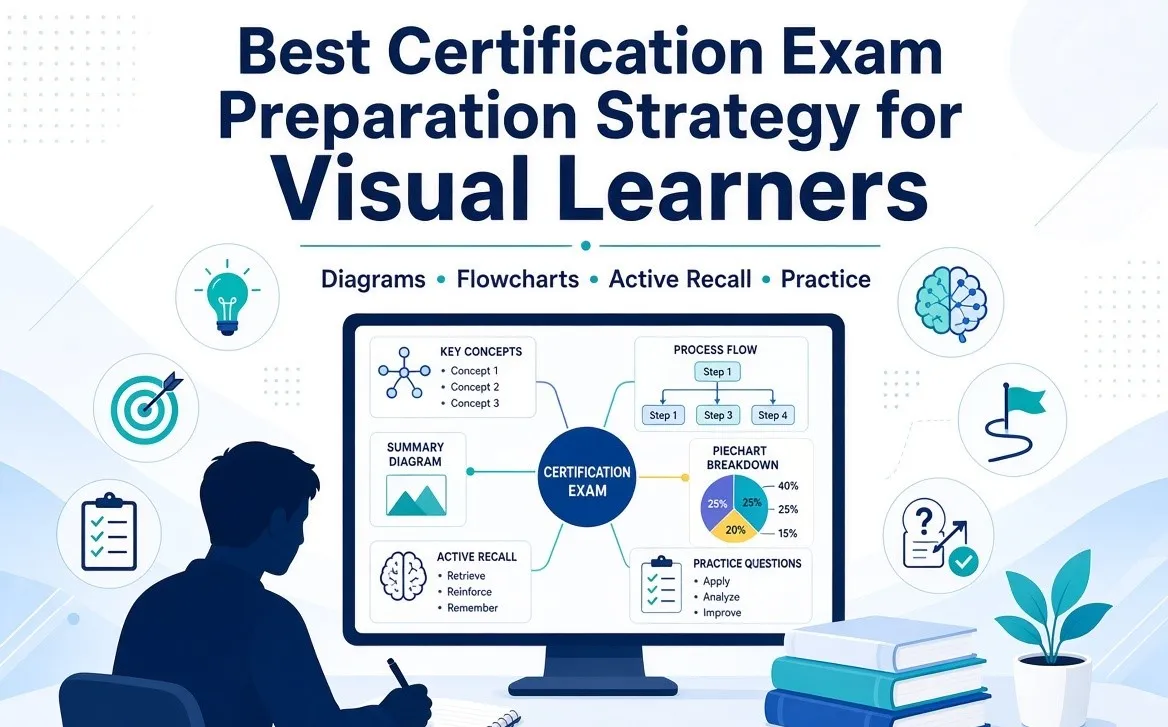
Some people naturally prefer learning through diagrams, charts, flowcharts, highlighted notes, demonstrations, and other visual formats. But effective certification exam preparation should not depend on being placed into a fixed “visual learner” category. Research has not established that matching instruction to a supposed learning style reliably improves results. A better approach is to use visual tools alongside active recall, practice questions, spaced review, and application. Certuvo brings several of these elements together through exam-style practice, performance analytics, AI-supported explanations, and visual question content such as diagrams and tables.
The best study strategy for someone who prefers visual learning is not simply watching videos or making colorful notes. Use diagrams, flowcharts, mind maps, tables, and visual summaries to understand difficult concepts, then strengthen learning with retrieval practice, spaced repetition, practice questions, and mock exams. This combination helps turn visual information into knowledge you can recall and apply under exam conditions.
What Does “Visual Learning” Actually Mean?
A visual learning preference generally describes a preference for receiving or organizing information through things such as:
- Diagrams
- Charts
- Images
- Flowcharts
- Mind maps
- Timelines
- Tables
- Written summaries
- Color-coded information
However, it is important to separate learning preference from the idea of a scientifically proven “visual learner.”
Research has repeatedly found limited evidence that students perform better when teaching is specifically matched to a declared learning style. A 2024 meta-analysis examined 21 studies involving 1,712 participants and found that evidence supporting the learning-style matching hypothesis was too small and inconsistent to justify widespread adoption.
So, instead of asking, “Am I a visual learner?”, a more useful question is:
“Which visual study techniques help me understand and remember this particular topic?”
That shift makes your study plan more practical.
Why Visual Study Techniques Can Still Be Useful
The lack of evidence for fixed learning styles does not mean that visuals are useless.
Diagrams and other visual representations can help organize complicated information and show relationships between ideas. Research on evidence-based learning strategies includes dual coding alongside retrieval practice, spaced practice, interleaving, elaboration, and concrete examples.
What Is Dual Coding?
Dual coding means representing information using two complementary forms, such as words and visuals.
For example:
Instead of only reading a paragraph about an audit process, you could create a simple flowchart showing:
Planning → Risk Assessment → Evidence Gathering → Evaluation → Reporting → Follow-up
You are still using words, but the visual structure helps show how the concepts relate.
The Best Visual Study Techniques for Certification Exams
1. Turn Complex Topics Into Flowcharts
Flowcharts are particularly useful when a topic involves steps, decisions, processes, or sequences.
They can be useful for subjects such as:
- Audit procedures
- Accounting processes
- Tax procedures
- Project management processes
- Risk management
- Compliance workflows
- IT controls
Rather than copying an entire chapter into your notes, reduce it to the decisions and relationships you actually need to understand.
2. Use Mind Maps for Related Concepts
Mind maps work well when one central concept connects to several smaller concepts.
For example, if you are studying risk management, your central topic could branch into:
- Risk identification
- Risk assessment
- Risk response
- Controls
- Monitoring
- Reporting
This creates a visual overview before you move into detailed study.
3. Build One-Page Topic Summaries
After studying a chapter or domain, create a one-page summary.
Include only:
- Key definitions
- Important formulas
- Major concepts
- Processes
- Differences between similar terms
- Common mistakes
- A few examples
The purpose is not to reproduce the textbook. It is to create something you can review quickly later.
Don't Just Make Visual Notes, Test Yourself
This is one of the most important parts of an effective study strategy.
Reading a diagram and thinking “I understand this” is different from being able to reproduce the concept without looking at your notes.
That is where retrieval practice becomes important.
What Is Retrieval Practice?
Retrieval practice means trying to recall information from memory rather than simply reading it again.
For example:
Look at a risk-management flowchart for two minutes.
Then close it.
Try to recreate the process from memory.
Afterward, compare your version with the original and correct the gaps.
This turns a passive visual activity into active learning.
Research reviews identify retrieval practice as one of the learning strategies with substantial research support.
Also Read: How to Avoid Burnout While Studying for Professional Certification Exams
Combine Visual Learning With Practice Questions
Professional certification exams do not normally ask whether you can recognize a pretty diagram.
They test whether you can remember, interpret, analyze, and apply information.
That is why practice questions should become part of your visual study workflow.
A useful cycle is:
Learn → Visualize → Recall → Practise → Review → Repeat
For example:
- Learn a new concept.
- Create a simple visual summary.
- Close your notes and explain it from memory.
- Complete related practice questions.
- Review incorrect answers.
- Update your visual summary if you discovered a knowledge gap.
This approach connects understanding with exam application.
Use Color Carefully
Color can make notes easier to scan, but too much color can have the opposite effect.
Instead of using ten different colors, create a simple system.
For example:
- One color for definitions
- One for formulas or rules
- One for exceptions
- One for mistakes
- One for items that need further review
The goal is faster recognition, not decoration.
How AI Study Tools Can Help Visual Learners
AI study tools can add another layer to a visual study strategy.
An AI learning platform can help turn a difficult concept into different representations, such as:
- A simple explanation
- A step-by-step process
- A comparison
- A practical example
- A set of practice questions
- A revision quiz
For example, if you are struggling with a complicated accounting rule, you could ask an AI tutor to explain the concept in simple language and then create a scenario-based question that tests your understanding.
However, AI should be treated as a study aid rather than an unquestioned authority. Important technical information should be checked against the official exam blueprint, standards, textbooks, or other authoritative sources.
How Certuvo Can Fit Into a Visual Study Strategy
Certuvo combines exam-style questions, realistic simulations, performance analytics and AI-supported study tools across certifications such as CPA, CMA, CIA, CFA, PMP and others. Its AI Coach can interact through text or voice and can interpret information displayed on the screen, including diagrams, tables and answer choices.
For a candidate who likes visual explanations, the useful part is not simply having an AI tool. It is being able to move between visual information, explanation, practice, and feedback.
For example, a study session could look like this:
- Review a visual summary.
- Ask the AI Coach to explain a difficult section.
- Complete related questions.
- Review incorrect answers.
- Identify the weak topic through performance analytics.
- Create or review a new visual summary.
- Test yourself again later.
That creates a study loop rather than relying on passive reading.
Visual Study Strategy by Exam Type
Different professional exams require different kinds of visual organization.
1. CPA Exam Prep
For CPA preparation, use:
- Process diagrams
- Accounting flowcharts
- Formula sheets
- Journal-entry examples
- Tax comparison charts
- TBS walkthroughs
Then reinforce the material with MCQs and task-based simulations.
2. CMA Exam Prep
For CMA, visual tools can help organize:
- Cost concepts
- Budgeting processes
- Financial ratios
- Performance measurement
- Decision-making frameworks
Use calculations and scenario-based questions to test whether you can apply the information.
3. CIA Exam Prep
CIA candidates can use:
- Audit process diagrams
- Risk-control relationships
- Governance frameworks
- Standards summaries
- Comparison charts
Then use practice questions to test whether the concept can be applied to a scenario.
4. CISA Exam Prep
For CISA preparation, flowcharts can be useful for understanding:
- IT governance
- Risk management
- Security controls
- Audit processes
- Systems development
- Incident management
The visual structure can help show how different controls and processes connect.
5. PMP Exam Prep
PMP candidates may benefit from:
- Process maps
- Lifecycle diagrams
- Stakeholder maps
- Risk matrices
- Decision trees
- Agile workflow diagrams
These should be followed by PMP Practice Questions and scenario-based practice because understanding a diagram is not the same as applying project-management principles to a new situation.
A Practical Visual Study Plan
If you are preparing for a professional certification, try this simple weekly structure.
1. Early week, Learn
Study new material and create short visual summaries.
2. Middle of week, Recall
Close your notes and recreate important diagrams, processes or definitions from memory.
3. Later week, Practise
Complete practice questions related to the topics you studied.
4. End of week, Review
Identify incorrect answers and update your notes.
5. Every few weeks, Test
Take a timed practice exam or mixed-topic assessment to see whether you can apply knowledge without relying on visual prompts.
This approach combines visual organization with evidence-supported learning techniques such as spacing and retrieval practice.
Common Mistakes Visual Learners Should Avoid
1. Making notes instead of learning
A beautifully designed page does not automatically mean you understand the topic.
2. Watching too many videos
Videos can explain concepts, but passive viewing should not replace practice and recall.
3. Using too many colors
If everything is highlighted, nothing stands out.
4. Avoiding difficult questions
A visual summary may make a topic look simple. Practice questions reveal whether you can actually apply it.
5. Relying completely on one format
Even if you strongly prefer visual material, certification exams require you to read questions, reason through scenarios and recall information under time pressure.
Visual Study Strategy: What Works Best?
1. For understanding:
Use diagrams, flowcharts, examples and visual summaries.
2. For remembering:
Use retrieval practice and spaced review.
3. For applying:
Use scenario-based questions and practice exams.
4. For identifying weaknesses:
Use performance analytics and error tracking.
5. For difficult concepts:
Use explanations, examples and AI-supported tutoring, while verifying technical information against authoritative sources.
6. For final preparation:
Reduce dependence on notes and increase timed, mixed-topic practice.
Final Takeaway
The most effective strategy is not to build your entire study plan around the label “visual learner.” Instead, use visual tools where they make information easier to understand, then strengthen that knowledge through retrieval practice, spaced review, practice questions and realistic exams. This gives you a more complete approach to professional certification exam preparation and prepares you for the type of active recall and application required on exam day.
If you prefer visual study methods, start with one difficult topic and turn it into a simple diagram, flowchart or one-page summary. Then close your notes and explain the concept from memory. Follow it with practice questions and review the mistakes. Over time, this creates a much more useful study system than simply collecting attractive notes.
Certuvo can be one option for candidates who want to combine exam-style practice, performance tracking, simulations and AI-supported explanations in the same study environment. Its platform currently offers preparation across multiple professional certifications and includes tools designed to help candidates identify weak areas and practise according to their progress.
Frequently Asked Questions
Q1. Is visual learning better for certification exam preparation?
Not necessarily. Research does not support the idea that matching study methods to a fixed learning style reliably improves learning. Visual techniques can still be useful for organizing and understanding complex information.
Q2. What are the best visual study techniques?
Flowcharts, mind maps, diagrams, comparison charts, one-page summaries and simple visual frameworks can all be useful. Combine them with retrieval practice and exam questions.
Q3. Are videos enough for professional certification exam preparation?
No. Videos can help explain concepts, but effective preparation should also include active recall, practice questions, error review and timed exams.
Q4. Can AI help visual learners study?
Yes. AI tools can explain concepts, create examples, generate practice questions and help you work through difficult material. Important technical information should still be verified against authoritative sources.
Q5. What is dual coding in exam preparation?
Dual coding involves combining words with complementary visual representations. For example, you could pair a written explanation of an audit process with a flowchart showing the sequence.
Q6. Should I make handwritten notes for certification exams?
Handwritten notes can be useful if they force you to summarize and organize information. However, copying large amounts of material is less useful than creating concise notes and then testing yourself from memory.
Q7. How can visual learners prepare for scenario-based exams?
Use diagrams and decision trees to understand the concepts first, then practise scenario-based questions without looking at your visual notes. This helps transfer knowledge from recognition to application.
Q8. Can Certuvo be used for different professional certification exams?
Yes. Certuvo currently provides preparation resources for certifications including CPA, CMA, CIA, CFA, PMP, CISA and other exams, with features such as practice questions, simulations, analytics and AI-supported study tools.

























Sign in to leave a comment.