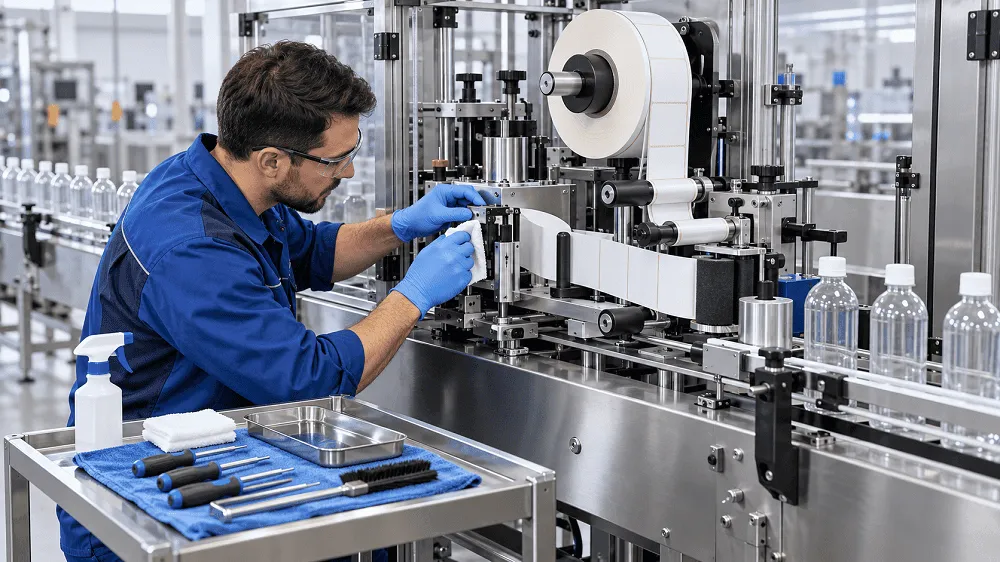

A Bottle Labeling Machine helps manufacturers apply labels quickly and consistently. It can improve package appearance and reduce manual work. However, the machine needs regular care to maintain good performance.
Dust, label scraps, adhesive, and product spills can collect inside the machine. Rollers and belts can also wear over time. These problems may cause crooked labels, wrinkles, missed labels, and unexpected stoppages.
Preventive maintenance helps identify small issues before they become expensive repairs. It also supports safer operation and more stable production.
The following Bottle Labeling Machine maintenance tips can help protect your equipment and improve labelling quality.
Follow the Machine Manual
Every labelling machine has a different design. Maintenance intervals and cleaning methods may vary between machines.
Start with the manufacturer’s operating and maintenance manual. Follow its instructions for cleaning, adjustment, lubrication, and part replacement.
Do not change control settings without understanding their purpose. Keep a copy of the manual near the production area.
Operators and maintenance staff should also receive proper training.
Make the Machine Safe Before Maintenance
Safety must come before cleaning or repair. A labelling machine contains moving belts, conveyors, rollers, motors, and electrical parts.
Stop the machine before opening guards or touching internal components. Isolate electrical, pneumatic, and other energy sources according to your workplace safety procedure.
Unexpected machine movement or the release of stored energy can cause serious injuries. Proper energy-isolation procedures help protect workers during servicing and maintenance.
Never reach into a moving conveyor to remove a jammed bottle or label. Only trained and authorised staff should perform technical repairs.
Do not bypass safety switches or operate a machine with damaged guards.
Clean the Machine Every Day
Daily cleaning is one of the most important maintenance tasks. It can prevent many label-feeding and placement problems.
Remove:
- Loose labels
- Backing paper
- Label dust
- Adhesive residue
- Product spills
- Broken container pieces
Pay close attention to the conveyor, label head, peel plate, rollers, sensors, and waste liner area.
Use cleaning products approved for the machine materials. Strong solvents may damage rubber rollers, plastic parts, sensors, or painted surfaces.
Do not use sharp tools to remove adhesive. They may cut or scratch the rollers. Use a soft cloth and approved adhesive remover when required.
Keep the Label Path Clean
The label web moves from the supply roll through guides and rollers. It then reaches the peel plate, where each label separates from the backing liner.
Dust, adhesive, or torn paper in this path can create extra friction. The label web may slip, tear, or move out of position.
Clean these areas regularly:
- Label supply reel
- Guide rollers
- Tension rollers
- Drive rollers
- Peel plate
- Waste liner take-up reel
- Label pressing surfaces
Check that the label web follows the correct threading path. Poor threading can cause unstable tension and missed labels.
Inspect the Peel Plate
The peel plate creates the sharp turn that separates a label from its backing liner.
Keep the edge clean and smooth. Adhesive build-up can cause the label to release too early or too late.
Check that the plate is tight and correctly aligned. Loose hardware can change the label release point.
Replace a damaged or heavily worn peel plate. A rough or bent surface may scratch labels and disturb the label web.
Clean the Label Sensor
The label sensor detects the space or mark between labels. Dust and adhesive can block its reading.
A dirty or poorly aligned sensor may cause:
- Missed labels
- Double labels
- Incorrect stopping positions
- Frequent alarms
- Uneven label gaps
Clean the sensor using a soft cloth or approved wipe. Do not scratch its lens.
Check the alignment after cleaning. Transparent labels may need a special sensor or sensitivity setting.
Make adjustments only after the sensor is clean. Otherwise, dirt may create false readings.
Inspect the Bottle Sensor
The bottle sensor detects each container entering the labelling position. A dirty or misaligned sensor may fail to start the label cycle.
Clean the sensor face and inspect its mounting. Make sure the wires and connectors are secure.
Test the sensor with the different bottles used in production. Clear, dark, shiny, or reflective containers may require careful adjustment.
Examine Rollers and Pressing Belts
Rollers and pressing belts attach labels firmly to bottles. Their surfaces should remain clean and even.
Inspect them for:
- Adhesive build-up
- Cuts
- Cracks
- Hardening
- Flat areas
- Uneven wear
- Loss of grip
Dirty rollers can leave marks on labels. Worn parts may cause wrinkles, bubbles, or poor edge adhesion.
Check the pressure against the bottle. Too much pressure may deform light plastic containers. Too little pressure may leave loose label edges.
Check the Conveyor and Bottle Guides
The conveyor must move bottles smoothly through the labelling station. Belt slip or unstable guides can change label placement.
Remove spills, label pieces, and other waste from the conveyor.
Inspect the belt for cracks, fraying, and unusual wear. Check its tracking and tension according to the machine manual.
A loose conveyor belt may slip. Excessive tension may increase wear on bearings and drive parts.
Bottle guides should support containers without squeezing them. Record the correct guide positions for each bottle size.
Maintain Correct Label-Web Tension
The label web needs steady tension. Loose material may move sideways or wrinkle. Excessive tension can stretch the backing liner or cause it to break.
Inspect:
- Dancer arms
- Tension rollers
- Brakes
- Springs
- Clutches
- Take-up reels
Make sure these parts move freely. The waste liner should wind evenly onto its take-up reel.
Do not change several tension settings at the same time. Make one adjustment and run a short test. Record the setting that produces the best result.
Inspect Belts and Drive Parts
Drive belts, chains, and gears transfer movement through the machine. Worn parts may cause slipping, vibration, or poor timing.
Look for:
- Cracked belts
- Missing belt teeth
- Frayed edges
- Rust
- Loose fasteners
- Abnormal movement
- Unusual noise
Replace worn parts before they fail during production. Always use the correct replacement type and size.
Lubricate parts only where the manual recommends it. Too much lubricant can attract dust or reach bottles and labels.
Check Pneumatic Components
Some labelling machines use compressed air for bottle control, label application, or rejection systems.
Inspect air tubes, fittings, cylinders, filters, and regulators. Listen for air leaks while the system is pressurised.
Drain moisture from the air-treatment system when required. Confirm that the air pressure remains within the approved range.
Low pressure can cause slow or incomplete movement. Excessive pressure may damage machine parts or containers.
Inspect Electrical Connections
Loose electrical connections can cause alarms and unexpected stoppages.
Look for:
- Damaged cables
- Loose connectors
- Worn insulation
- Burn marks
- Signs of overheating
- Moisture inside the cabinet
Keep the electrical cabinet closed, clean, and dry.
Only qualified staff should open the cabinet or work on electrical components. The correct isolation procedure must be followed first.
Test Emergency Stops and Safety Guards
Safety systems must remain functional. Test emergency-stop buttons and safety interlocks at the required intervals.
Check that guards are secure and free from damage. Do not continue production if a safety device fails.
Record every safety inspection. Repair any fault before restarting normal operation.
Save Settings for Every Product
Many labelling problems begin after an incorrect changeover. Operators may forget the correct guide, sensor, roller, or speed settings.
Create a setting sheet for every bottle and label combination.
Record:
- Conveyor speed
- Label feed speed
- Sensor position
- Bottle-guide positions
- Label height
- Roller pressure
- Web-tension settings
- Coding-unit position
If the control panel supports stored recipes, use clear product names. Protect important settings from accidental changes.
Inspect the Machine During Production
Maintenance should not happen only after the machine stops. Operators should look for warning signs during every shift.
Watch for:
- Labels moving out of position
- New wrinkles or bubbles
- Label-web tracking changes
- Bottles shaking or falling
- Repeated sensor alarms
- Unusual sounds
- Excessive vibration
- Rising rejection rates
- Adhesive near the peel plate
Stop and investigate repeated problems. Resetting an alarm without identifying its cause may allow the fault to become worse.
Create a Preventive Maintenance Schedule
A clear schedule ensures that important checks are not missed. The exact intervals should follow the machine manual and working conditions.
Daily Maintenance
- Clean the conveyor and machine surfaces
- Remove labels and backing paper
- Clean the peel plate
- Clean product and label sensors
- Inspect rollers and pressing belts
- Check label tracking
- Look for loose parts and air leaks
Weekly Maintenance
- Inspect web-tension components
- Check conveyor tracking
- Review bottle-guide alignment
- Inspect pneumatic tubes and fittings
- Check drive belts for wear
- Test common product settings
- Clean hard-to-reach areas
Monthly or Planned Maintenance
- Inspect bearings and drive components
- Check electrical connections
- Test emergency stops and interlocks
- Review spare-parts stock
- Check placement accuracy
- Review alarm and downtime records
- Inspect the machine frame and fasteners
Maintenance may be required more often in dusty environments or high-output production.
Keep Maintenance Records
Maintenance records help production teams find repeated problems.
Record:
- Maintenance date
- Machine operating hours
- Reported problem
- Inspection results
- Corrective action
- Replaced parts
- Technician’s name
- Final test result
Track label waste, downtime, rejected bottles, and recurring alarms.
A growing number of small stops may show that a sensor, belt, roller, or drive part is wearing out.
Keep Important Spare Parts Available
A small damaged part can stop the entire production line.
Keep critical spare parts based on the machine supplier’s recommendations and your operating experience.
Common spares may include:
- Sensors
- Drive belts
- Pressing rollers
- Fuses
- Pneumatic fittings
- Springs
- Brushes
- Peel plates
- Conveyor parts
Store parts in a clean, dry, and labelled area. Confirm that each replacement part matches the machine model.
Common Labelling Problems and Maintenance Checks
Labels Are Crooked
Check bottle guides, conveyor movement, sensor position, and peel-plate alignment. Confirm that the label roll is correctly threaded.
Labels Have Wrinkles or Bubbles
Clean the pressing roller or belt. Check bottle stability and application pressure. Confirm that the label suits the bottle shape.
Machine Misses Labels
Clean and align the label sensor. Check the label gap, web tension, and sensitivity setting.
Labels Do Not Stick
Check the bottle surface for water, dust, or oil. Inspect the pressing system and confirm that the adhesive suits the container.
Label Web Breaks
Check web tension, sharp edges, worn rollers, and the threading path. Make sure the take-up reel is not pulling too strongly.
Conclusion
Regular maintenance keeps a Bottle Labeling Machine clean, accurate, and reliable.
Daily cleaning prevents adhesive, dust, and label waste from affecting the machine. Routine inspections can identify worn rollers, sensors, belts, and guides before they cause downtime.
Always follow the machine manual and workplace safety procedure. Record maintenance work and successful product settings.
A planned maintenance programme can reduce label waste, improve package quality, and extend the working life of the equipment.

















Sign in to leave a comment.