
In modern offices and creative studios, the ability to produce high-quality large-format prints efficiently is critical. Professionals in architecture, engineering, and design often face tight deadlines and require printing solutions that deliver both speed and accuracy. Large-format printers have evolved to offer not just printing but scanning and workflow integration, making them essential tools for businesses aiming to maintain productivity while producing professional-grade output. The right printer can reduce wasted materials, minimize errors, and streamline the document management process, ensuring that teams can focus on creative and technical tasks rather than troubleshooting equipment.
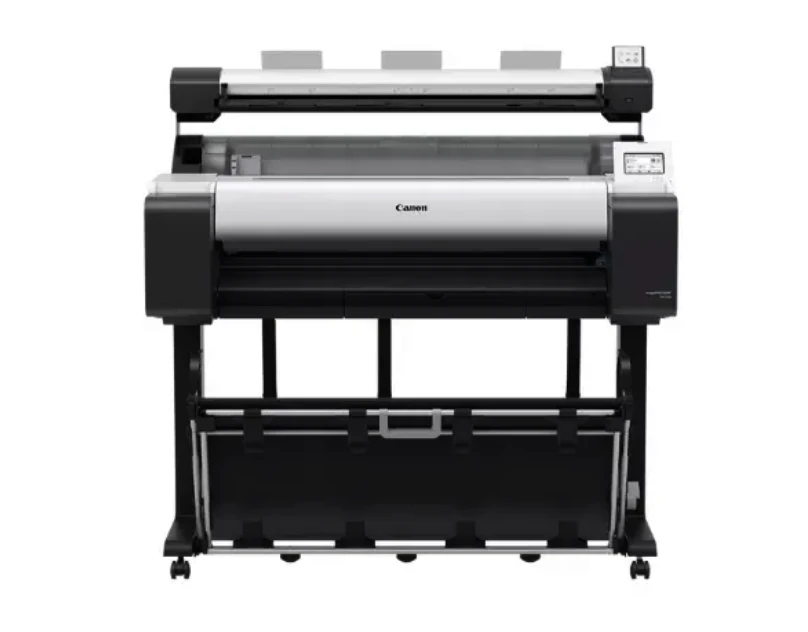
The Canon imagePROGRAF TM-350 MFP Lm36 is designed with these exact needs in mind. Combining precise printing, an integrated scanner, and user-friendly controls, this all-in-one solution caters to professionals who require dependable performance and high-resolution output. With its advanced LUCIA TD pigment ink system and compact design, the Canon imagePROGRAF TM-350 MFP Lm36 is engineered to optimize workflow and deliver consistent, vibrant results for a wide variety of large-format applications.
Printing Excellence
Five-Color LUCIA TD Ink Technology
The Canon imagePROGRAF TM-350 MFP Lm36 employs a sophisticated five-color LUCIA TD ink system that includes a vivid magenta for richer, more vibrant prints. This technology ensures accurate color reproduction and long-lasting prints that are resistant to fading. Whether producing CAD plans, promotional posters, or architectural renderings, the printer provides clear lines, smooth gradients, and precise detail, meeting the high expectations of professional users.
High-Resolution Output
With a maximum resolution of 2400 x 1200 dpi, the Canon imagePROGRAF TM-350 MFP Lm36 produces crisp and detailed images that showcase every aspect of your designs. Fine lines, small text, and intricate graphics are reproduced accurately, making it an indispensable tool for technical and creative work. This resolution ensures that printed output meets professional standards without sacrificing speed or efficiency.
Fast and Reliable Printing
The printer can handle A1-sized CAD drawings at approximately 3.2 pages per minute, which helps offices maintain productivity during high-volume printing tasks. This combination of speed and precision allows teams to meet deadlines without compromising on quality, making the Canon imagePROGRAF TM-350 MFP Lm36 a dependable solution for busy environments.
Integrated Scanning Features
36-Inch Large-Format Scanner
The integrated scanner of the Canon imagePROGRAF TM-350 MFP Lm36 allows for quick digitization of large documents, posters, and technical drawings. It supports materials up to 0.8mm thick, offering flexibility for a range of media. High-resolution scanning preserves the integrity of details, ensuring that digital copies match the quality of the original documents.
Streamlined Workflow
Having an all-in-one system that combines printing and scanning eliminates the need for separate devices, saving office space and reducing workflow complexity. Users can scan and print from the same platform, which improves productivity and simplifies document handling, making everyday operations more efficient.
User-Friendly Interface and Connectivity
Touchscreen Operation
The Canon imagePROGRAF TM-350 MFP Lm36 features a 4.3-inch LCD color touchscreen, allowing intuitive access to print settings, scanning options, and job management. This interface simplifies the learning curve for new users and reduces errors, enabling staff to operate the printer with minimal supervision.
Flexible Connectivity Options
The printer provides both USB 3.0 and Gigabit Ethernet connections, ensuring fast data transfer and easy integration into office networks. Multiple users can print and scan simultaneously without delays, supporting collaborative workflows and enhancing overall office efficiency.
Compact Design and Eco-Friendly Features
Space-Saving Form Factor
Despite its large-format capabilities, the Canon imagePROGRAF TM-350 MFP Lm36 has a compact "fat-top" design that fits comfortably into limited office spaces. The tilt touchscreen and efficient layout maximize usability while maintaining a small footprint, making it ideal for environments where space is at a premium.
Energy-Efficient Operation
This printer meets ENERGY STAR and EPEAT Gold standards, demonstrating its commitment to energy efficiency and environmental responsibility. Reduced energy consumption and eco-conscious materials help businesses minimize their carbon footprint while maintaining high performance.
Accessories and Maintenance
The Canon imagePROGRAF TM-350 MFP Lm36 comes with a printer stand and stackable basket for convenient storage of printed materials. It includes starter ink tanks in black, cyan, magenta, yellow, and matte black, as well as a maintenance cartridge and PF-06 print head. These accessories allow users to start printing immediately while ensuring consistent output quality over time.
Conclusion
The Canon imagePROGRAF TM-350 MFP Lm36 offers a comprehensive solution for large-format printing and scanning, combining precision, speed, and user-friendly operation in a single device. Its advanced ink system, high resolution, and integrated scanning capabilities make it ideal for professionals in architecture, engineering, and design. With energy-efficient certifications and a compact design, this printer supports sustainability and optimized workspace use. The Canon imagePROGRAF TM-350 MFP Lm36 is a reliable choice for businesses that require professional-quality output, streamlined workflows, and consistent performance for all large-format printing needs.



























Sign in to leave a comment.