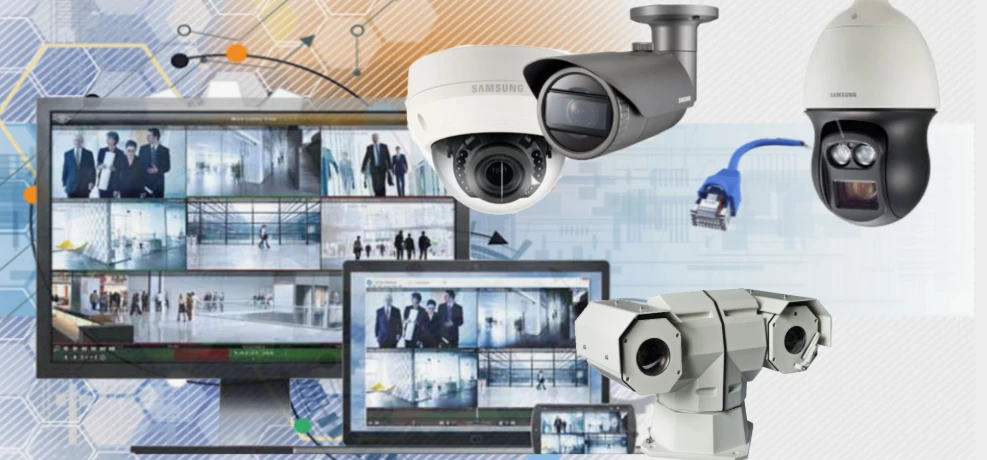

In today’s world, ensuring the safety of your home or business is more important than ever. Whether you're worried about break-ins, package theft, or just want peace of mind, a proper security system installation can be your first line of defense. Thanks to modern technology, these systems are now more effective, affordable, and easier to use. This guide will walk you through everything you need to know—so you can make the right decision and feel confident in your security setup.
What Is a Security System and How Does It Work?
A security system is a network of connected devices designed to protect your property from unauthorized access or emergencies. Common components include:
- Cameras – Record or stream live video for real-time monitoring.
- Motion Sensors – Detect movement in sensitive areas.
- Door and Window Sensors – Alert you when entry points are opened.
- Alarm Panels – Central hub to control the system.
- Smart Apps – Let you monitor and control your system from anywhere.
A professional security system installation ensures all these elements work together for full property coverage and fast response during an emergency.
Types of Security Systems You Can Install
There’s no one-size-fits-all solution. Depending on your needs, you can choose from several types of security systems:
Wired Security Systems
These systems are hardwired into your building and are known for their reliability. They're ideal for new constructions or larger homes.
Wireless Security Systems
Easy to install and move, wireless systems are popular for residential use. They use Wi-Fi or cellular signals to operate.
DIY Security Systems
These systems come with pre-configured devices and easy setup guides. Best for tech-savvy users and smaller spaces.
Monitored Security Systems
These connect to a professional monitoring service that alerts emergency responders if a threat is detected.
Choosing the right system depends on your property size, budget, and comfort with technology.
Step-by-Step Security System Installation Process
While DIY systems are simpler to install, professional security system installation offers complete coverage and reliability. Here's how a typical installation works:
1. Property Assessment
A technician evaluates your property to identify vulnerable points and suggest camera/sensor placement.
2. System Design
Based on the assessment, a custom security plan is created to meet your safety goals and budget.
3. Equipment Setup
Cameras, sensors, control panels, and other devices are installed and connected properly.
4. System Testing
The technician tests all components to make sure they’re working and synced correctly.
5. User Training
You’ll be shown how to operate the system, use the app, and respond to alerts.
Proper security system installation ensures long-term protection, reduced false alarms, and peace of mind.
Benefits of Installing a Security System
Investing in a good security system offers many advantages for homeowners and business owners alike:
- Deters Criminal Activity: Visible cameras and signs often prevent crime before it happens.
- 24/7 Monitoring: Stay protected even when you’re asleep or away from home.
- Remote Access: Monitor your home from your smartphone or computer.
- Faster Emergency Response: Alerts can be sent to police, fire, or medical teams quickly.
- Insurance Discounts: Many insurers offer lower premiums for properties with security systems.
A professional security system installation increases your property's safety and value.
Maintenance Tips for Long-Term Security
Keeping your security system in top shape is just as important as the installation:
- Check Battery Levels: Replace batteries in sensors and alarms regularly.
- Test the System Monthly: Ensure all components are functioning properly.
- Clean Cameras and Sensors: Remove dust or debris that could block sensors or lenses.
- Update Software: Keep your system's firmware and app updated for performance and security.
- Review Recorded Footage: Occasionally check recorded video to ensure storage is working correctly.
With routine care, your security system installation will continue to perform effectively for years.
FAQs
Q1: How long does professional security system installation take?
A: Most installations take 3 to 6 hours, depending on system complexity and property size.
Q2: Can I install a security system by myself?
A: DIY systems are available and can be installed easily, but professional setups offer better coverage and reliability.
Q3: Are security systems worth the cost?
A: Yes. They offer peace of mind, deter crime, and may qualify you for insurance discounts.
Q4: Will my security system still work during a power outage?
A: Most systems have backup batteries and some use cellular signals to stay active when power or internet is down.
Q5: Can I access my system remotely?
A: Yes. Most modern systems come with mobile apps that let you monitor and control the system from anywhere.
Conclusion: Secure What Matters Most with the Right Installation
No one wants to think about break-ins, but being prepared makes all the difference. With professional security system installation, you’re not just installing devices—you’re installing peace of mind. From choosing the right system to regular maintenance, every step contributes to a safer environment. Invest wisely, secure smartly, and protect what matters most to you.
























Sign in to leave a comment.