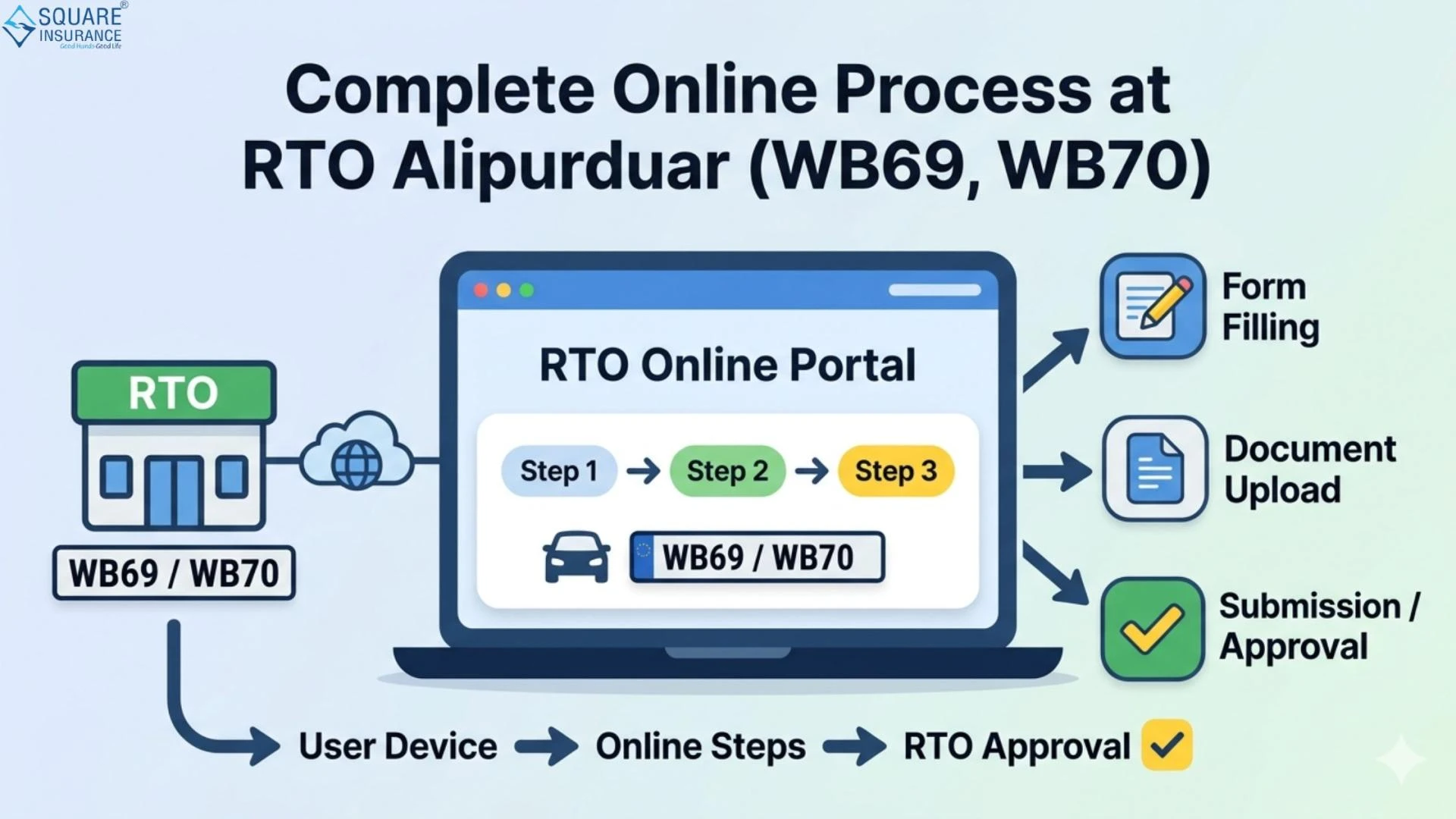

Managing vehicle-related tasks has become significantly easier with the digitization of transport services in India. Whether it’s applying for a driving licence, registering a vehicle, or paying road tax, most services can now be accessed online without long queues. For residents of West Bengal, understanding the complete online process at RTO Alipurduar (WB69, WB70) is essential to save time and ensure compliance with legal requirements.
This guide covers everything you need to know about the online services offered by RTO Alipurduar, including step-by-step procedures, required documents, fees, and important tips to ensure a smooth experience.
Overview of RTO Alipurduar (WB69, WB70)
RTO Alipurduar operates under the West Bengal Transport Department and is responsible for regulating vehicle-related services in the region. The RTO codes WB69 and WB70 are assigned to Alipurduar and its surrounding areas.
The office handles:
- Vehicle registration
- Driving licence issuance
- Road tax collection
- Vehicle transfer and ownership changes
- Permit issuance
- Fitness certification
With the introduction of online portals, most of these services can now be accessed from the comfort of your home.
Key Online Services Available
Here are the major services you can complete online:
1. Driving Licence Services
- Apply for learner’s licence
- Book driving test appointment
- Apply for permanent driving licence
- Download digital licence
2. Vehicle Registration Services
- New vehicle registration
- Temporary registration
- Renewal of registration certificate
3. Road Tax Payment
- Pay road tax online
- Check tax dues
- Download payment receipts
4. Ownership Transfer
- Apply for transfer of vehicle ownership
- Track application status
5. Permit Services
- Apply for commercial permits
- Renew transport permits
6. Vehicle Fitness Certificate
- Apply for fitness test
- Download certificate
Step-by-Step Online Process at RTO Alipurduar (WB69, WB70)
Step 1: Visit the Official Transport Portal
Go to the Ministry of Road Transport and Highways (Parivahan) portal or the West Bengal Transport website.
Step 2: Select the Required Service
Choose the relevant option such as:
- Driving Licence
- Vehicle Registration
- Tax Payment
Step 3: Fill in Application Details
Enter accurate details such as:
- Name and address
- Vehicle details
- Aadhaar or ID proof
Ensure all information matches your official documents.
Step 4: Upload Required Documents
Upload scanned copies of:
- Identity proof
- Address proof
- Age proof
- Insurance certificate
- Pollution Under Control (PUC) certificate
Step 5: Pay Applicable Fees
Pay the required fees online through:
- Net banking
- Debit/credit card
- UPI
Step 6: Book Appointment (If Required)
For services like driving tests or vehicle inspection, select a convenient time slot.
Step 7: Track Application Status
Use your application number to check the progress online.
Step 8: Download Documents
Once approved, download:
- Driving licence
- Registration certificate
- Payment receipts
Documents Required for Online RTO Services
Depending on the service, you may need:
- Aadhaar card
- PAN card
- Passport-size photographs
- Address proof (electricity bill, voter ID, etc.)
- Vehicle invoice (for new registration)
- Insurance policy document
- PUC certificate
Make sure all documents are valid and clearly scanned.
Benefits of Online RTO Services
1. Time-Saving
No need to stand in long queues at the RTO office.
2. Transparency
You can track your application status in real-time.
3. Convenience
Access services anytime, anywhere.
4. Reduced Errors
Online forms guide users, reducing mistakes.
5. Digital Records
Easy access to documents in digital format.
Common Challenges and How to Avoid Them
1. Incorrect Details
Always double-check your information before submission.
2. Document Upload Issues
Ensure documents are:
- Clear
- Within size limits
- In correct format (PDF/JPEG)
3. Payment Failures
Use a stable internet connection and verify payment status.
4. Missing Appointments
Book and attend appointments on time to avoid delays.
Tips for a Smooth Online Experience
- Keep all documents ready before starting
- Use a reliable internet connection
- Save application numbers for tracking
- Regularly check application updates
- Follow instructions carefully
Frequently Asked Questions (FAQs)
Q1. Can I apply for a driving licence online at RTO Alipurduar (WB69, WB70)?
Yes, you can apply for both learner’s and permanent driving licences online through the Parivahan portal.
Q2. Is it mandatory to visit the RTO office?
For certain services like driving tests or vehicle inspections, a physical visit is required. However, most processes can be initiated online.
Q3. How can I check my application status?
You can track your application using the application number on the official transport portal.
Q4. What payment methods are accepted online?
You can pay via UPI, debit card, credit card, or net banking.
Q5. How long does it take to complete online RTO services?
Processing time varies depending on the service but generally takes a few days to a few weeks.
Q6. Can I download my RC and driving licence online?
Yes, once approved, both documents can be downloaded digitally.
Conclusion
Understanding the complete online process at RTO Alipurduar (WB69, WB70) helps vehicle owners and drivers manage their responsibilities efficiently. With digital platforms simplifying procedures, tasks like licence applications, tax payments, and vehicle registration are now more accessible than ever.
By following the correct steps, keeping documents ready, and staying informed, you can avoid unnecessary delays and ensure a hassle-free experience. Additionally, integrating insurance planning with your vehicle management is equally important. Square Insurance can help you choose the right policies to safeguard your vehicle and financial future, making your journey secure and stress-free.
Please Note: Your policies, your control, manage everything smoothly with Square Insurance POS apps on Google Play.





























Sign in to leave a comment.