
What is a Digital Wallet?
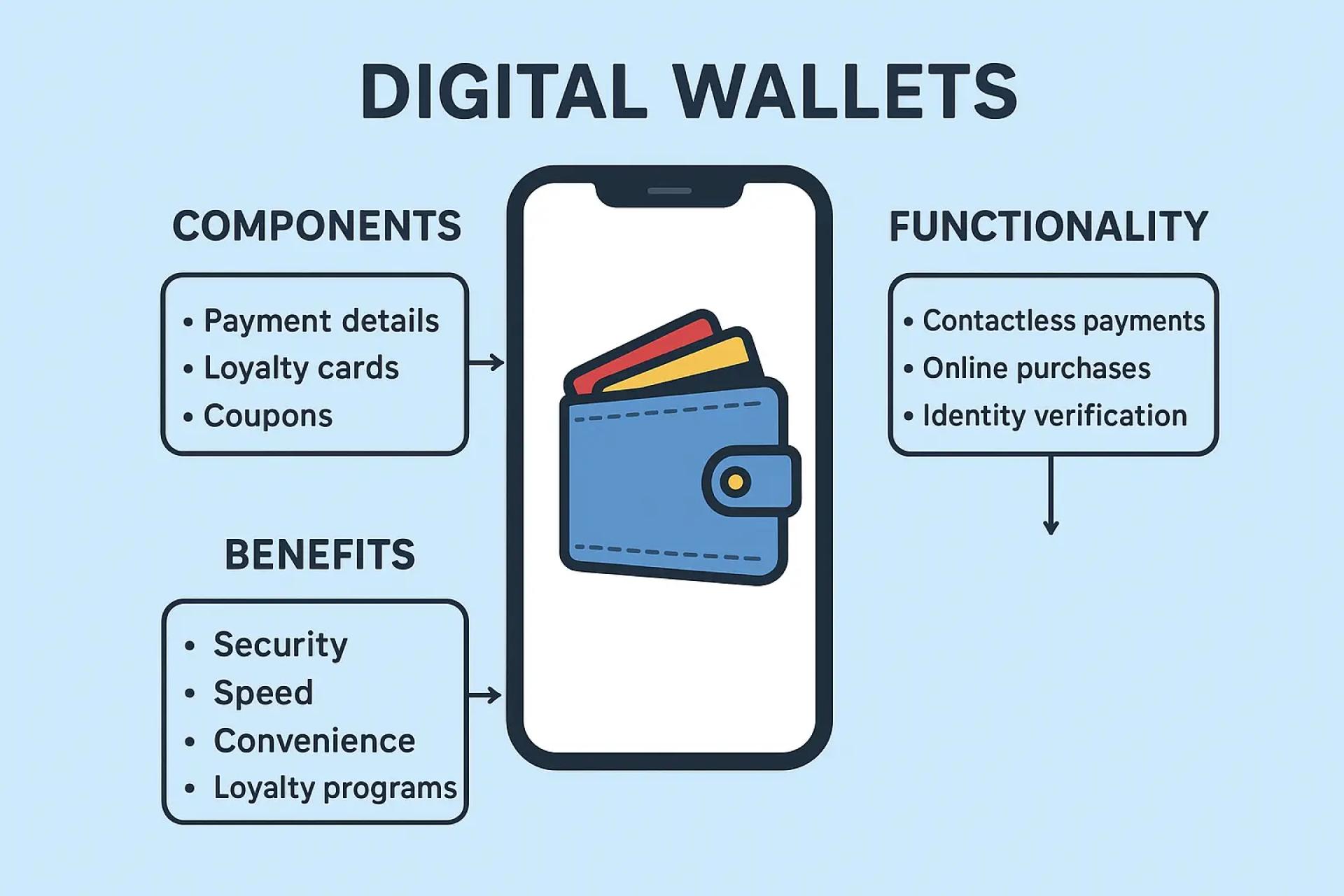
A digital wallet, often called an e-wallet, is an application that securely stores your payment details, passwords, and other financial information. It allows you to make fast, contactless, and secure payments both online and in physical stores using your smartphone, smartwatch, or other connected devices.
For instance, imagine you’re at a café and realize you’ve forgotten your physical wallet. Instead of panicking, you can still pay instantly by tapping your phone at the checkout terminal using Apple Pay or Google Pay.
Digital wallets go beyond money transfers. They can also verify a user’s identity—for example, confirming someone’s age when buying alcohol. This concept is already widespread in Japan, where digital wallets are known as mobile wallets.
In the U.S., some states have even approved digital driver’s licenses and IDs that can be stored inside digital wallets. These can be used at airports (TSA checkpoints), banks, and select businesses, reducing the need to carry physical cards.
Business Benefits of Digital Wallets
Adopting digital wallets can help companies streamline operations and enhance customer satisfaction:
- Quicker Checkout: Tap-and-go payments reduce waiting times, especially during rush hours.
- Stronger Security: Sensitive data is encrypted and tokenized, lowering fraud risks.
- Convenience for Shoppers: Offering multiple payment choices builds trust and encourages loyalty.
- Loyalty Integration: Many wallets can store coupons, rewards, and loyalty points.
- Cost Efficiency: Less reliance on cash handling means lower bank charges and reduced labor costs.
How Digital Wallets Work
1. Secure Storage
- Digital wallets keep all your financial information in one place, such as:
- Credit/debit card details
- Bank account information
- Loyalty and membership cards
- Coupons and gift cards
- Event tickets and boarding passes
- Digital IDs (like licenses in supported regions)
- Cryptocurrencies (through specialized wallets)
Some wallets also have a funds section, where received money (refunds, P2P transfers, or business payments) can be stored before being moved to a bank account.
2. Facilitating Transactions
- In-store Contactless Payments: Using NFC or QR codes, you can simply tap or scan to pay.
- Online & In-app Purchases: Digital wallets auto-fill your payment and shipping info, making checkout seamless and reducing abandoned carts.
- Peer-to-Peer (P2P) Transfers: Instantly send/receive money to friends or family using just a phone number, email, or username. Funds can remain in the wallet or be transferred to a bank.
3. Security Features
Digital wallets employ multiple protective measures:
- Tokenization: Real card numbers are replaced with a secure token, so merchants never see your actual details.
- Encryption: All stored information is scrambled, keeping it unreadable to outsiders.
- Biometric Authentication: Fingerprints, face recognition, or PINs ensure only you can authorize payments.
4. Financial Tools
Many wallets also provide value-added features:
- Expense tracking and budgeting tools
- Auto-applied loyalty points, coupons, or discounts
- Bill payments, mobile recharges, and recurring subscriptions
Advantages & Disadvantages
Advantages
- Convenience: Keep all cards, IDs, and tickets in one app.
- Speed: Quicker, tap-based payments.
- Enhanced Security: Biometric locks, encryption, and tokenization.
- Financial Insights: Expense tracking and management.
- Instant Transfers: P2P payments in real-time.
- Rewards & Cashback: Auto-applied offers and points.
- Accessibility: Available anywhere, anytime.
Disadvantages
- Tech Reliance: Requires internet and device battery.
- Merchant Limitations: Not all stores accept e-wallets.
- Potential Security Risks: Vulnerable to scams, phishing, or device theft if unsecured.
- Overspending Risks: Easy, tap-based spending may lead to impulse buying.
- Technical Glitches: Server downtime or app errors can disrupt payments.
- Privacy Concerns: Wallet providers may collect and analyze user data.
How to Create a Digital Wallet
1. Select a Wallet Type
- Everyday payments: Apple Pay, Google Pay, Samsung Pay
- Cryptocurrencies: Coinbase Wallet, MetaMask, Trust Wallet
- Business-specific needs: Proprietary wallets from certain companies
2. Download the App
- Get it from the App Store or Google Play Store.
- Follow setup instructions.
3. Add Payment Methods
- Enter card details manually or scan your card.
- Confirm identity through bank verification (SMS or email code).
4. Start Using
- Make payments in-store or online.
- Store loyalty cards, IDs, tickets, and more.
- Send or receive money from contacts.
Key Notes:
Security: Advanced encryption and tokenization keep data safe.
Fees: Some transactions may carry fees depending on the provider.
Compatibility: Ensure the wallet works with your device and local merchants.
Privacy: Review how your wallet provider handles personal data.
FAQs
Q1. Why is it important to evaluate fintech digital wallets?
Yes. Since not all wallets offer the same level of security, usability, and regulatory compliance, evaluation is crucial for users, businesses, and regulators.
Q2. Which digital wallet provides the strongest security?
Apple Pay and Samsung Pay are top-rated for biometrics and tokenization, PayPal excels in online security, while crypto wallets like Tangem and Trust Wallet offer high-end protection for digital assets.
Final Thoughts
Digital wallets are transforming how payments and identity verification work. They make transactions faster, safer, and more convenient, while also helping businesses operate more efficiently. As society shifts further away from cash, adopting the right digital wallet can ensure you stay secure, improve financial management, and enjoy a smoother payment experience in daily life.























Sign in to leave a comment.