
Introduction
A reliable internet connection has become essential for modern homes and businesses. From streaming movies and attending video meetings to gaming, browsing websites, managing smart home devices, and transferring large files, almost every connected activity depends on a stable Wi-Fi network. As the number of connected devices continues to increase, choosing the right router has become just as important as choosing a good internet plan.
One of the most common router technologies available today is the dual-band router. But what exactly does dual-band mean, how does it work, and why might it be better than an older single-band router?
In this guide, we will explain what a dual-band router is, how its two Wi-Fi bands work, the benefits it provides, and how to determine whether it is the right choice for your network.
What Is a Dual-Band Router?
A dual-band router is a wireless router that operates on two separate Wi-Fi frequency bands: 2.4 GHz and 5 GHz. Instead of relying on a single wireless frequency, the router can provide connections through both bands, allowing compatible devices to connect to the frequency that best suits their needs.
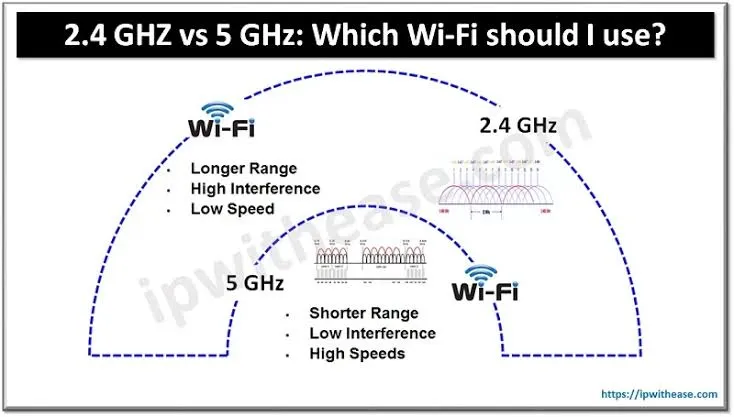
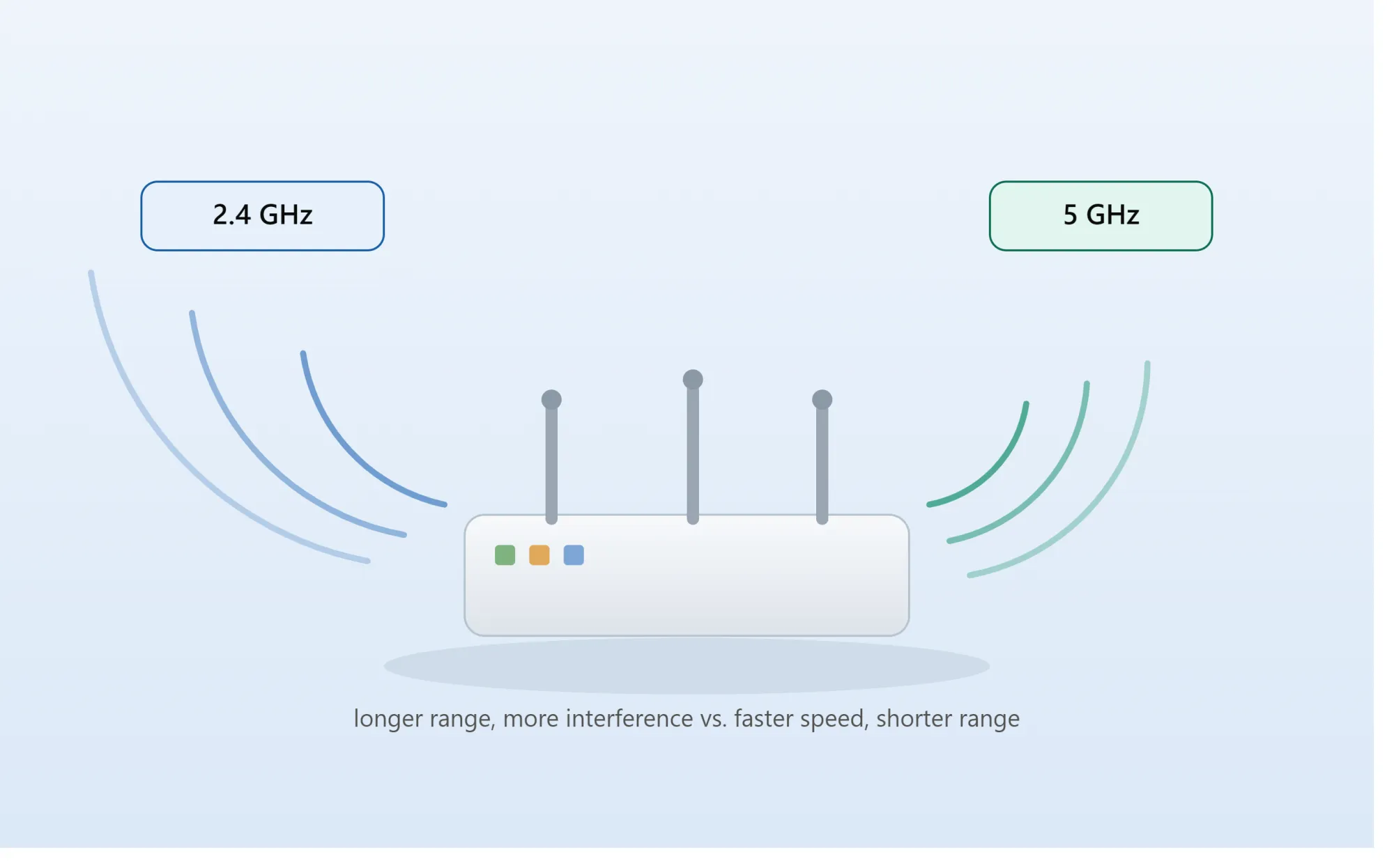
The 2.4 GHz band has been used by Wi-Fi networks for many years. It generally provides better coverage and can travel farther through walls and other obstacles. However, because many wireless devices use this frequency, it can become crowded and experience interference.
The 5 GHz band offers higher wireless speeds and typically experiences less congestion. Its main limitation is that its signal does not travel as far as 2.4 GHz and may have more difficulty passing through walls.
A dual-band router essentially combines these two options into one networking device. This gives users greater flexibility when connecting different devices throughout their homes or offices.
How Does a Dual-Band Router Work?
A dual-band router creates wireless networks using both the 2.4 GHz and 5 GHz frequencies. Depending on the router configuration, these networks may appear as separate Wi-Fi names or may be combined under a single network name using features such as band steering.
When separate network names are available, users can manually choose which frequency a device should use. For example, a smart home device located far away from the router might work better on 2.4 GHz, while a laptop sitting near the router could connect to 5 GHz for faster performance.
Some modern routers automatically determine which band is more appropriate for a connected device. This can make the network easier to manage because users do not necessarily need to decide which frequency each device should use.
The router manages communication between connected devices and the internet while simultaneously handling wireless traffic on both bands.
Understanding the 2.4 GHz Band
The 2.4 GHz frequency is known primarily for its range and penetration. Because the wavelength is longer than that of 5 GHz, wireless signals can generally travel farther and handle obstacles more effectively.
This makes 2.4 GHz useful for devices that are located farther away from the router. It can also be useful for smart home products such as sensors, plugs, cameras, and other connected devices that do not require extremely high bandwidth.
However, the 2.4 GHz band can become congested. Bluetooth devices, neighboring Wi-Fi networks, wireless peripherals, and various household electronics can contribute to interference. In densely populated areas, many nearby networks may be competing for the same limited wireless channels.
As a result, 2.4 GHz is often more suitable when range and reliability are more important than maximum speed.
Understanding the 5 GHz Band
The 5 GHz band is designed to provide faster wireless connectivity and generally offers more available channels than 2.4 GHz. It is particularly useful for activities that require substantial bandwidth.
Streaming high-resolution video, online gaming, downloading large files, video conferencing, and transferring data between devices can benefit from a strong 5 GHz connection.
The main disadvantage is range. A 5 GHz signal usually loses strength more quickly as distance increases and can be affected more significantly by walls and other physical obstacles.
This means a device located in the same room as the router may achieve excellent performance on 5 GHz, while a device several rooms away may perform more consistently on 2.4 GHz.
Dual-Band vs. Single-Band Routers
Older single-band routers generally operate only on the 2.4 GHz frequency. Although they can still provide internet access, they may struggle when many devices are connected simultaneously.
A dual-band router provides another wireless band, which allows network traffic to be distributed more effectively.
For example, a household might have smartphones, smart TVs, laptops, gaming consoles, security cameras, smart speakers, and other connected devices operating at the same time. Instead of forcing everything onto one frequency, a dual-band router can use both 2.4 GHz and 5 GHz.
This can reduce congestion and provide better overall network performance.
What Are the Benefits of a Dual-Band Router?
One of the biggest advantages of a dual-band router is improved flexibility. Different devices have different connectivity requirements, and having two frequency options allows the network to accommodate those differences.
Another important benefit is better performance in busy environments. When numerous devices are connected to a single frequency, congestion can negatively affect speeds and responsiveness. Dual-band operation provides another wireless pathway for compatible devices.
Dual-band routers can also provide faster connections through the 5 GHz band. While actual performance depends on the router, device, internet plan, signal strength, and environmental conditions, 5 GHz is generally better suited for bandwidth-intensive activities.
The technology can also improve the overall user experience by allowing slower or less demanding devices to remain on 2.4 GHz while higher-performance devices use 5 GHz.
When Should You Use 2.4 GHz?
The 2.4 GHz band is particularly useful when a device is located relatively far from the router or when there are several walls between the device and the router.
It can also be appropriate for devices that require only small amounts of bandwidth. A smart plug, temperature sensor, or basic smart home device does not usually need the same wireless capacity as a gaming PC or 4K streaming television.
If a device has difficulty maintaining a connection on 5 GHz because of distance, switching to 2.4 GHz may provide a more stable connection.
When Should You Use 5 GHz?
The 5 GHz band is generally preferable when the device is relatively close to the router and requires higher performance.
A modern laptop used for video conferencing, a gaming console, a desktop computer, or a smart TV streaming high-resolution content can benefit from 5 GHz.
The reduced congestion and higher potential speeds can make the connection more responsive, particularly when multiple users are accessing the network.
However, it is important to remember that simply connecting to 5 GHz does not guarantee a particular internet speed. Your actual performance is influenced by several factors, including your internet service, router capabilities, device hardware, distance, interference, and network traffic.
Is a Dual-Band Router Good for Gaming?
A dual-band router can be a good choice for gaming, particularly when a gaming device has a strong 5 GHz connection.
Online gaming does not necessarily require enormous bandwidth, but it does benefit from a stable and responsive connection. A less congested 5 GHz network can help provide a smoother wireless experience when conditions are favorable.
For the best possible gaming performance, however, a wired Ethernet connection is often preferable because it avoids many of the interference and signal-strength issues associated with wireless networking.
Is a Dual-Band Router Suitable for Smart Homes?
Yes, dual-band routers are particularly useful for smart homes because modern households can contain dozens of connected devices.
Many smart home products are designed to operate on 2.4 GHz because of its longer range and lower bandwidth requirements. Meanwhile, smartphones, computers, televisions, and gaming systems can use 5 GHz when appropriate.
This allows a single network to support a diverse collection of devices without requiring every device to compete for the same wireless resources.
Dual-Band Router and Internet Speed
It is important to understand that a dual-band router does not automatically increase the speed provided by your internet service provider.
For example, if your internet plan provides a certain maximum download speed, purchasing a faster router cannot magically increase the speed delivered by your ISP beyond the limitations of your connection.
What a dual-band router can do is improve how your devices communicate with the router. Better wireless capacity, reduced congestion, and access to the 5 GHz band can make your network feel faster and more responsive.
In other words, a dual-band router improves wireless networking capability, but it does not replace a faster internet plan.
How to Choose the Right Dual-Band Router
When choosing a dual-band router, you should consider more than just the words "dual-band." Different routers support different Wi-Fi standards, wireless speeds, coverage areas, security features, and numbers of connected devices.
A small apartment with a few devices may not require the same router as a large house with dozens of connected products. Businesses may also require additional features such as advanced security, multiple access points, VLAN support, centralized management, or stronger hardware.
You should also consider whether the router supports newer Wi-Fi generations. Newer standards can provide improvements in speed, efficiency, capacity, and performance when compatible devices are used.
Dual-Band vs. Tri-Band Routers
The main difference between dual-band and tri-band routers is the number of wireless bands available.
A dual-band router normally provides one 2.4 GHz band and one 5 GHz band. A tri-band router adds another wireless band, which can provide additional capacity for networks with many high-bandwidth devices.
For a typical home with moderate wireless usage, dual-band technology can be more than sufficient. A tri-band router may become more attractive for larger households, demanding users, or environments with many simultaneous wireless connections.
The Future of Dual-Band Wi-Fi
Wireless networking continues to evolve, with newer Wi-Fi technologies improving speed, efficiency, capacity, and device management. Even as newer standards become increasingly common, dual-band operation remains an important foundation for many home and business networks.
The combination of 2.4 GHz coverage and 5 GHz performance provides a practical balance between range and speed. For many users, this makes dual-band routers a significant upgrade over older single-band equipment.
Conclusion
A dual-band router is a wireless networking device that operates on both 2.4 GHz and 5 GHz frequencies. The 2.4 GHz band generally provides greater range and better obstacle penetration, while 5 GHz can provide faster and less congested wireless connections when devices are within suitable range.
The biggest advantage of dual-band technology is flexibility. Different devices can use different frequencies according to their location and performance requirements, helping create a more efficient wireless network.
For modern homes, offices, and smart environments with multiple connected devices, a dual-band router can provide a strong balance between coverage, performance, and convenience. Understanding how both bands work can help you configure your network more effectively and get better performance from your connected devices.
Frequently Asked Questions
What does dual-band mean on a router?
Dual-band means that the router can operate on two Wi-Fi frequencies: 2.4 GHz and 5 GHz. Each band has different characteristics, with 2.4 GHz generally offering greater range and 5 GHz generally offering higher potential speeds.
Is 5 GHz better than 2.4 GHz?
Neither frequency is universally better. 5 GHz is usually better for speed and lower congestion when the device is close enough to the router. 2.4 GHz is generally better for longer distances and situations where the signal must pass through several obstacles.
Does a dual-band router increase internet speed?
A dual-band router does not increase the internet speed provided by your ISP. However, it can improve wireless performance by providing access to the 5 GHz band and reducing congestion across the network.
Can old devices connect to a dual-band router?
Yes, many older devices can connect to the 2.4 GHz network. However, a device must have compatible wireless hardware to connect to the 5 GHz band.
Should I use 2.4 GHz or 5 GHz?
Use 5 GHz when you need higher wireless performance and are relatively close to the router. Use 2.4 GHz when range and signal penetration are more important.
Is dual-band Wi-Fi good for a home?
Yes. Dual-band Wi-Fi is suitable for many modern homes because it can support a mixture of high-performance devices and lower-bandwidth smart devices.
Can a dual-band router support many devices?
Yes, although the practical number of devices depends on the router's hardware, Wi-Fi standard, network configuration, and traffic demands. A dual-band router can generally handle a wider variety of devices more efficiently than a basic single-band router.
Is a dual-band router better than a single-band router?
For most modern networks, yes. Dual-band routers provide an additional frequency option, allowing compatible devices to use 5 GHz while other devices can remain connected to 2.4 GHz. This can improve flexibility and reduce congestion.
























Sign in to leave a comment.