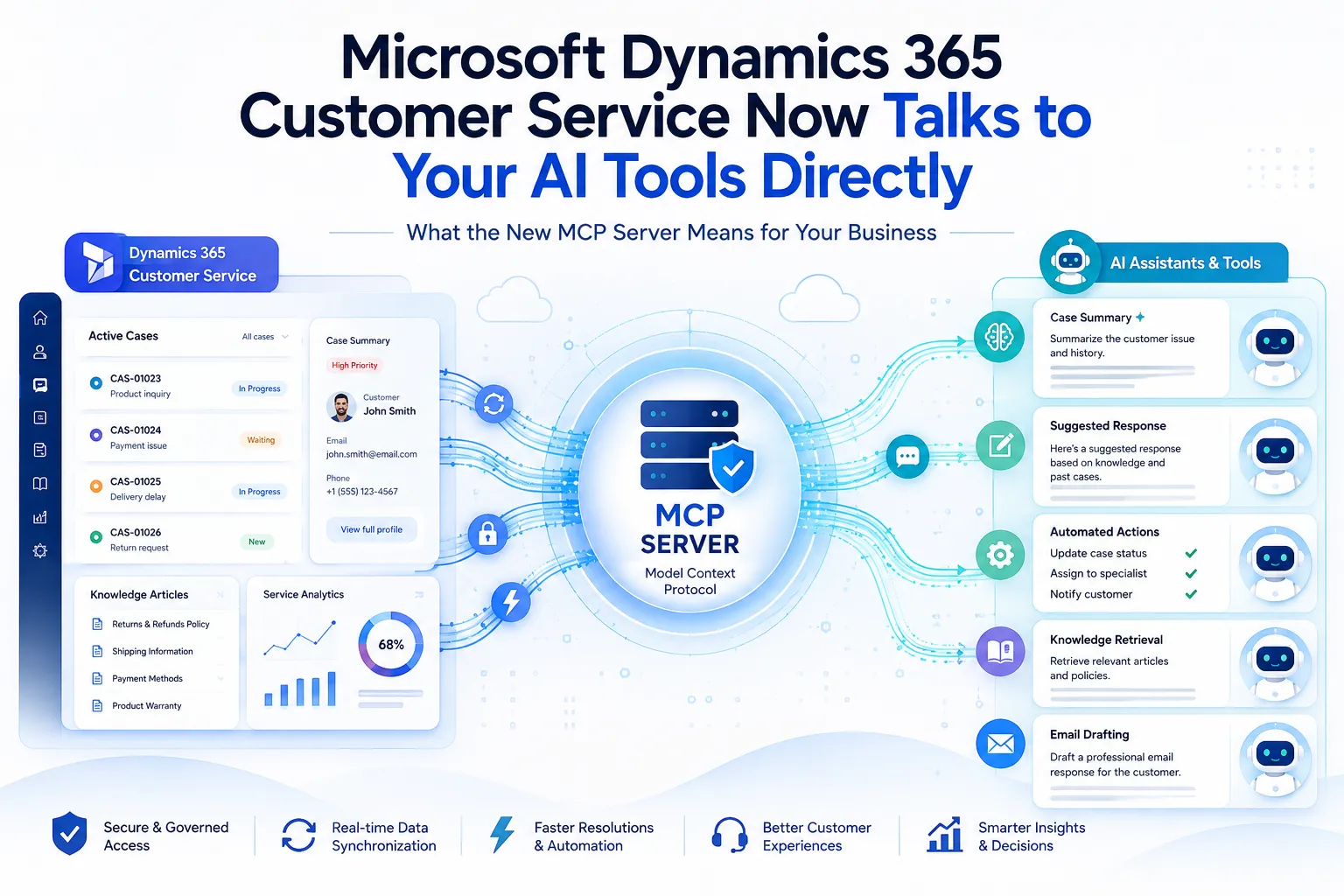

If you have been keeping half an eye on where Microsoft is taking its AI strategy this year, you have probably noticed a pattern. Every few months, another Dynamics 365 module gets a new connector, a new "agentic" capability, or a new way to plug into the AI tools people are already using at work. The latest one is worth paying attention to, because it changes something fairly fundamental about how service teams interact with their CRM data.
Microsoft has just announced that the Dynamics 365 Customer Service MCP Server has moved from public preview to general availability. In plain terms, this means the same tools and data that power Service Agent inside Microsoft 365 Copilot can now be accessed by any AI client that speaks the Model Context Protocol not just Microsoft's own products.
That last part is the real story here, and it is worth unpacking.
First, What Is MCP and Why Should You Care?
The Model Context Protocol, or MCP, is an open standard that lets AI applications connect to business systems in a consistent way. Think of it as a common language that different AI tools can use to ask a CRM system for information, rather than each tool needing its own custom-built bridge into that system.
Before something like this existed, if you wanted an AI assistant to pull case details from your CRM, summarize a customer's activity history, or draft a response based on your knowledge base, someone had to build a dedicated integration for that specific assistant. Want to connect a second AI tool? Build another integration. A third? Same story again. Every new client meant another one-off project, more maintenance, and more places for something to break.
MCP flips that model. Build the connection once, expose it through a standard protocol, and any compatible client can use it. Microsoft's own numbers back up how seriously this is being taken the Customer Service MCP Server ships with more than 90 service-oriented tools at general availability, covering everything from case management and customer context to knowledge search, email drafting, and next-best-action recommendations.
Which AI Tools Can Actually Use This?
This is where it gets interesting for organizations that are not fully locked into the Microsoft ecosystem. Because the server speaks a standard protocol, it already works with:
- Microsoft 365 Copilot, including the Service Agent experience
- Microsoft Copilot Studio agents
- Visual Studio Code and GitHub Copilot CLI
- Other MCP-compatible clients, including tools like ChatGPT and Claude Code
That is a genuinely broad reach for a Microsoft product. It reflects a shift in how enterprise software vendors are thinking about AI: rather than trying to be the only assistant in the room, Microsoft is making its data and tools available to whichever assistant a team happens to be using.
Connections are managed through the Agent 365 Tooling Gateway, which handles authentication back to your Dataverse environment. Access still follows your existing Dataverse roles and permissions, so governance and security controls that are already in place do not need to be rebuilt from scratch just to support this.
Why This Matters Beyond the Feature List
It is easy to read an announcement like this as "one more integration option" and move on. But for teams running customer service operations on Dynamics 365, the practical impact is bigger than that.
Case management, knowledge article search, email drafting, and SLA tracking are no longer confined to the Dynamics 365 interface or to Copilot alone. An agent working inside VS Code, a developer scripting something through GitHub Copilot CLI, or a team experimenting with a different AI client can now reach into the same governed set of tools without anyone writing a bespoke integration to make it happen.
For IT leaders, this also means fewer point-to-point connections to secure and monitor over time. Instead of a growing list of one-off integrations, each with its own authentication method and its own failure points, you get one governed access layer that multiple clients can share.
The server is also built to be extended. Admins can register their own external MCP servers so tools from other business systems sit alongside the built-in Customer Service capabilities, bring in Copilot Studio agents they have already built, and configure agent profiles and permissions to match how their teams actually work. That is not a fixed feature set it is meant to be a foundation that grows as an organization's AI strategy matures.
Where This Gets Complicated in Practice
Here is where a lot of organizations run into friction, and where the real work usually happens. Turning on a new capability like this is straightforward on paper. Making it fit cleanly into an environment that has years of customizations, existing security roles, and workflows built around how your specific business operates is a different matter entirely.
Questions that tend to come up quickly include: which Dataverse roles should have access to which MCP tools, how existing case routing rules interact with agentic recommendations, whether custom entities and business logic need adjustment to work well with the new tool set, and how to test all of this without disrupting live service operations.
This is exactly the kind of work that falls under Dynamics 365 CRM Services not just flipping a switch on a new Microsoft feature, but assessing how it interacts with everything already built into your CRM, and configuring it so it actually improves day-to-day service work rather than adding another layer of complexity.
Why Custom Development Still Matters Here
It is tempting to assume that because MCP is a standard protocol, adoption is a purely administrative task. In reality, most organizations have Dynamics 365 environments shaped by years of custom entities, business rules, and integrations with other systems. Getting an AI client to genuinely understand and act on that environment often calls for Custom Dynamics 365 CRM Development extending the tool set, adjusting how case data is structured and surfaced, or building the connectors that let your other business systems participate in the same governed MCP layer.
This is not a one-time setup. As your AI strategy evolves and you bring in new clients, agents, or line-of-business tools, the underlying CRM needs to keep pace. That is a development effort, not just a configuration checkbox.
Getting the Rollout Right
If your team is considering connecting Dynamics 365 Customer Service to Copilot Studio, GitHub Copilot CLI, or any other MCP-compatible client, it is worth planning the rollout rather than treating it as a quick toggle. A few things worth working through before go-live:
- Auditing which Dataverse roles will map to which MCP tools, and whether current permission structures are granular enough
- Reviewing how existing case management workflows, SLAs, and routing rules will behave once agentic recommendations enter the picture
- Deciding whether custom entities or existing business logic need updates to work well with the expanded tool set
- Running a pilot with one client and one team before opening access more broadly
Working through this with a partner who has hands-on experience across Dynamics 365 CRM, Business Central, Power Platform, and Azure tends to save a lot of rework later. That is the kind of ground-level experience a Dynamics 365 CRM Development Company brings to a rollout like this not just knowledge of what the new server does, but a sense of how it will actually behave once it meets your specific configuration, your specific data, and your specific team's workflows.
The Takeaway
The move from preview to general availability signals that Microsoft expects the Customer Service MCP Server to become a standard part of how service teams work with AI, not a niche experiment. The breadth of supported clients From Copilot to GitHub Copilot CLI to third-party assistants means the days of building a separate integration for every AI tool are numbered, at least for organizations willing to adopt the protocol.
The technology is ready. Whether your environment is ready for it is a separate question, and usually the more important one to answer first.


























Sign in to leave a comment.