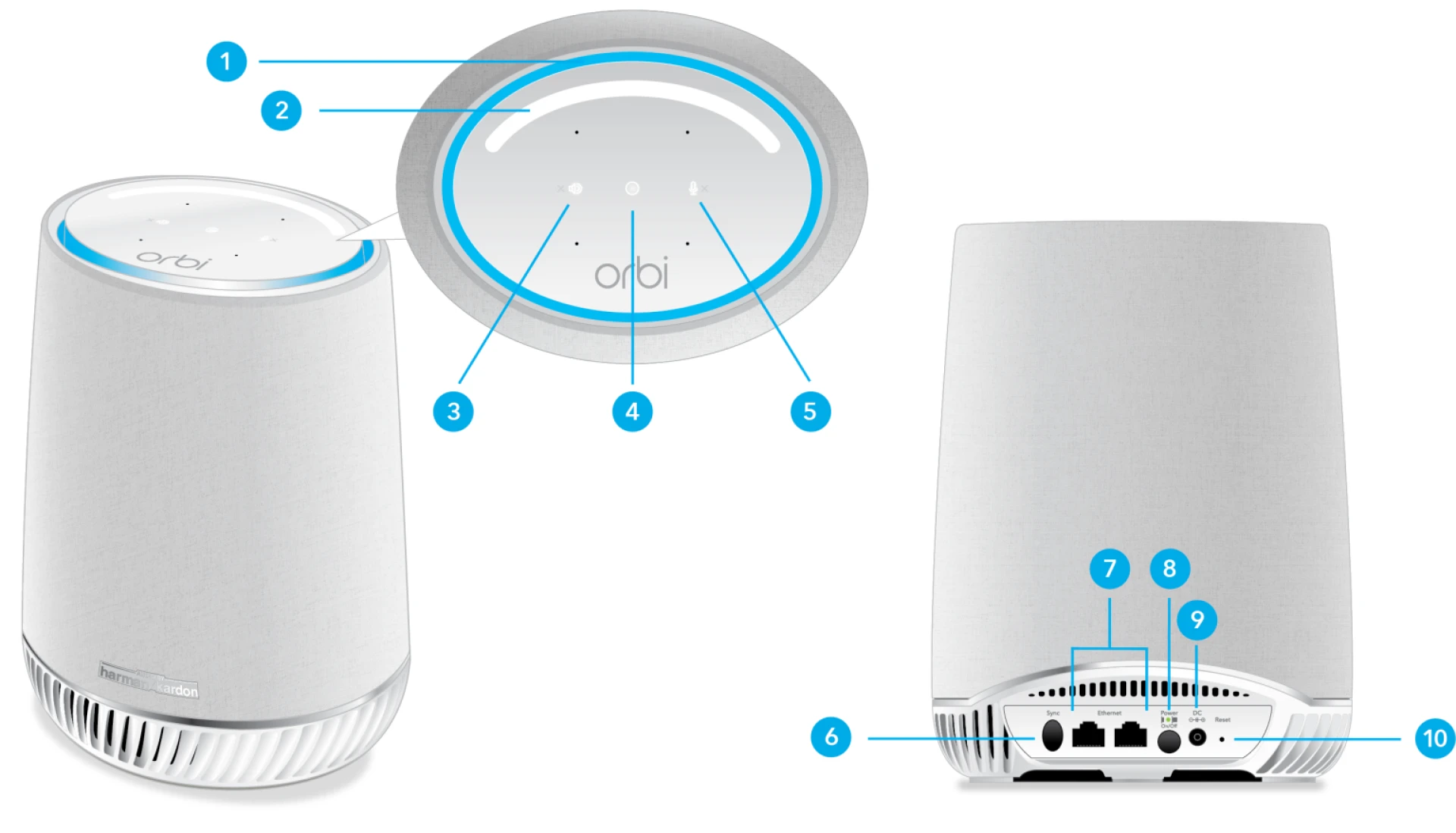

If you’re dealing with weak or spotty WiFi at home, a mesh system like Netgear Orbi can help. It spreads WiFi evenly across your whole space, so you get a strong signal in every room. This quick and easy guide will help you get your Orbi system up and running in no time.
Orbi Mesh Setup: Two Ways to Get Started
Step 1: Connect Your Orbi Router
- Turn off your modem.
- Use the Ethernet cable that came with your Orbi to connect the yellow WAN port on the router to your modem.
- Turn both the modem and the Orbi router back on.
- Wait for the router's LED light to turn solid white, then pulse white.
Step 2: Set Up the Orbi Satellite
- Plug the satellite into a power outlet halfway between your Orbi router and the area with poor WiFi.
- Press the Sync button on both the router and the satellite.
- Wait for the satellite to show that it’s connected—usually with a solid blue or white light.
Method 1: Set Up Using the Orbi App
- Download the NETGEAR Orbi App from the App Store or Google Play.
- Open the app and tap New System Setup.
- Follow the on-screen steps. Allow location access and connect to Orbi’s temporary WiFi.
- Choose your WiFi name (SSID) and password—this becomes your main home network.
- Set an admin password for your Orbi system.
Once done, your devices will connect to your new WiFi network. Walk around your home to check the signal—coverage should now be smooth and strong.
Method 2: Set Up Using a Web Browser
- On your computer or laptop, connect to Orbi’s default WiFi network.
- Open your browser and type orbilogin.net or 192.168.1.1 in the address bar.
- You’ll see the Orbi setup page. Log in with the default credentials (usually admin / password). Check the label on your router if needed.
- Follow the setup wizard to name your WiFi network and create a password.
- Set a new admin password for extra security.
- Once setup is complete, the router will restart. Reconnect your devices to the new network.
Troubleshooting Tips
- Can’t log in to Orbilogin.net?
- Try clearing your browser’s cache, use a different browser, or type in the IP address: 192.168.1.1.
- Use the Orbi App for Easier Setup
- The app is usually smoother and gives you more control over your network.
- Reset If Needed
- If you're stuck, reset your Orbi device. Use a paperclip to press the small Reset hole on the back for 10 seconds. The light will blink amber, then reboot and return to factory settings.
Final Thoughts
Setting up your Orbi mesh WiFi system doesn’t have to be complicated. Whether you use the app or your web browser, the process is straightforward. And if something goes wrong, a reset or firmware update usually fixes it. Once it's set up, you’ll enjoy fast, reliable WiFi all over your home.
FAQs
Q: How do I connect my Orbi mesh system?
A: Just connect the Orbi router to your modem using the included Ethernet cable. Turn on both devices and follow the steps using either the app or browser.
Q: Is Orbi different from a mesh system?
A: No—they’re the same thing. Orbi is a type of mesh system, just like Nighthawk or Wavlink.
























Sign in to leave a comment.