

In today’s digital world, spending long hours in front of a screen has become the norm—whether you're working from home, gaming, or operating in a corporate setting. This is where a monitor arm becomes an essential tool for enhancing both comfort and productivity. A monitor arm not only saves desk space but also promotes better posture and helps reduce neck and eye strain.
Sugatsune India is one of the leading manufacturers of metal hardware. Our wide variety of high quality products covers diverse fields from residential to office furniture, architectural to industrial parts and even disaster prevention.
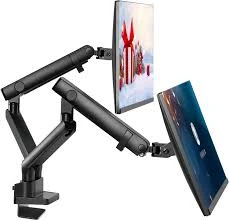
What Is a Monitor Arm?
A monitor arm is a mechanical support system that allows users to mount their computer screens off the desk surface and adjust them freely in height, angle, and position. Typically clamped to a desk or mounted on a wall, a monitor arm allows the screen to float and move as needed, giving users the flexibility to position their monitor exactly where they want it.
The main goal of a monitor arm is to improve ergonomics, reduce clutter, and create a cleaner, more efficient workspace.
Benefits of Using a Monitor Arm
Using a monitor arm offers numerous advantages for both individual users and businesses:
- Ergonomic Support
- A monitor arm helps you align your screen at eye level, reducing strain on your neck, shoulders, and back. This is especially helpful for people working long hours at a desk.
- Space Saving
- By lifting the monitor off the desk, a monitor arm frees up valuable surface area. You can use this extra space for other tasks, accessories, or to maintain a clean and organized environment.
- Enhanced Productivity
- With a monitor arm, adjusting your screen becomes quick and seamless. You can switch from sitting to standing positions, share your screen with colleagues, or change the viewing angle without any hassle.
- Dual or Multi-Monitor Setup
- Many professionals use more than one screen. A monitor arm makes it easy to mount two or more monitors side by side, improving multitasking and workflow efficiency.
- Aesthetic Appeal
- A sleek monitor arm adds a modern touch to your setup. It reduces wire clutter and gives your workspace a more professional and streamlined look.
Types of Monitor Arms
There are various types of monitor arms available to suit different needs:
- Single Monitor Arm – Ideal for basic workstations where one screen is used.
- Dual Monitor Arm – Perfect for professionals needing extended screen space.
- Gas Spring Monitor Arm – Allows smooth and easy movement with minimal effort.
- Wall-Mounted Monitor Arm – Great for saving desk space completely or mounting in unique locations.
- Laptop and Monitor Combo Arm – Lets you mount both your laptop and monitor side-by-side for a flexible workspace.
Each type of monitor arm is designed for specific use cases, from home offices to professional studios.
How to Choose the Right Monitor Arm
When selecting a monitor arm, consider the following factors:
- Monitor Size and Weight – Make sure the monitor arm supports your monitor's size and weight. Most arms are designed for screens ranging from 13 to 32 inches, but heavy-duty options are available.
- Mounting Options – Choose between desk clamp, grommet mount, or wall mount depending on your workspace.
- Adjustment Range – Look for features like height adjustment, swivel, tilt, and rotation to ensure the arm meets your ergonomic needs.
- Cable Management – Many monitor arms come with built-in cable routing systems to keep wires tidy and out of sight.
- Build Quality – A high-quality monitor arm made of durable materials like aluminum or steel ensures longevity and stability.
Installation and Setup
Installing a monitor arm is generally simple and doesn’t require advanced tools. Most units come with a VESA-compatible mount (usually 75x75mm or 100x100mm), which fits the back of most monitors. Follow the manufacturer's instructions, secure the arm to your desk or wall, and adjust the tension according to your monitor's weight.
Once installed, the monitor arm can be adjusted to suit your sitting or standing position, helping you maintain good posture and focus throughout the day.
Final Thoughts
A monitor arm is one of the best ergonomic upgrades you can make to your workspace. Not only does it enhance comfort and posture, but it also improves organization and aesthetics. Whether you're a professional working in an office, a content creator, or a gamer, a monitor arm can transform the way you interact with your screen.




























Sign in to leave a comment.