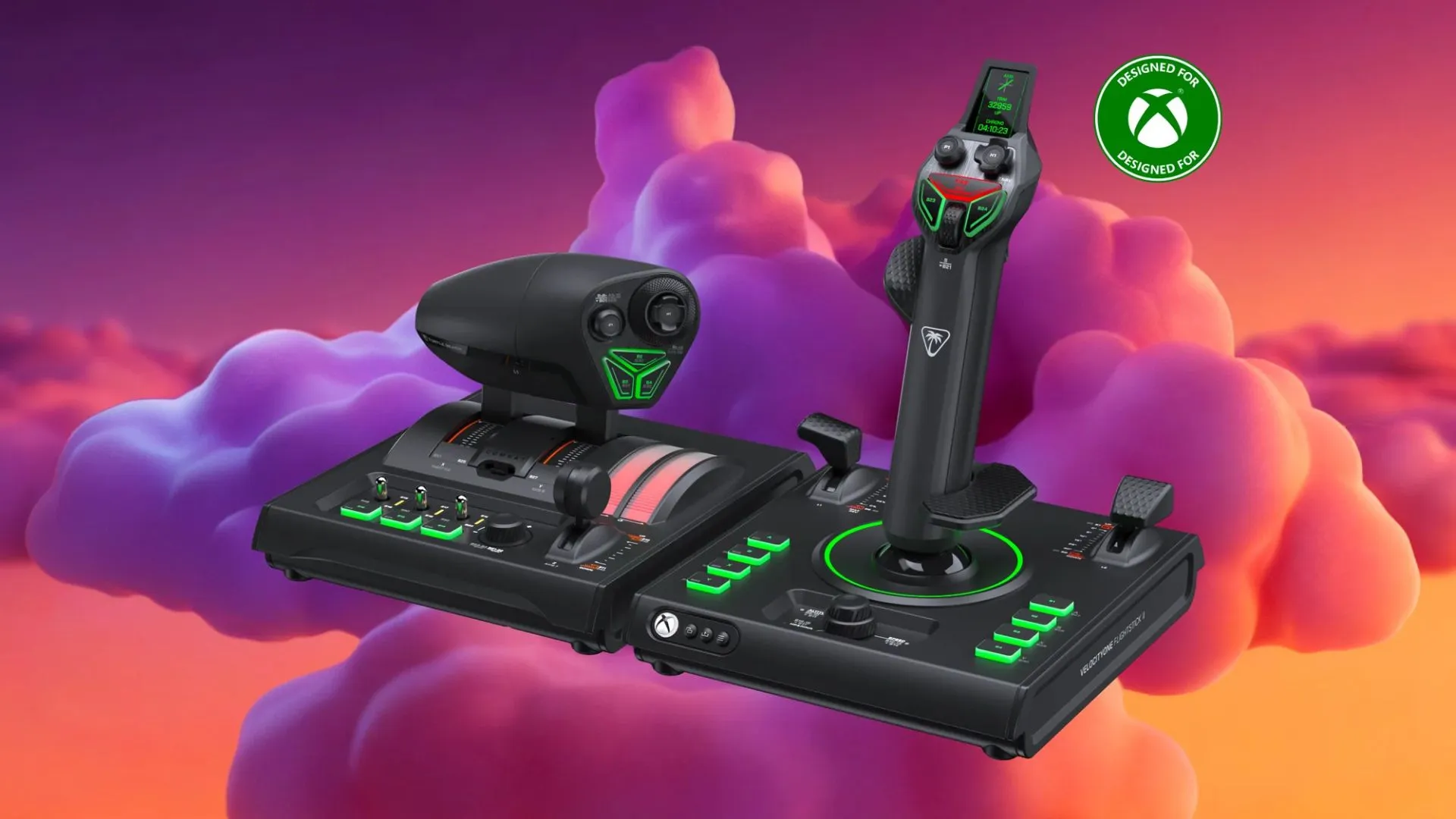

Explore how flight sim controls improve gaming realism, accuracy, and comfort. Learn about types, features, setup tips, and choosing the right gear.
Flight simulation becomes much more realistic when players use the right equipment instead of relying only on a keyboard and mouse. Modern flight sim controls help create a more natural flying experience by giving users dedicated buttons, sticks, and control systems that feel closer to a real cockpit.
Whether you are a beginner learning basic aircraft movement or an experienced virtual pilot improving precision, choosing the right setup can make a major difference. The right controls improve accuracy, reduce mistakes, and make long flight sessions more comfortable.
Choosing the Right Flight Sim Controls for Your Gaming Setup
The best flight sim controls depend on the type of aircraft you enjoy flying, your experience level, and your available space. Some players prefer simple setups, while others build complete cockpit-style stations.
When selecting flight sim controls, consider these important factors:
- Type of simulation: Fighter jets, commercial aircraft, helicopters, and space simulators often require different control layouts.
- Comfort: Controls should feel natural during long gaming sessions.
- Button placement: Easily accessible buttons help manage important aircraft functions.
- Compatibility: Check whether the equipment works with your preferred gaming platform and simulation software.
A basic setup may include a joystick and throttle, while advanced users may add pedals, panels, and additional accessories for a more immersive experience.
Types of Flight Sim Controls and Their Features
Different types of flight sim controls are designed for different flying styles. Understanding each option helps users create a setup that matches their needs.
Joysticks for Precise Aircraft Movement
A joystick is one of the most common choices for flight simulation. It allows players to control aircraft direction with smoother movements compared to a traditional controller.
Joysticks are useful for:
- Controlling pitch and roll movements
- Improving aircraft handling
- Creating a more realistic flying experience
- Supporting beginner and advanced pilots
Many flight sim controls setups start with a joystick because it provides the essential movements needed for most aircraft.
Throttle Systems for Better Engine Management
A throttle controller gives users direct control over engine power. This is especially useful for aircraft that require careful speed adjustments during takeoff, landing, and cruising.
A dedicated throttle can provide:
- More accurate speed control
- Multiple programmable buttons
- Better control during complex maneuvers
- A realistic cockpit feeling
Rudder Pedals for Advanced Control
Rudder pedals add another level of realism by allowing users to control yaw movements with their feet. They are commonly used by players who want a complete simulation setup.
Pedals are helpful for:
- Smoother turns
- Better ground control during taxiing
- More realistic aircraft handling
How Flight Sim Controls Improve the Simulation Experience
Using dedicated equipment changes the way players interact with flight simulators. Instead of remembering keyboard shortcuts, users can physically operate controls that match their actions in the virtual cockpit.
Quality flight sim controls provide better feedback because movements are more precise and predictable. Small adjustments become easier, which is important during landing approaches, aerial maneuvers, and long-distance flights.
They also reduce the learning curve for many users. Once the controls are properly configured, players can focus more on flying and less on searching for the right keyboard commands.
Setting Up Flight Sim Controls for Better Performance
A good setup is not only about buying equipment. Proper configuration plays an important role in getting the best experience.
Follow these steps:
- Position controls comfortably on your desk or mounting area.
- Adjust sensitivity settings according to your flying style.
- Map important functions to easy-to-reach buttons.
- Test controls before starting longer simulation sessions.
- Update drivers and software when needed.
Well-configured flight sim controls allow smoother movements and prevent unnecessary frustration during gameplay.
Features to Look for in Quality Flight Sim Controls
Before purchasing equipment, users should compare features that affect performance and comfort.
Important features include:
- Adjustable resistance for realistic movement
- Programmable buttons for customization
- Durable construction for regular use
- Ergonomic designs for comfort
- Easy connection options
The right choice depends on whether you want casual entertainment or a more serious simulation experience.
Are Flight Sim Controls Worth Buying?
For players who regularly enjoy flight simulation, dedicated equipment can be a valuable upgrade. While a keyboard or standard controller can work, specialized controls offer better immersion and improved handling.
Flight sim controls are especially useful for users who want to practice realistic flying techniques, explore complex aircraft systems, or simply enjoy a more engaging gaming experience.
A complete setup does not need to be expensive or complicated. Many players begin with a basic joystick and gradually add more equipment as they become comfortable.
Frequently Asked Questions
What are flight sim controls used for?
Flight sim controls are used to operate aircraft in simulation games with more accuracy and realism. They replace basic keyboard inputs with dedicated hardware like joysticks, throttles, and pedals.
Are flight sim controls better than a gaming controller?
Flight sim controls usually provide more precision and customization than standard gaming controllers. They are designed specifically for aircraft movement and cockpit-style interaction.
Do beginners need advanced flight sim controls?
Beginners do not need a complete cockpit setup. A basic joystick or entry-level control system is often enough to learn flight simulation.
Can flight sim controls work with different flight games?
Many flight sim controls support multiple simulation games, but compatibility depends on the hardware, operating system, and software requirements.
How do I choose the right flight sim controls?
Choose based on your preferred aircraft type, available space, budget, and desired level of realism. Beginners can start simple and upgrade later.
Do flight sim controls make flying games more realistic?
Yes, dedicated controls improve immersion by providing physical movement, better accuracy, and easier access to important aircraft functions.
Conclusion
The right flight sim controls can transform a basic flight game into a more realistic and enjoyable experience. From simple joystick setups to advanced systems with throttles and pedals, there are options for every type of virtual pilot.
Choosing equipment based on comfort, compatibility, and flying goals helps create a setup that feels natural and performs well. With the right configuration, flight simulation becomes more engaging, accurate, and rewarding.


















Sign in to leave a comment.