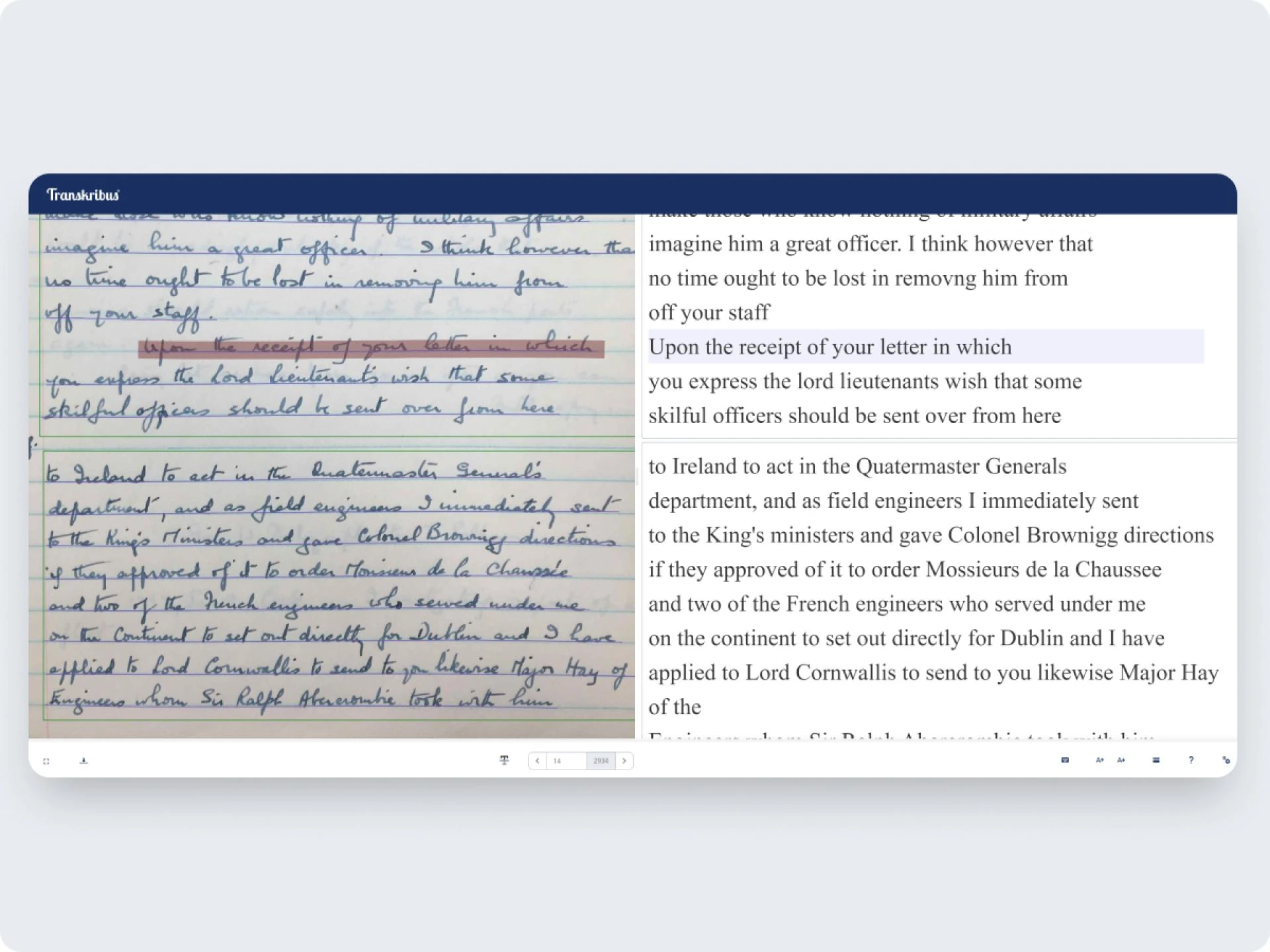

In recent years, PDF to handwriting tools have become increasingly popular, especially among students, teachers, and professionals who need handwritten content without spending hours writing manually. These tools allow users to convert typed PDFs into realistic handwritten notes that closely resemble human writing.
But how do these tools work, are they reliable, and when should you use them? This guide explains everything clearly, step by step, in simple language.
What Is a PDF to Handwriting Tool?
A PDF to handwriting tool is an online or software-based solution that converts digital PDF documents into handwritten-style text. Instead of standard typed fonts, these tools use handwriting fonts and layout variations to mimic real human writing.
Many people use PDF to handwriting converters to:
- Create handwritten assignments
- Prepare handwritten study notes
- Convert lecture PDFs into handwritten format
- Save time while maintaining a natural handwritten look
The goal is simple: make digital content look like it was written by hand.
How PDF to Handwriting Conversion Works
Most PDF to handwriting generators follow a structured process to produce realistic results.
First, the tool reads and extracts text from the PDF file. This includes paragraphs, headings, and sometimes images or equations, depending on the tool’s capability.
Next, the extracted text is mapped to handwriting fonts. These fonts are designed to look human, with slight variations in letter size, spacing, and alignment. Advanced tools introduce randomness so the handwriting does not look repetitive or machine-made.
Finally, the tool formats the output like real handwritten notes. This includes line spacing, margins, page breaks, and sometimes background styles such as ruled or plain paper.
The result is a handwritten PDF that feels natural and readable.
Why Students Use PDF to Handwriting Tools
Students are the largest users of PDF to handwriting converters, and for good reasons.
Handwritten assignments are still required in many schools and colleges. Writing long answers manually can be time-consuming and physically tiring. Converting PDF to handwritten notes helps students save time while maintaining proper formatting.
Another common use is exam preparation. Students often turn lecture PDFs into handwritten notes because handwritten material is easier to revise and remember.
PDF to handwriting tools are also useful for distance learning, where handwritten submissions are required but physical writing is not always practical.
Key Features of a Good PDF to Handwriting Converter
Not all tools produce the same quality. A reliable PDF to handwriting tool usually includes:
- Multiple handwriting font styles
- Adjustable font size and spacing
- Natural variation in letters
- Support for long PDFs
- Clean and readable output
- No obvious robotic patterns
Some advanced tools also allow users to upload custom handwriting styles or choose page backgrounds for a more realistic look.
Is PDF to Handwriting Legal and Safe?
Using PDF to handwriting tools is generally legal, but it depends on how they are used.
If you are converting your own notes, study material, or original content, there is no issue. However, submitting handwritten content generated from someone else’s copyrighted material without permission may cause problems.
Safety is another concern. Always use trusted platforms that do not store your uploaded PDFs or misuse personal data. Reading the privacy policy before uploading files is a smart practice.
Common Mistakes to Avoid
Many users make simple mistakes that reduce the quality of handwritten output.
One common mistake is choosing fonts that look too perfect. Real handwriting is slightly inconsistent, so overly clean fonts look fake.
Another issue is converting large PDFs without checking formatting. Always preview the output to ensure page breaks and spacing look natural.
Overusing the same handwriting style for every page can also raise suspicion. Variation makes handwritten notes more believable.
Tips to Make PDF to Handwriting Look More Natural
To get the best results, keep these tips in mind:
- Use medium font sizes instead of very small text
- Avoid perfect alignment and spacing
- Choose ruled paper styles for academic notes
- Break long paragraphs into shorter sections
- Review the final PDF before submission
These small adjustments make a big difference in realism.
Future of PDF to Handwriting Technology
With AI improvements, PDF to handwriting tools are becoming smarter and more realistic. New systems can analyze real handwriting samples and replicate natural writing behavior more accurately.
In the future, we may see tools that fully personalize handwriting, making digital handwritten notes nearly impossible to distinguish from real ones.
Final Thoughts
PDF to handwriting tools are a practical solution for students and professionals who need handwritten content quickly and efficiently. When used responsibly, they save time, improve productivity, and help maintain a natural handwritten appearance.
Choosing the right tool, using realistic settings, and understanding ethical use are the keys to getting the best results.





























Sign in to leave a comment.