
The sector of engagement, the number of employees, the amount of workload, and the type/s of workforce (in-office, hybrid, remote) are all deciding factors in scaling hosted VDI. But cost remains the most important factor.
For the purposes of sizing hosted VDI resources, scaling up or down translates to an increase or decrease in the cost of deployment and operation. That is why, businesses must carefully consider the number of resources they need at any given time to ensure optimization and minimal redundancy.
When it comes to saving costs, businesses often relegate user experience as secondary. However, user experience is just as important a factor as any because it greatly determines workforce productivity.
If employees face difficulty in accessing resources, suffer from speed bumps or endure significant downtime, the quantity and quality of deliverables take a downward spiral.
In fact, this is the nightmare of every business. In order to cut costs, businesses opt for lesser resources and a cheaper solution that make a dent on productivity and business performance. A single wrong decision, such as this one, can break a company.
So, why risk deploying hosted VDI in the first place?
Because several compelling reasons have emerged in recent years to make businesses slowly embrace hosted VDI.
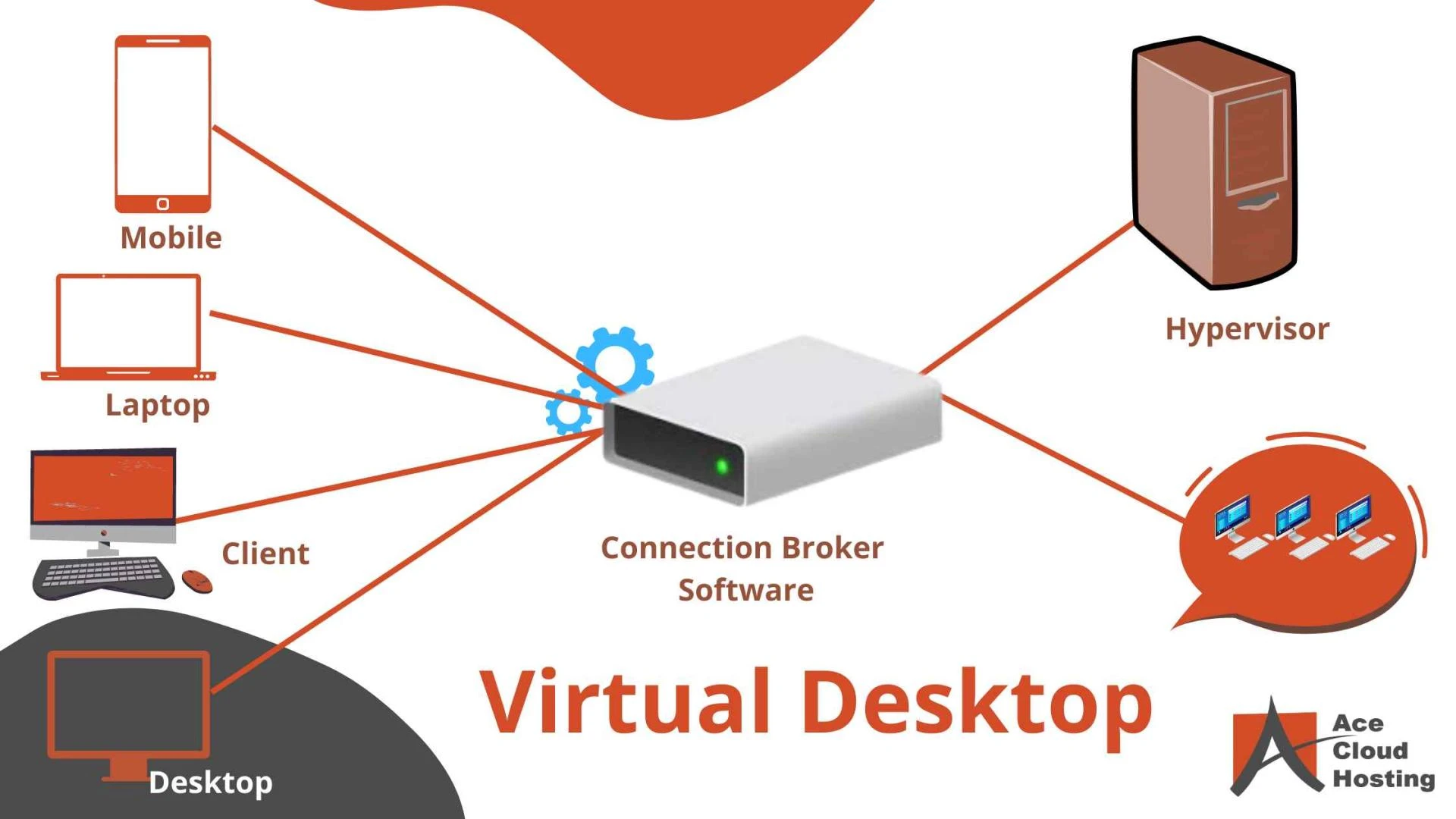
Hosted VDI utilizes the technology of desktop virtualization to offer remote access to computing resources. This means, employees can work from anywhere in the world with an internet connected device.
Furthermore, desktop virtualization hosts multiple users on a single/parent virtual machine (VM), thereby necessitating fewer resources and lower maintenance costs when compared to physical desktops.
This makes hosted VDI a cost-effective solution for businesses to deploy. With the benefits of mobility, flexibility, and enhanced security, hosted VDI has now become the preferred choice for doing business.
Nevertheless, the deployment of hosted VDI requires an investment in and commitment to a technology that may not work out in the end. And the reason for that has to do with the inappropriate scaling of VDI resources. To ensure the right fit, businesses must realize importance of sizing especially for a wider IT environment.
In the section below, we’ll discuss the most important sizing components in a hosted VDI solution and how they impact the overall success of deployment:
what is windows virtual desktop1. Central Processing Unit (CPU)
CPU or Central Processing Unit is the component that ensures a user experience similar to that of a physical desktop. For most of the workforce, familiar as they are with the rigors of a physical workstation, this is an important criterion. Businesses often face the scenario of an overdrawn/oversubscribed CPU pool when the physical core needed to run a certain number of virtual desktops is higher than the overall configuration. This means, they’ve failed to account for the total number of active virtual desktops at any given moment, the accumulated processor requirement of these, or both. Note that a minimum of oversubscription is inevitable in cases of resource-pooling among users of the same host VM.
But businesses need to know precisely how much is too much.
Technically, individual VMs can tolerate anywhere between 5%-15% of oversubscription at any given point of time. Beyond 15%, users typically suffer from performance issues that can drive down workload completion rates. Oversubscription is a common and recommended practice to cut down on resource wastage and utilize host VM density. However, a limited core warrants careful configuration as to the number of vCPUs.
Each hosted VDI provider typically has their own set of policies when it comes to oversubscription. But more importantly, processor upgradations play an important role in managing such issues and providers must carry out regular upgradations to ease resource-pooling. Thus, when it comes to choosing a hosted VDI provider, businesses should try and acquire as much information as possible about individual provider policies related to processor oversubscription. Ultimately, the right
Also Read:- Daas Providers
processing power and processor count are indispensable to the success of a hosted VDI solution.
2. Disk Space
Disk space, or storage space, refers to the capacity of accommodating user data and applications. In the case of virtual desktops, a virtual disk is responsible for storing information for end-user accessibility. The ability to store and grant access to mission-critical resources defines the performance of virtual desktops. Therefore, disk space plays a significant role in both workload distribution and workforce productivity.
When it comes to scaling VDI, businesses must keep tabs on disk space consumption. Based on contingent workload and the size of a workforce, insufficient disk space can result to repeated performance issues, because adequate disk space is essential for an operating system to perform optimally. With a hosted VDI solution, additional storage requirements can be easily allocated once sufficient disk space has been provisioned for. But additional storage usually becomes at a price, and it is a good idea to check with a potential provider on the price of additional features.
3. Random Access Memory (RAM)
RAM or Random Access Memory has a critical part in driving the cost and performance of a hosted VDI solution. For a physical desktop-like user experience, VDI needs at least a comparable amount of RAM.
But because virtual desktops offer additional security features and performance boosters such as GPUs, they come with the promise of better performance as compared to physical desktops. Typically, physical desktops end up consuming higher RAM for background applications.
This is particularly expensive since applications can drain available memory even when they’re inactive. With virtual desktops, RAM misappropriation is rare because unnecessary and/background applications can be easily shut down.
When it comes to sizing this component, it is best to remember that users generally have varying RAM needs. For instance, employees in the BPO sector need lower desktop performance than graphic designers or financial analysts. Accordingly, their demands from virtual desktops vary as greater performance inevitably calls for a higher RAM
allocation. RAM also has a considerable effect on licensing fees and the overall cost of a hosted VDI solution
0







Sign in to leave a comment.