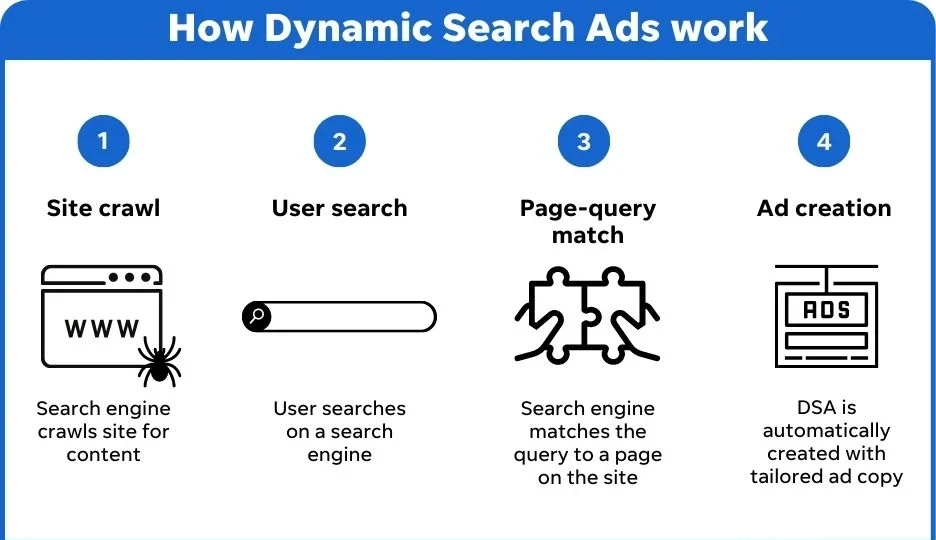
In the competitive world of e-commerce, staying ahead of the curve requires innovative advertising strategies. One such strategy that has gained popularity in recent years is Dynamic Search Ads (DSA). Unlike traditional PPC campaigns, DSAs automatically generate ads based on the content of your website, making them a powerful tool for driving traffic and conversions. In this blog, we’ll explore how e-commerce businesses can use Dynamic Search Ads to maximize their advertising efforts, along with actionable tips and best practices.
What Are Dynamic Search Ads?
Dynamic Search Ads (DSA) are a type of Google Ads campaign that uses your website’s content to create targeted ads. Instead of manually selecting keywords, DSAs automatically match user search queries with relevant pages on your site. This makes them an excellent option for e-commerce businesses with large, frequently updated inventories.
Key Features of DSAs:
- Automated Ad Creation: DSAs generate headlines and landing pages based on your website content.
- Keyword-Free Targeting: Ads are triggered by user search queries, eliminating the need for manual keyword selection.
- Dynamic Landing Pages: Users are directed to the most relevant page on your site, improving the user experience.
- Real-Time Optimization: DSAs continuously optimize based on performance data.
Why Use Dynamic Search Ads for E-Commerce?
E-commerce businesses face unique challenges, such as managing large product catalogs, keeping up with inventory changes, and targeting a wide range of customer search queries. DSAs address these challenges by offering the following benefits:
1. Save Time and Effort
Managing traditional PPC campaigns for large e-commerce sites can be time-consuming. DSAs automate the process of ad creation and targeting, freeing up time for other marketing activities.
2. Capture Long-Tail Keywords
DSAs are particularly effective at targeting long-tail keywords, which are often overlooked in manual campaigns. These keywords typically have lower competition and higher conversion rates.
3. Keep Up with Inventory Changes
For e-commerce businesses with frequently updated inventories, DSAs ensure that your ads always reflect your current product offerings.
4. Improve Ad Relevance
By dynamically matching user search queries with relevant landing pages, DSAs deliver highly targeted ads that resonate with your audience.
5. Boost ROI
DSAs help you reach potential customers who may not be captured by traditional keyword-based campaigns, increasing your overall ROI.
How to Set Up Dynamic Search Ads for E-Commerce
Step 1: Define Your Goals
Before setting up a DSA campaign, determine your objectives. Are you looking to drive traffic, increase sales, or promote specific product categories? Clear goals will help you tailor your campaign for maximum effectiveness.
Step 2: Audit Your Website
Ensure your website is optimized for DSAs by:
- Organizing products into clear categories.
- Using descriptive product titles and meta descriptions.
- Ensuring your site is mobile-friendly and loads quickly.
Step 3: Create a DSA Campaign in Google Ads
- Log in to your Google Ads account and click on “Campaigns.”
- Click the “+” button and select “New Campaign.”
- Choose your campaign goal (e.g., Sales, Leads, or Website Traffic).
- Select “Search” as the campaign type.
- Under “Dynamic Search Ads,” click “Set Up Dynamic Search Ads.”
Step 4: Configure Your Targeting
- Categories: Use Google’s predefined categories (e.g., product pages, blog posts) to target specific sections of your site.
- Specific Pages: Manually select pages you want to target.
- All Website Pages: Target your entire site for broad coverage.
Step 5: Create Ad Groups
Organize your campaign into ad groups based on product categories, brands, or other criteria. This allows for more granular targeting and optimization.
Step 6: Write Dynamic Ad Copy
While DSAs generate headlines automatically, you’ll need to provide a description. Write compelling, benefit-driven ad copy that encourages users to click.
Step 7: Set Your Budget and Bidding Strategy
Choose a budget that aligns with your goals and select a bidding strategy, such as Maximize Clicks or Target ROAS (Return on Ad Spend).
Step 8: Launch and Monitor
Once your campaign is live, monitor its performance using Google Ads’ reporting tools. Make adjustments as needed to optimize results.
Best Practices for Dynamic Search Ads in E-Commerce
1. Use Negative Keywords
While DSAs don’t require keywords, adding negative keywords can prevent your ads from showing for irrelevant queries. For example, if you sell luxury watches, you might add “cheap” as a negative keyword.
2. Optimize Your Website Content
Since DSAs rely on your website content, ensure your product titles, descriptions, and meta tags are clear, descriptive, and keyword-rich.
3. Segment Your Campaigns
Create separate campaigns for different product categories or brands to improve targeting and performance tracking.
4. Leverage Custom Labels
Use custom labels in Google Ads to group products based on attributes like price range, bestsellers, or seasonal items. This allows for more precise targeting.
5. Monitor Search Terms
Regularly review the search terms that trigger your DSAs. This will help you identify new keyword opportunities and refine your targeting.
6. Combine DSAs with Traditional PPC
Use DSAs to complement your existing PPC campaigns. For example, use DSAs to capture long-tail keywords while using traditional campaigns for high-value keywords.
7. Test and Optimize
Continuously test different ad copies, landing pages, and bidding strategies to identify what works best for your audience.
Real-Life Examples of Dynamic Search Ads in E-Commerce
1. Zappos
Zappos, a leading online shoe retailer, uses DSAs to target long-tail keywords and promote its vast inventory. By dynamically matching user queries with relevant product pages, Zappos has increased its ad relevance and conversion rates.
2. Wayfair
Wayfair, an e-commerce giant specializing in home goods, uses DSAs to keep up with its constantly changing inventory. This ensures that ads always reflect the latest products and promotions.
3. ASOS
ASOS, a global fashion retailer, leverages DSAs to target niche search queries and drive traffic to specific product categories. This has helped ASOS reach a wider audience and boost sales.
Common Challenges and How to Overcome Them
1. Irrelevant Search Queries
To avoid showing ads for irrelevant queries, regularly review your search term reports and add negative keywords.
2. Low-Quality Landing Pages
Ensure your landing pages are optimized for conversions by including clear CTAs, high-quality images, and detailed product descriptions.
3. Budget Overruns
Set a daily budget and monitor your campaign closely to avoid overspending. Use automated bidding strategies to maximize ROI.
Conclusion
Dynamic Search Ads are a game-changer for e-commerce businesses looking to streamline their advertising efforts and reach more customers. By automating ad creation and targeting, DSAs save time, improve ad relevance, and capture valuable long-tail keywords.
To get the most out of your DSA campaigns, follow best practices like optimizing your website content, using negative keywords, and continuously testing and refining your strategy.
Ready to take your e-commerce advertising to the next level? Contact us today to learn how our team can help you set up and optimize Dynamic Search Ads for your business!


































Sign in to leave a comment.