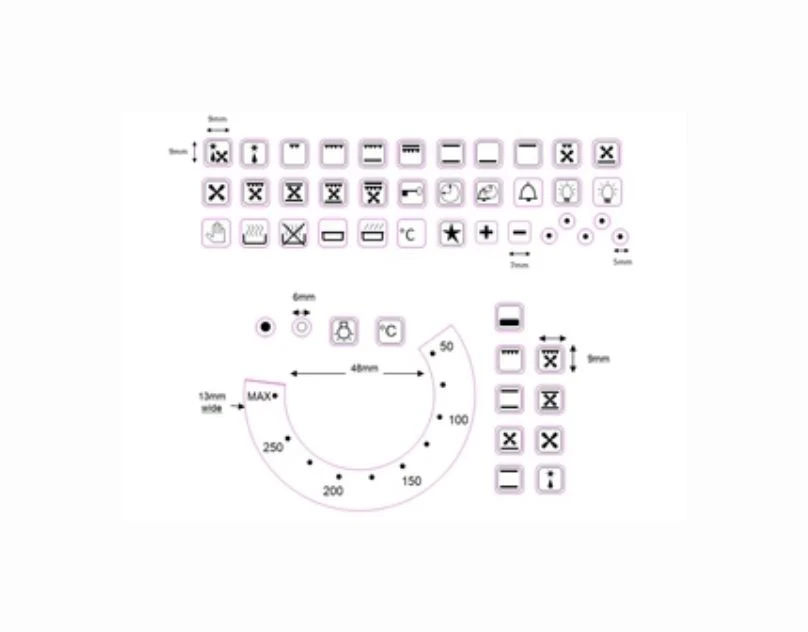

If you’ve ever found yourself puzzled by the symbols on your oven dial, you’re not alone. Oven dials often feature various oven decals symbols that can be confusing if you’re not familiar with what each one means. Understanding these symbols is key to using your oven safely and effectively, whether you’re baking, roasting, or grilling.
Why It’s Important to Understand Oven Decals Symbols
- Safety: Using the wrong setting could lead to undercooked or burnt food, or even pose a fire risk.
- Better Cooking Results: Correct settings help food cook evenly and achieve the desired texture.
- Efficiency: Knowing which mode to use saves energy and reduces cooking time.
Common Oven Decals Symbols and What They Mean
Here’s a quick rundown of some frequently seen oven decals symbols and their meanings:
1. Fan with Heat Symbol
- This symbol usually looks like a fan inside a circle or with wavy lines.
- It means the oven’s fan is on with the heating element, which helps circulate hot air for even cooking.
- Ideal for roasting and baking on multiple shelves.
2. Grill Symbol
- A zigzag or wavy line at the top of a square or rectangle.
- This activates the grill element, which provides direct heat from above.
- Perfect for grilling meats or toasting.
3. Conventional Heat Symbol
- Often shown as two horizontal lines, one at the top and one at the bottom of a square.
- Both the top and bottom heating elements are on.
- Best for baking bread, cakes, or casseroles.
4. Defrost Symbol
- Usually a snowflake or water droplets.
- It indicates a low heat setting to gently thaw frozen foods without cooking them.
5. Light Bulb Symbol
- Represents the oven light.
- This lets you see inside the oven without opening the door.
6. Fan Only
- Just the fan icon without heating lines.
- Used to cool the oven after use or circulate air without heat.
Suggestion
If you want to learn more about taking care of other kitchen appliances, check out this helpful read: A Guide to Delonghi Coffee Machine Parts Maintenance. It provides easy tips for keeping your coffee machine working smoothly.
How to Use Oven Decals Symbols on Your Oven Dial
- Identify the Symbol: Look carefully at the symbol on the dial and compare it with your oven’s manual or a decal guide.
- Select the Right Mode for Your Dish: Choose the setting that matches your recipe instructions or the cooking style needed.
- Set the Temperature: Use the temperature dial to adjust heat as required.
- Wait for Preheat: Many ovens need a few minutes to reach the set temperature, so wait before placing food inside.
- Monitor Cooking: Use the oven light symbol to check your food without opening the door, which can lower the temperature.
Tips to Read Your Oven Dial Correctly
- Always consult your oven’s manual for specific details about the symbols used, as designs can vary by brand.
- Keep your oven dial clean so the symbols are easy to see.
- If your oven dial is worn or faded, consider buying replacement oven decals symbols to make reading the dial easier.
- If unsure about a symbol, look for online resources or videos for your specific oven model.
How to Replace Oven Decals Symbols on Your Oven Dial
Over time, oven decals can fade or peel, making it hard to know which setting you’re using. Here’s how to replace them:
- Measure Your Dial: Check the size of the existing decal for a proper fit.
- Order Replacement Decals: Purchase oven decals symbols from reliable suppliers. This ensures durability and clear print.
- Clean the Surface: Remove old decals and clean the dial surface with mild soap and water.
- Apply New Decals: Carefully stick the new decals in place, aligning them properly.
- Allow to Set: Let the adhesive dry before using the oven.
Common Mistakes to Avoid When Using Oven Decals Symbols
- Don’t guess the meaning of symbols; always verify.
- Avoid using the wrong mode for delicate foods.
- Never force the dial past the stops to avoid damaging the mechanism.
- Keep the dial clean to avoid misreading symbols.
Final Thoughts
Reading your oven dial correctly by understanding the oven decals symbols can improve your cooking experience significantly. It helps you select the right cooking method, temperature, and timing. If your decals are worn out or unclear, consider replacing them to avoid confusion and ensure safety. Always follow your oven’s manual and look for reliable decal replacements if needed.



























Sign in to leave a comment.