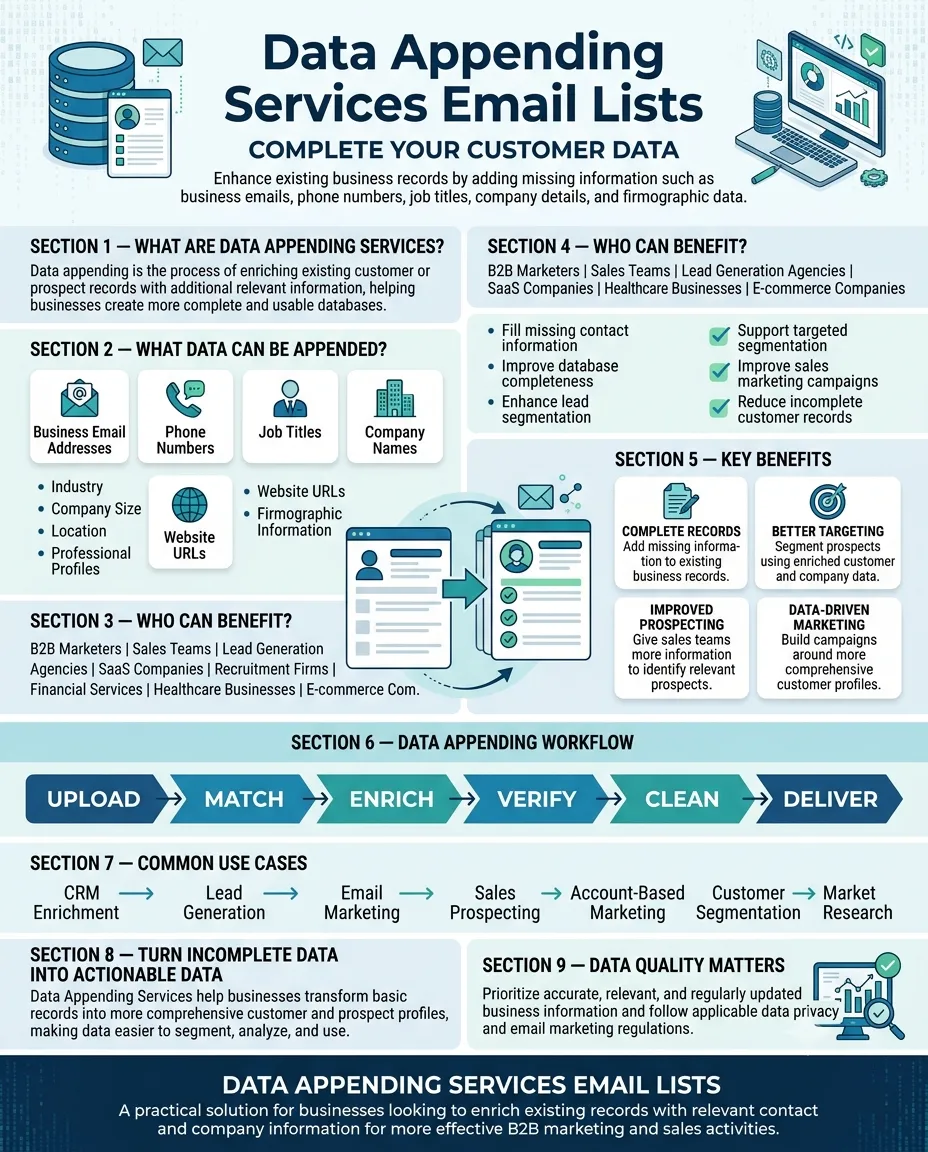

What Are Data Appending Services and How Do They Work?
What Are Data Appending Services and How Do They Work? Email List
Businesses depend on accurate customer and prospect information to support sales, marketing, customer service, and business analysis. However, databases often contain incomplete records. A company may have a customer's name and company but lack a current phone number, business email address, job title, industry, or other useful information.
Data appending services help organizations enrich existing records by adding relevant information from external data sources. Instead of creating an entirely new database, businesses can use data appending to improve the completeness and usefulness of information they already have.
This guide explains what data appending services are, how they work, their common types, benefits, challenges, and best practices for using them effectively.
What Are Data Appending Services?
Data appending services are processes used to add missing or updated information to an existing customer, prospect, or business database.
For example, a company might have a record containing:
- Business name
- Contact name
- Company website
- City and state
An appending service may be able to add other business-related information, depending on the available sources and applicable data rules, such as:
- Business email address
- Phone number
- Job title
- Industry
- Company size
- Company location
- Website
- Professional or firmographic information
The objective is to make existing records more complete and useful for legitimate business purposes.
How Do Data Appending Services Work?
The exact process varies between providers, but most data appending workflows follow several basic stages.
1. Businesses Provide Their Existing Data
The process usually begins with an existing database or customer file.
The file might contain thousands of records collected through legitimate business activities, CRM systems, website interactions, events, sales activities, or other sources.
The organization determines which fields need enrichment.
2. Data Is Standardized
Before matching records, the existing information may be standardized.
For example, one database may contain:
ABC Technologies Pvt Ltd
while another source may use:
ABC Technologies Private Limited
Standardization helps systems recognize that these records may represent the same business.
Similar processes can be applied to names, addresses, telephone numbers, postal codes, and other fields.
3. Records Are Matched
The service then compares the organization's records against available data sources.
Depending on the project, matching may use fields such as:
- First and last name
- Company name
- Business address
- Website domain
- Phone number
- Existing email address
- Location
- Other business identifiers
The more reliable information available in the original record, the easier it may be to identify a corresponding record.
4. Missing Information Is Added
After successful matching, relevant information can be appended to the original database.
For example:
Original record:
John Smith | ABC Technologies | Bengaluru
Enriched record:
John Smith | Marketing Director | ABC Technologies | Business email | Business phone | Bengaluru
The exact information available depends on the provider, source, industry, geography, and applicable data restrictions.
5. Data Is Validated
Quality checks can be performed to identify incomplete, outdated, or potentially incorrect records.
Validation may include checking formatting, identifying duplicates, removing obvious errors, and verifying available contact information.
6. The Enriched File Is Delivered
Once the process is completed, the enriched data may be returned in a format compatible with the organization's CRM, marketing platform, spreadsheet, or other database system.
Common Types of Data Appending
Data appending can involve different categories of information.
Email Appending
Email appending focuses on adding relevant business email information to existing records where appropriate.
Businesses may use this information to support professional communication, subject to applicable marketing and privacy requirements.
Phone Appending
Phone appending adds available business telephone information to existing records.
This can help sales teams identify additional channels for professional outreach.
Address Appending
Address enrichment can add or update business location information, postal codes, city, state, or other geographic fields.
Firmographic Appending
Firmographic information describes businesses rather than individuals. Examples include:
- Industry
- Company size
- Revenue range
- Headquarters location
- Business type
- Number of employees
This information can be particularly useful for B2B segmentation.
Demographic Appending
Depending on the use case and applicable regulations, demographic information may be added to records to support audience segmentation.
Organizations should carefully evaluate whether collecting and using such information is appropriate for their specific purpose.
Technographic Appending
Technographic data describes technologies or software used by organizations. It can help technology vendors identify businesses that may have a relevant technology environment.
Benefits of Data Appending Services
Improved Data Completeness
One of the primary advantages is the ability to fill information gaps in existing databases.
A more complete record can provide sales and marketing teams with better context when evaluating prospects.
Better Segmentation
Additional information allows businesses to create more specific audience segments.
For example, a company could segment B2B prospects by industry, company size, location, or job function.
More Efficient Sales Prospecting
Sales professionals can spend less time manually researching basic company information when relevant fields are already available in their CRM.
Improved CRM Quality
Data appending can help organizations improve incomplete records and create more consistent customer profiles.
Better Marketing Personalization
Additional business information can help marketers create campaigns that are more relevant to different customer segments.
Data Appending vs. Data Enrichment
The terms data appending and data enrichment are often used interchangeably, but they can describe slightly different activities.
Data appending generally refers to adding specific missing fields to an existing record.
Data enrichment is a broader concept that can include adding information, updating existing fields, validating records, identifying relationships, and creating a more comprehensive customer profile.
For example, adding a phone number to an existing contact may be considered data appending, while combining company information, technology data, organizational details, and updated contact information may fall under broader data enrichment.
Challenges to Consider
Data appending is not automatically a guarantee of accurate information.
Outdated Data
People change jobs, companies relocate, businesses close, and contact information changes.
Matching Errors
Poor-quality source records can sometimes result in incorrect matches.
Incomplete Coverage
A provider may not have information for every record in a database.
Privacy and Compliance
Organizations must understand applicable data protection and marketing laws before using appended information. Requirements can vary depending on location, data type, industry, and intended use.
Data Security
Customer and prospect information should be handled securely throughout the enrichment process.
Best Practices for Data Appending
To get better results, businesses should:
- Start with clean source data.
Better input data generally makes matching easier. - Define required fields.
Decide whether you need email addresses, phone numbers, firmographics, or other information. - Use reliable data sources.
Ask providers about sourcing, validation, update frequency, and quality controls. - Establish matching rules.
Determine how records should be matched and how uncertain matches will be handled. - Verify important information.
Critical contact information should be validated before being used in campaigns. - Maintain the database regularly.
Data quality can decline over time, so enrichment should be part of an ongoing data-management strategy. - Respect privacy requirements.
Ensure data collection, processing, storage, and marketing activities comply with applicable laws and organizational policies.
How to Choose a Data Appending Provider
Before selecting a provider, consider its:
- Data coverage
- Accuracy and validation process
- Update frequency
- Matching methodology
- Industry experience
- Geographic coverage
- Security practices
- Compliance approach
- Integration options
- Customer support
It is also useful to test a small sample before committing to a large-scale project. A sample can help businesses evaluate match rates, accuracy, completeness, and overall data quality.
Conclusion
Data appending services can help businesses turn incomplete databases into more useful and actionable business information. By matching existing records with relevant external data, organizations can improve database completeness, support segmentation, enhance sales prospecting, and strengthen CRM management.
However, successful data appending depends on data quality, reliable matching, regular validation, responsible sourcing, and appropriate privacy practices. Businesses should focus on the accuracy and relevance of enriched information rather than simply increasing the number of fields in their database.
For organizations evaluating a What Are Data Appending Services and How Do They Work? Mailing List, the same principle applies: useful data should be accurate, relevant, responsibly sourced, and aligned with a clear business purpose.





















Sign in to leave a comment.