
Apple devices, renowned for their seamless integration and user-friendly experience, have become an integral part of our digital lives. Whether it's an iPhone, iPad, or MacBook, managing storage efficiently is crucial to ensure optimal performance and a clutter-free environment. In this comprehensive guest post, we delve into the world of Apple storage, exploring different device options, storage management tips, and addressing frequently asked questions.
Unveiling Apple Storage: Understanding the Essentials
Apple's ecosystem offers a range of devices, each with varying storage capacities, designed to cater to different needs and preferences. As we embrace a digital age marked by photos, videos, apps, and documents, effective storage management becomes imperative to ensure devices operate smoothly and efficiently.
Exploring Apple Device Storage Options:
iPhone Storage:
iPhones are available in different storage capacities, ranging from 64GB to 512GB or more. The storage you choose should align with your usage patterns, considering apps, photos, videos, and other content.
iPad Storage:
Similar to iPhones, iPads offer different storage options to cater to various user requirements. If you plan to store large media files or use apps that demand more space, opting for higher storage capacity is recommended.
MacBook Storage:
MacBook models come with varying storage capacities, from modest options to larger SSDs that can accommodate extensive media libraries, software, and files.
Effective Storage Management Tips:
Regular Cleanup:
Periodically review and delete unnecessary photos, videos, and apps. Consider using Apple's built-in tools like "Optimize Storage" on iCloud Photos to manage your media.
Offload Unused Apps:
Enable the "Offload Unused Apps" feature to automatically remove apps that you rarely use, while preserving app data.
iCloud Storage:
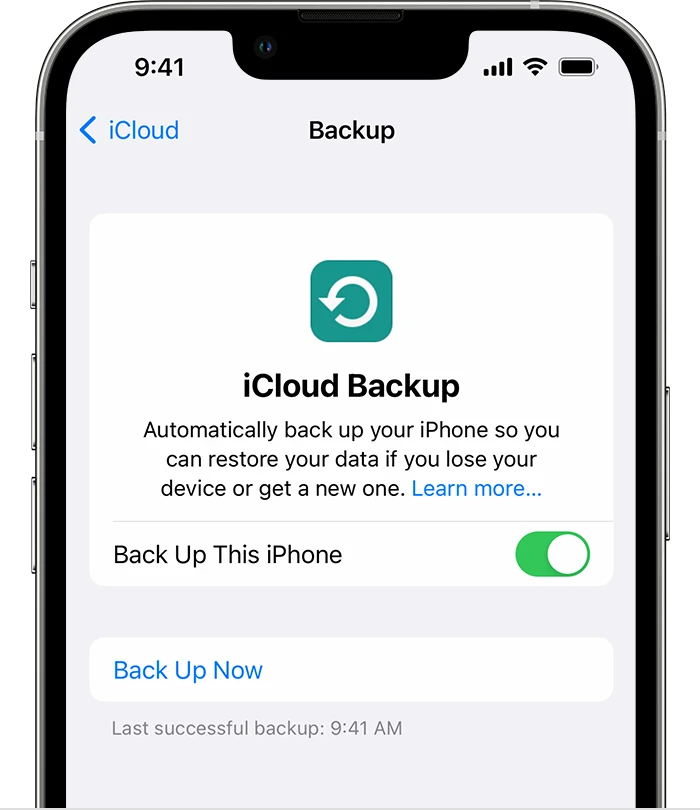
Utilize iCloud storage to back up your devices and store content in the cloud. This frees up local storage while ensuring your data is accessible across devices.
External Storage:
For MacBook users, consider external storage solutions like portable SSDs or hard drives to offload larger files and media libraries.
App Storage Settings:
Some apps allow you to adjust their storage settings. For example, podcasts can be set to auto-delete episodes after they've been played.
File Management:
Organize files into folders and utilize cloud storage services like iCloud Drive, Google Drive, or Dropbox to keep your documents accessible without taking up local space.
Frequently Asked Questions about Apple Storage:
Q1: Is it better to buy a higher storage capacity device initially?
A1: Choosing the right storage capacity depends on your usage patterns. If you consistently use a lot of apps, store media, or work with large files, investing in higher storage can be beneficial.
Q2: Can I upgrade storage on my Apple device later?
A2: For iPhones and iPads, storage upgrades cannot be done after purchase. However, for some MacBook models, you may be able to upgrade the SSD, but this varies based on the model.
Q3: Are cloud storage services secure?
A3: Reputable cloud storage services like iCloud, Google Drive, and Dropbox offer strong security measures. However, it's essential to use strong passwords and enable two-factor authentication for added protection.
Q4: Can I transfer content from my device to an external storage device?
A4: Yes, for MacBook users, you can transfer content to external storage devices using USB or Thunderbolt connections.
Q5: What is "Other" storage on my iPhone, and how can I manage it?
A5: "Other" storage includes cached files, settings, and app data. It can be managed by clearing browser caches, deleting app data, and using the "Offload Unused Apps" feature.
Conclusion:
As our digital lives expand, managing Apple device storage becomes an essential practice to ensure optimal performance, accessibility, and organization. From iPhones to MacBooks, understanding storage options and employing effective management techniques can significantly impact your overall digital experience. By embracing iCloud storage, optimizing media content, and utilizing external storage solutions, you can strike a balance between ample space and efficient operation. With these insights and solutions, you're well-equipped to navigate the intricate landscape of Apple storage and make the most of your devices' capabilities.




























Sign in to leave a comment.