12 Common Password Mistakes That Could Put Your Accounts at Risk (and How to Avoid Them)


Introduction
It only takes one weak password.
One reused login.
One small mistake.
That's often all it takes for someone to gain access to your online accounts.
Most people imagine hackers sitting behind computers, manually trying thousands of password combinations until they finally get lucky.
Reality is much less dramatic—and far more dangerous.
Today, most password attacks are automated. When usernames and passwords are exposed in a data breach, they're often added to enormous databases. From there, automated tools test those same credentials against hundreds of popular websites in minutes.
They don't know who you are.
They don't care.
They're simply looking for accounts protected by passwords that have already been leaked, reused, or created using predictable patterns.
That's why many account compromises don't happen because someone "hacked" a password.
They happen because people unknowingly make the same password mistakes millions of others make every day.
The encouraging news is that these mistakes are surprisingly easy to avoid.
Whether you're protecting your email, online banking, social media accounts, or work credentials, building a few better habits can dramatically reduce your chances of becoming the next victim of an automated attack.
In this guide, you'll discover 12 of the most common password mistakes, learn why they put your accounts at risk, and find simple, practical ways to strengthen your online security—without making your digital life more complicated.
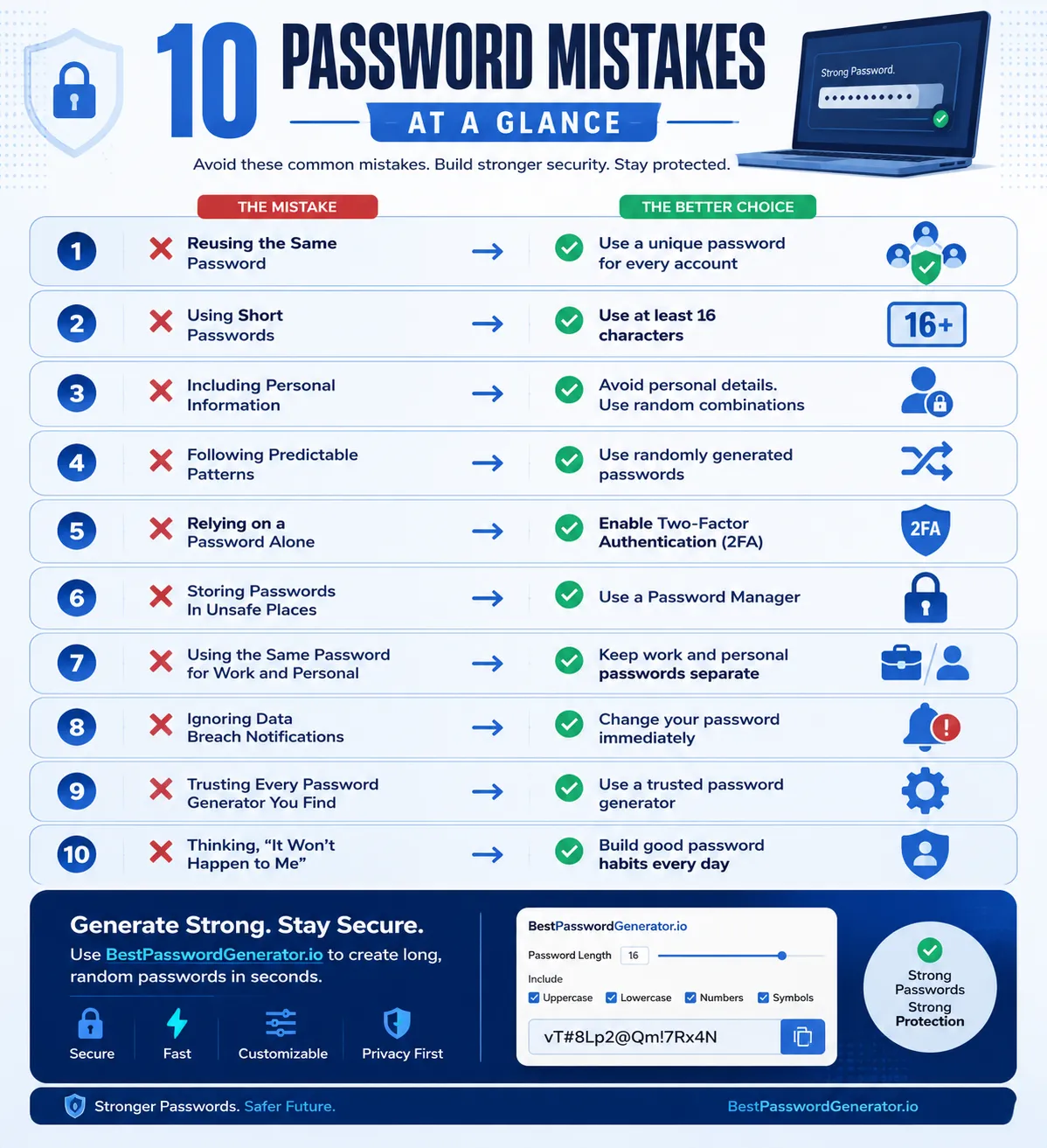
| Password Mistake | Risk Level | Quick Fix |
| Reusing the same password | 🔴 Very High | Use a unique password for every account. |
| Using short passwords | 🔴 Very High | Aim for at least 16 random characters. |
| Avoid names, birthdays, and phone numbers. | 🔴 High | Including personal information |
| Use randomly generated passwords instead. | 🔴 High | Following predictable patterns |
| Enable two-factor authentication (2FA). | 🔴 High | Relying on a password alone |
| Use a trusted password manager. | 🟠 Medium | Storing passwords insecurely |
| Keep work and personal credentials separate. | 🔴 Very High | Reusing work and personal passwords |
| Change affected passwords immediately. | 🔴 High | Ignoring data breach notifications |
| Choose generators that use secure randomness. | 🟠 Medium | Trusting weak password generators |
| Build good password habits before you need them. | 🔴 High | Thinking you're "not a target" |
1. Reusing the Same Password Across Multiple Accounts
Using the same password for several accounts might seem harmless.
After all, it's easier to remember one password than twenty.
The problem is that convenience comes with a serious security risk.
Imagine you sign up for a small online store using your usual email address and password. A few months later, that website experiences a data breach. Your login credentials are leaked online without you even realizing it.
For attackers, this is where the real opportunity begins.
Instead of trying to crack your Gmail, Microsoft, or Facebook password, they simply test the stolen email and password combination on those services. Automated tools can try the same credentials across hundreds of popular websites in just a few minutes.
This type of attack is known as credential stuffing, and it's surprisingly effective because millions of people reuse the same password across multiple accounts.
The attacker doesn't need to guess your password.
They already have it.
They only need to find another place where it still works.
A Better Habit
Every important account should have its own unique password.
Your email account deserves the strongest protection because it's often used to reset passwords for your other online accounts.
Creating dozens of different passwords may sound impossible, but that's exactly why password managers exist. They can generate long, random passwords and store them securely, so you only need to remember one strong master password.
Did You Know?
Credential stuffing attacks don't rely on hacking your password. They rely on people reusing passwords that were exposed in previous data breaches.
Reusing passwords is one of the biggest security mistakes people make.
But even users who create a different password for every account often make another mistake without realizing it.
They simply make their passwords too short.
2. Believing a Short Password Is Strong Enough
For years, an eight-character password was considered acceptable.
Today, cybersecurity recommendations have changed.
Modern attackers don't sit behind a keyboard manually guessing passwords. Instead, they use powerful automated tools capable of testing enormous numbers of password combinations every second.
That's why password length matters more than ever.
Consider these examples:
| Password | Security |
|---|---|
| Tiger12 | ❌ Weak |
| TigerRunsFast2026 | ✅ Better |
| vT#8Lp2@Qm!7Rx4N | ✅ Strong |
Many people believe that replacing a few letters with symbols automatically creates a secure password.
Unfortunately, passwords such as these remain easy to predict:
- P@ssword123
- Welcome1!
- Summer2026!
Although they look more complex than plain words, they follow patterns that attackers have seen millions of times before.
Replacing A with @ or adding ! to the end doesn't make a password truly unpredictable.
Length and randomness provide much stronger protection than simple substitutions.
The Better Option
Whenever possible, choose passwords that are at least 16 characters long.
Better still, let a trusted password generator create them for you.
Randomly generated passwords are significantly harder to predict than passwords people invent themselves, especially when each account has its own unique password.
3. Using Personal Information in Your Password
If someone wanted to guess your password, where would they start?
For many people, the answer is surprisingly simple: their social media profiles.
A quick look at Facebook, Instagram, or LinkedIn can reveal birthdays, pet names, favorite sports teams, children's names, or even anniversaries. These details may seem harmless, but they often become the first words attackers try when attempting to access an account.
Passwords like these are more common than you might think:
- Ahmed1998
- Bella2025
- Liverpool123
- Sarah@01
While they may feel unique, they're built from information that's easy to discover.
The more personal a password is, the easier it often becomes to predict.
A Better Habit
Your password should never contain information that someone else could learn about you.
Avoid using:
- Your name or nickname
- Birthdays or anniversaries
- Phone numbers
- Family members' names
- Pet names
- Favorite sports teams
Instead, choose a password that's completely unrelated to your personal life.
Pro Tip
Before using a new password, ask yourself:
"Could someone who knows me guess this?"
If the answer is yes—or even maybe—it's time to create a different one.
Using personal information isn't the only way people create predictable passwords.
Many users unknowingly follow almost identical patterns.
4. Following Predictable Password Patterns
Most people believe they're being creative when they make a password.
In reality, millions of users follow nearly the same formula.
A common word.
A capital letter.
A number.
A special character.
Examples include:
- Summer2026!
- Welcome123!
- Football#1
- Sunshine99@
These passwords appear strong because they satisfy basic password requirements.
Unfortunately, they also follow patterns that attackers expect.
After analyzing billions of leaked passwords over the years, security researchers have found that people repeatedly make the same substitutions:
- Replacing A with @
- Replacing O with 0
- Adding 123 at the end
- Capitalizing the first letter
- Finishing with an exclamation mark
Password-cracking tools are specifically designed to test these variations before trying completely random combinations.
That's why a password that looks clever isn't always difficult to crack.
What Works Better?
Instead of modifying ordinary words, let randomness do the work.
Compare these examples:
| Password | Predictability |
|---|---|
| Football2026! | High |
| Ahmed1998@ | High |
| TigerRunsFast2026 | Medium |
| Qr#7LmP!9xV2@NaK | Very Low |
The final example isn't easy to remember—and that's perfectly fine.
You don't need to memorize dozens of complex passwords anymore. A password manager can safely store unique passwords for all of your accounts while you remember only one strong master password.
Did You Know?
Attackers don't succeed because they're better at guessing passwords. They succeed because millions of people unknowingly create passwords using the same familiar patterns.
Even a long, random password has one limitation.
If someone manages to steal it, they can still sign in.
That's why passwords alone are no longer enough to protect your most important accounts.
5. Relying on a Password Alone
A strong password is an excellent first step.
But today, it shouldn't be your only defense.
Imagine locking your front door while leaving a spare key under the welcome mat.
That's similar to protecting an important account with only a password.
If an attacker obtains that password through a phishing email, malware, or a previous data breach, they may be able to sign in immediately.
This is where Two-Factor Authentication (2FA) makes a significant difference.
After entering your password, you'll be asked to verify your identity using a second method, such as:
- A code from an authentication app
- A text message verification code
- A hardware security key
- A biometric method like Face ID or a fingerprint
Even if someone knows your password, they usually can't access your account without that second verification step.
For you, it takes only a few extra seconds.
For an attacker, it can stop the attack completely.
Where Should You Enable 2FA First?
If you don't want to enable it on every account immediately, start with the services that matter most.
Prioritize:
- Your primary email account
- Online banking and financial services
- Your password manager
- Cloud storage accounts
- Social media accounts
- Shopping websites that store payment information
Your email account deserves special attention.
If someone gains access to your email, they can often reset the passwords for many of your other accounts.
Think of your email as the front door to your digital life.
Protect it accordingly.
Quick Tip
Whenever possible, use an authentication app instead of SMS verification. Authentication apps generally provide stronger protection against certain types of attacks.
Adding a second layer of protection is one of the easiest security improvements you can make.
However, even strong passwords can become a problem if they're stored in the wrong place.
6. Storing Passwords in Unsafe Places
Convenience often wins.
Security quietly loses.
Many people save passwords wherever they're easiest to find.
A text file named Passwords.txt.
A spreadsheet on the desktop.
A notebook beside the computer.
An email sent to themselves.
Or a sticky note attached to the monitor.
These methods may seem harmless, but they offer very little protection if someone gains access to your device or workspace.
The issue isn't that these locations are convenient.
The issue is that they weren't designed to store sensitive information securely.
A Better Solution
A reputable password manager encrypts your passwords and stores them securely in one place.
Instead of remembering dozens of different passwords, you only need to remember one strong master password.
Many password managers can also:
- Generate strong random passwords.
- Detect reused passwords.
- Identify weak passwords.
- Alert you if one of your accounts appears in a known data breach.
- Synchronize securely across your devices.
This makes it much easier to follow good password habits without relying on memory alone.
For many people, using a password manager is the difference between intending to use unique passwords and actually doing it.
Did You Know?
One of the biggest reasons people reuse passwords isn't laziness—it's memory. Password managers solve that problem by remembering strong, unique passwords for you, so you don't have to.
By this point, you've avoided many of the most common password mistakes.
But there's another habit that often goes unnoticed until it's too late.
Many people use the same password for both personal and work accounts, creating a much bigger risk than they realize.
7. Using the Same Password for Work and Personal Accounts
Using the same password for your personal and work accounts might seem harmless.
After all, it saves you from remembering another login.
But if that password is ever exposed, the consequences can go far beyond your personal accounts.
Imagine your favorite shopping website suffers a data breach.
Your email address and password are leaked online.
Within minutes, automated tools begin testing those same credentials on Microsoft 365, Google Workspace, Slack, Dropbox, VPN portals, and other business platforms.
If you reused the same password for work, an attacker may gain access to company systems without ever targeting your employer directly.
Why This Matters
A compromised work account can expose:
- Internal documents
- Customer information
- Financial records
- Business emails
- Cloud storage
- Company networks
For many organizations, a single compromised employee account is enough to trigger a major security incident.
A Better Habit
Keep your personal and work passwords completely separate.
If possible, use a password manager to generate unique passwords for every account.
Think of your work credentials as more than your own—they also help protect your colleagues, customers, and the organization you work for.
Quick Reminder
One reused password can be enough to compromise dozens of personal and business accounts.
Using unique passwords reduces the impact of a data breach.
However, it's equally important to act quickly when a breach actually happens.
8. Ignoring Data Breach Notifications
Receiving a security notification isn't something anyone enjoys.
It's also not something you should ignore.
When a company informs users that a data breach has occurred, many people assume their account probably wasn't affected—or they decide to change their password later.
Unfortunately, later is often too late.
Stolen usernames and passwords are frequently shared, sold, and tested against other websites for months after a breach.
The longer you wait, the more opportunities attackers have to misuse your credentials.
What You Should Do
If one of your accounts is involved in a data breach:
- Change the password immediately.
- Replace it anywhere else you've reused it.
- Enable two-factor authentication if you haven't already.
- Review recent login activity.
- Sign out of devices you no longer recognize.
These simple steps take only a few minutes and can significantly reduce your risk.
Did You Know?
Many people first discover a compromised account weeks—or even months—after the original data breach occurred.
Once you've replaced a weak password, the next question becomes just as important:
How do you create a truly strong replacement?
9. Trusting Every Password Generator You Find Online
Not every password generator offers the same level of security.
Many websites promise to create "secure" passwords, but few explain how those passwords are generated.
When choosing a password generator, look for one that:
- Uses cryptographically secure randomness.
- Lets you customize the password length.
- Includes uppercase letters, lowercase letters, numbers, and symbols.
- Generates a different password every time.
- Creates passwords directly in your browser whenever possible.
Transparency matters.
A trustworthy tool should explain how it works rather than asking users to trust it blindly.
If you're looking for a practical example, BestPasswordGenerator.io allows you to generate customizable passwords directly in your browser. You can adjust the length and character types to create unique passwords for email accounts, Wi-Fi networks, social media, banking, and more.
The best password generator isn't the one with the flashiest design.
It's the one that consistently creates long, unpredictable passwords without making the process complicated.
Strong passwords, unique passwords, and secure tools all make a difference.
But there's one final mistake that often prevents people from improving their security at all.
10. Thinking, "It Won't Happen to Me"
Perhaps the biggest password mistake isn't technical.
It's believing you're not a target.
Many people assume cybercriminals only focus on celebrities, large businesses, or wealthy individuals.
The reality is much simpler.
Most attacks are automated.
Software doesn't care who you are.
It checks millions of usernames and passwords every day, looking for accounts protected by weak or reused credentials.
If your password works, your account becomes another successful login.
You don't have to be famous.
You don't have to be wealthy.
You only need to have a password that's easier to compromise than someone else's.
Good password habits aren't just for people who work in technology.
They're for anyone with an email account, a bank account, or a smartphone.
Password Security Checklist
Before you leave, ask yourself these simple questions.
- ✅ Do I use a different password for every important account?
- ✅ Is my email account protected with two-factor authentication?
- ✅ Are my passwords at least 16 characters long whenever possible?
- ✅ Do I avoid using names, birthdays, and other personal information?
- ✅ Do I use a trusted password manager?
- ✅ Do I change passwords after a data breach?
- ✅ Are my work passwords different from my personal passwords?
- ✅ Do I generate passwords using a reliable password generator?
If you answered "No" to any of these questions, today is a good day to start making improvements.
Even one small change can make your accounts significantly more difficult to compromise.
Final Thoughts
Password security doesn't have to be complicated.
Most successful attacks don't happen because hackers have extraordinary skills.
They happen because ordinary mistakes create unnecessary opportunities.
Using unique passwords, enabling two-factor authentication, storing passwords securely, and responding quickly to security alerts are simple habits that can dramatically improve your online security.
No password can guarantee complete protection.
But strong habits make your accounts a far less attractive target.
If you need a secure password for a new account—or want to replace an old one with something stronger—you can use BestPasswordGenerator.io to generate long, random passwords tailored to your needs in just a few seconds.
Frequently Asked Questions
1. What makes a password truly strong?
A strong password is long, random, and unique. Instead of using names, dictionary words, or predictable patterns, choose a password with at least 16 characters that combines uppercase letters, lowercase letters, numbers, and symbols. Most importantly, never reuse it on another account.
2. Is a 12-character password still secure?
It depends on how it's created.
A randomly generated 12-character password is generally much stronger than a predictable 16-character password based on names or common words. However, if a website allows longer passwords, choosing 16 characters or more provides additional protection with very little downside.
3. Do I really need a different password for every account?
Yes.
Using a unique password for every account prevents one data breach from putting all of your accounts at risk. If one password is stolen, your other accounts remain protected.
4. Are password managers safe?
For most people, yes.
A reputable password manager is far safer than storing passwords in notebooks, spreadsheets, or text files. It also makes it much easier to use a different password for every account without trying to memorize dozens of them.
5. How often should I change my passwords?
You don't need to change strong passwords on a fixed schedule.
Instead, change them whenever:
- A website reports a data breach.
- You suspect someone accessed your account.
- You accidentally shared your password.
- You've reused the same password elsewhere.
6. What's the easiest way to create a secure password?
The simplest solution is to use a trusted password generator.
Instead of inventing passwords yourself, let a secure tool create a long, random password based on the options you choose.
If you'd like to create strong passwords in seconds, BestPasswordGenerator.io lets you customize password length and character types before generating a completely random password directly in your browser.
Final Thoughts
The strongest password isn't the one that's easiest to remember.
It's the one that's hardest for anyone else to predict.
Most successful account compromises don't happen because attackers are exceptionally skilled. They happen because everyday password habits—such as reusing passwords, choosing predictable patterns, or ignoring security alerts—create opportunities that automated attacks are designed to exploit.
The good news is that improving your password security doesn't require advanced technical knowledge.
Using unique passwords, enabling two-factor authentication, storing passwords securely, and responding quickly to data breach notifications are simple habits that can dramatically reduce your risk.
If you need a quick and reliable way to create strong passwords, BestPasswordGenerator.io can generate long, random passwords directly in your browser, helping you protect everything from email accounts to online banking and Wi-Fi networks.
Your online security doesn't depend on one perfect password.
It depends on consistently making better password decisions.


Sign in to leave a comment.