
Have you ever noticed that your landscape or portrait shots aren't quite as sharp as what you see while you're visiting stunning locations? In actuality, less-than-perfect images might be produced by shoddy shooting methods, camera effects, or inadequate lighting. Already back home from the picturesque location and unable to take any more pictures? Through modifications made in post-production, the image can truly be made perfect. You may be aware of the value of photo editing, but how do you go about doing it with your travel photos?
In fact, as long as you have some very handy photo editing software, you can edit them on your phone, computer, or online. And it only takes a few simple steps to transform your photos. Even the editing effect achieved by this simple editor will surprise you.
Let's examine the capabilities and usage instructions of the well-known and well-liked online photo editor - Fotor, providing photo editing possibilities for beginners.
What is Fotor?
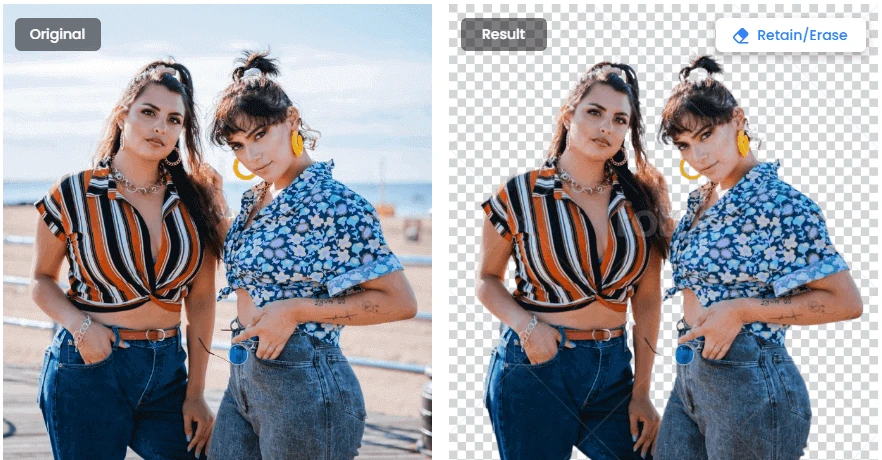
A number of fundamental photo editing and AI editing features are offered by the robust online photo editor Fotor. A few clicks can easily and amusingly edit images. A function called background remover, the system will automatically remove the background of your photo within 5 seconds after you click to upload it. It is the function that also allows you to change the background color with a single click, making it simple and quick to create different backgrounds for ID or avatar photos or your landscape photographs.
What can Fotor do with travel photos?
Crop the photoMaybe you know that the first point of photo editing is to re-crop the composition, cutting out the extra elements in the picture, to make the image composition look more comfortable. But maybe you're just a novice, so you're just bothering about the trash cans you've accidentally photographed in your photos because they're so annoying - so let's just crop them out with a photo editor.
Of course, there are situations when you'll discover that you can't crop out other elements from a picture, like tourists. Currently, Fotor has a feature to delete undesired elements from a photo.
Add filterYour photo may alter in style, become more appealing, or appear more professional if you apply a different filter to it. Then you should give the different Fotor filters a try. To your images, you could, for instance, add retro-style filters, stylish black-and-white filters, romantic painting filters, and other novel filters. Of course, you can enhance your images with color halo, rainbow, aurora, and other light effects.
Enhance photos with one click
This one-click photo improvement option can help you easily clear up photos that were captured in poor light or were relatively grainy. This is because as a result of the Ai algorithm's enhancement of color, reduction of blur, increase in sharpness, elimination of haze, and emphasizing of focus.
Portrait retouching
We are all aware that using a camera can produce unflattering results, such as highlighting more facial flaws than you actually have. Then, if necessary, utilize Fotor's portrait editing features to repair imperfections on your face, brighten the color of your lips, remove wrinkles, eliminate red eye, and achieve a leaner appearance.
In short
Fotor is a versatile and powerful online editor that allows you to make a full range of changes to your travel photos with its many editing features. Its simple operation makes it easy to operate even for novice editors. I encourage you to try more new editing functions and wish you make all of your travel pictures more attractive.
0








Sign in to leave a comment.