

According to Cybersecurity Ventures, cybercrime damages are projected to cost the world $10.5 trillion annually by 2025. As organizations accelerate their move to the cloud, security has become one of the most critical concerns. When migrating to Microsoft Azure, businesses gain access to one of the most secure cloud platforms available—but only if the migration is executed with security as a core priority. Overlooking Azure migration security can result in breaches, compliance failures, and costly downtime that undermine the benefits of cloud adoption.
Let’s dive deeper into the essential security measures every Azure migration must include.
Why Azure Migration Security Matters
Cloud migration is not just a technical project—it’s a transformation of how businesses store, process, and access critical data. Azure offers powerful capabilities across compute, storage, analytics, and AI, but without the right security measures in place, organizations expose themselves to:
- Unauthorized access to sensitive workloads
- Data leaks during or after migration
- Regulatory non-compliance and audit penalties
- Increased vulnerability to phishing, ransomware, and insider threats
Azure migration security ensures that workloads are protected at every stage—from pre-migration planning to post-migration governance. It’s about building a secure foundation for innovation, scalability, and long-term resilience.
Key Security Measures for Every Azure Migration
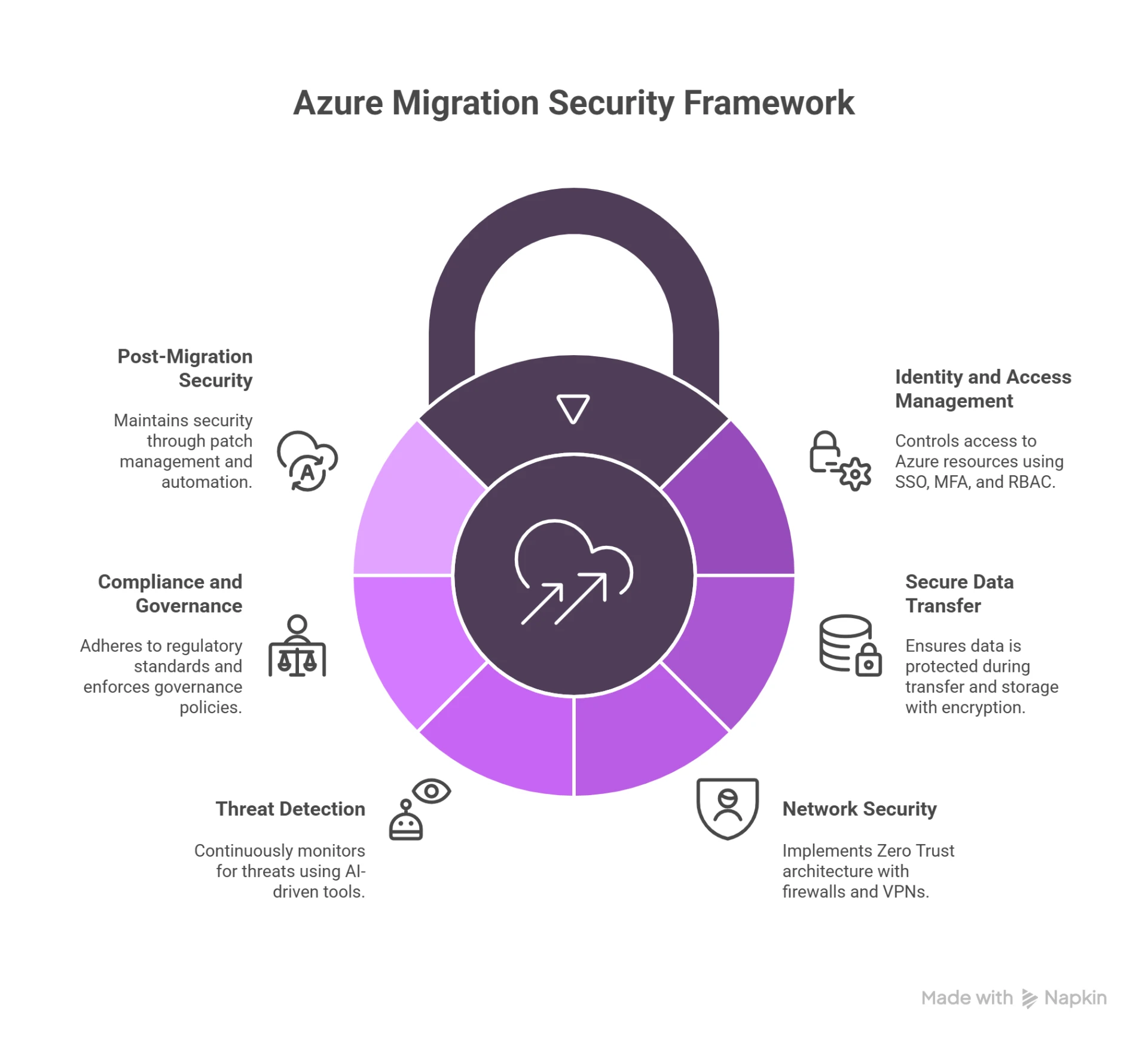
1. Identity and Access Management (IAM)
The first line of defense in Azure migration security is controlling who can access what. Azure Active Directory (Azure AD) provides:
- Single Sign-On (SSO): Streamlines access across apps while reducing password fatigue.
- Multi-Factor Authentication (MFA): Adds an extra verification layer to prevent credential-based attacks.
- Conditional Access Policies: Restrict access based on device, location, or risk level.
By enforcing role-based access controls (RBAC), organizations can ensure users only have the permissions necessary for their role, minimizing insider threats.
2. Secure Data Transfer and Encryption
Migrating workloads means transferring sensitive data between environments—a process ripe for interception if not secured. Best practices include:
- Encryption-in-Transit: Protects data as it moves between on-premises and Azure.
- Encryption-at-Rest: Ensures that data stored in Azure remains secure even if physical hardware is compromised.
- Azure Key Vault: Manages encryption keys, secrets, and certificates centrally and securely.
Implementing these measures safeguards sensitive information throughout the migration process.
3. Network Security and Zero Trust
Traditional perimeter-based security is no longer sufficient. Azure migration security should adopt a Zero Trust architecture, which means “never trust, always verify.”
Key controls include:
- Azure Firewall and Network Security Groups (NSGs): Restrict traffic based on policies.
- Azure DDoS Protection: Defends against denial-of-service attacks.
- Private Endpoints and VPNs: Secure communication channels between on-premises and Azure workloads.
This layered approach reduces the attack surface and limits lateral movement in case of a breach.
4. Continuous Threat Detection and Monitoring
Security is not static—threats evolve daily. Azure provides powerful tools for continuous monitoring:
- Microsoft Defender for Cloud: Offers real-time threat detection, vulnerability assessments, and compliance recommendations.
- Azure Sentinel (SIEM): Analyzes billions of security signals using AI to detect anomalies and accelerate response.
- Log Analytics: Helps IT teams gain visibility into system behavior during and after migration.
These tools ensure that Azure migration security remains proactive rather than reactive.
5. Compliance and Governance
Many industries—healthcare, finance, government—face strict regulatory requirements. Azure supports compliance with over 100 global standards, including GDPR, HIPAA, and ISO.
To strengthen compliance during migration:
- Use Compliance Manager to assess risks and track regulatory requirements.
- Apply Azure Policy to enforce governance rules across workloads.
- Conduct regular audits to ensure continuous alignment with standards.
This minimizes the risk of penalties and builds customer trust.
6. Post-Migration Security Best Practices
Azure migration security doesn’t end once workloads go live. Ongoing governance is crucial:
- Patch Management: Regularly update workloads to close vulnerabilities.
- Cost and Security Optimization: Use Azure Advisor to balance cost savings with secure configurations.
- Automation: Implement automated workflows for threat response, license revocation, and compliance reporting.
By embedding security into day-to-day operations, organizations maintain resilience long after migration.
Real-World Example
A multinational healthcare provider migrated its electronic health records system to Azure. By prioritizing Azure migration security—implementing MFA, encryption, and Sentinel monitoring—they achieved HIPAA compliance, reduced unauthorized access attempts by 45%, and cut incident response times by 30%. This case highlights how integrating security measures during migration leads to both compliance and operational efficiency.
Final Thoughts
Migrating to Microsoft Azure unlocks scalability, flexibility, and innovation. However, without a strong focus on Azure migration security, businesses risk turning a strategic opportunity into a costly liability. By implementing identity management, encryption, Zero Trust networking, continuous monitoring, and compliance frameworks, enterprises can ensure that their cloud journey is both secure and successful.
A secure migration doesn’t just protect workloads—it builds the foundation for long-term digital transformation and business resilience.
Happy Learning!!


























Sign in to leave a comment.