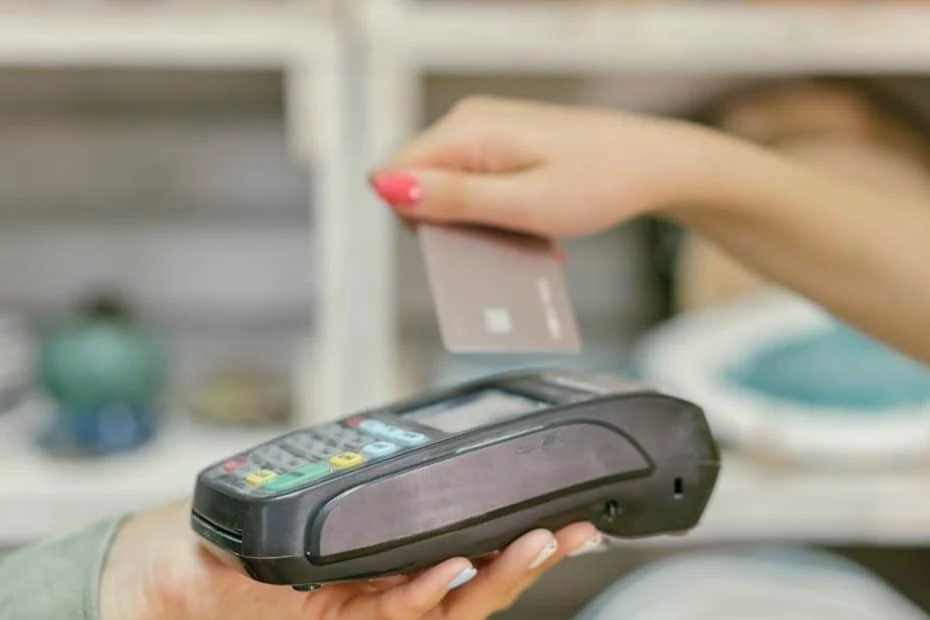

Nobody likes standing in a queue. Customers with three items in hand watching a cashier fumble through a slow transaction will put their stuff down and walk out. They might not say anything, but they will go somewhere faster next time. Slow checkout is one of the biggest silent killers in retail, and most store owners underestimate how much revenue it costs them.
The fix is not complicated. Faster, smarter payment processing at the till makes every transaction quicker. When the technology at the counter keeps up with the speed customers expect, the queue moves, the staff stays calm, and the business makes more money per hour. Here is how that works in practice.
Why Checkout Speed Matters More Than Ever
Consumer patience has dropped sharply over the past decade. People are used to tapping a card, scanning a QR code, and moving on. When they walk into a physical store and the payment process takes 45 seconds longer than it should, it feels like an eternity.
Research from retail industry groups shows that the average shopper will abandon a purchase if the queue exceeds four or five people. That is not a guess. It is a measured behaviour pattern across thousands of stores. Every extra minute at checkout costs the store not just the current sale, but future visits from that customer.
For small and medium retailers, where every transaction counts, the speed of the checkout process has a direct and measurable effect on daily revenue. A store that processes 10 more transactions per hour because the till runs smoothly can see a significant bump in monthly income.
What Slows Down a Traditional Till
Old cash registers were designed for a time when payment meant handing over banknotes and receiving change. The cashier typed in the amount, the drawer opened, and the transaction was done. When card payments arrived, an additional step was added. Then chip-and-pin. Then contactless. Each layer added time to the process.
Many small retailers still use a setup where the till and the card machine are separate devices that do not talk to each other. The cashier rings up the sale on the till, reads the total off the screen, types it into the card machine manually, and waits for the payment to process. This double entry creates two problems: it is slow, and it introduces the risk of typing errors.
A point of sale system that integrates the sale and the payment into a single workflow removes both problems. The cashier completes the transaction on one screen, the amount transfers to the card reader automatically, and the customer taps or inserts their card. One step instead of three.
How Integrated Terminals Change the Game
An integrated payment terminal connects directly to the store’s sales software. When a product is scanned and the total is calculated, the payment amount is sent to the card reader without the cashier doing anything extra. The customer pays, the transaction is recorded, and the receipt prints or gets sent to their phone.
This setup cuts the average transaction time by 15 to 30 seconds. That does not sound like much until you multiply it across 200 or 300 transactions a day. Over a week, the store saves hours of cumulative checkout time, which translates directly into shorter queues and higher throughput.
A POS system with integrated payments also reduces errors. Manual entry of amounts into a separate card machine leads to mistakes, especially during busy periods. A cashier who types R350 instead of R305 creates a problem that takes minutes to resolve, a void, a reprocessing, and an annoyed customer. Integration eliminates this category of errors entirely.
Tap-to-Pay and Contactless Options
Contactless payments are now the default for many South African shoppers. A card tap takes about two seconds. A phone payment using Apple Pay, Samsung Pay, or Google Pay is similarly quick. If the store’s terminal supports contactless, the payment step becomes almost instant.
The key is that the terminal needs to be modern enough to accept these methods. Older card machines that only accept chip-and-pin or swipe are slower by design. Upgrading to a terminal that handles tap, chip, QR, and mobile wallet payments means the store can process whatever payment method the customer prefers, at the fastest speed that method allows.
A good POS system comes with a terminal that accepts all modern payment types out of the box. There is no need to bolt on separate devices for different payment methods. Everything runs through a single unit.
Barcode Scanning and Product Lookup
Checkout speed is not just about the payment step. It starts with how quickly the cashier can ring up the products. Manual price entry is slow and error-prone. Barcode scanning is fast and accurate.
A modern POS machine includes a barcode scanner (either built-in or connected via USB) that reads product codes instantly. The item, price, and description appear on the screen in less than a second. For stores with hundreds or thousands of SKUs, this is the difference between a 10-second and a 60-second ring-up per item.
For products without barcodes (loose produce, deli items, custom orders), a well-configured system allows the cashier to search by name or use shortcut buttons on a touchscreen. A bakery might have buttons for “white loaf,” “brown loaf,” “rolls x6” that add the item with a single tap. This is far faster than scrolling through a menu or typing in a price.
Queue Busting with Mobile Terminals
Some retailers have started using mobile payment terminals to manage peak-hour queues. A staff member with a handheld device walks the queue, scanning items and processing payments before the customer reaches the main till. This is common in fast-food chains and is increasingly used in grocery and retail environments.
The mobile terminal connects to the same sales system as the fixed tills. Stock levels update in real time, and the transaction appears in the daily reports alongside every other sale. The customer gets a receipt on the spot and can leave without waiting in the main line.
For stores that experience predictable rush periods (lunchtime, after-work hours, Saturday mornings), a mobile terminal pays for itself quickly. The cost of the device is small compared to the revenue lost when customers walk away from a long queue.
Staff Training and Muscle Memory
The fastest hardware in the world is only as quick as the person operating it. Staff training on the checkout system is one of the most overlooked factors in transaction speed. A cashier who knows the system inside out can process a sale in half the time of someone who is still figuring out where the buttons are.
Training should cover not just the basics (scanning, totalling, accepting payment) but also common exceptions: processing returns, applying discounts, splitting payments, handling card declines, and voiding transactions. When the cashier can handle these situations smoothly, the queue keeps moving even when something unusual comes up.
After a few weeks on a well-designed system, the process becomes muscle memory. Scan, total, tap, receipt. Scan, total, tap, receipt. The cashier does not need to think about each step, and the customer barely has time to put their wallet away before the next person steps forward.
The Ripple Effect on Customer Experience
Faster checkout does more than move the queue. It changes the entire feeling of the store. Customers who know that a shop has fast service are more likely to pop in for a quick purchase. They do not have to factor in a 10-minute queue when deciding whether to stop by.
Staff morale improves too. Working a busy till on a slow system is exhausting and stressful. When the technology supports the pace, the cashier feels competent and in control. This translates into better customer interactions, fewer mistakes, and less staff turnover.
Store managers get better data as well. A modern system tracks every transaction in detail: time of sale, items purchased, payment method, and transaction duration. This data reveals patterns. If Monday afternoons are consistently slow, the store might adjust staffing. If a particular product is frequently purchased together with another, the store can create a bundle deal. None of this is possible with a basic cash register.
Making the Switch
Upgrading checkout hardware and software is simpler than most store owners expect. Modern systems are designed for quick setup, with cloud-based software that does not require a dedicated server. The hardware (screen, scanner, receipt printer, card terminal) connects and configures within hours, not days.
Data migration from an old system (product lists, prices, customer records) can usually be done through a CSV import. For stores that have been using a manual process, the product catalogue needs to be set up from scratch, but this is a one-time task that pays dividends every day afterward.
The transition period is short. Most staff become comfortable with a new system within a week. By the second week, they are faster on the new setup than they ever were on the old one. And from the customer’s perspective, the only thing they notice is that the queue moves faster and the experience is smoother.
For any retailer who has watched customers leave because the line was too long, or who has seen cashiers struggle with outdated equipment during the afternoon rush, the upgrade is not a luxury. It is a practical decision that directly affects daily revenue and long-term customer loyalty.































Sign in to leave a comment.