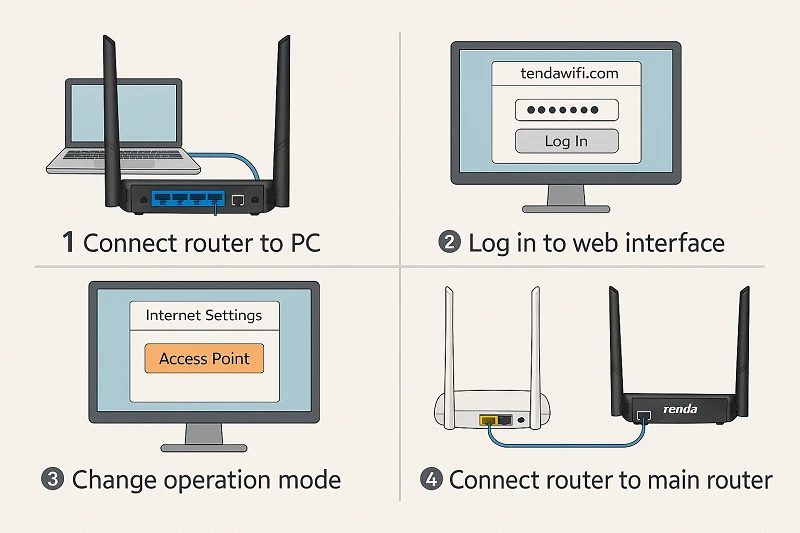

One of the easiest and most efficient methods to increase WiFi coverage in your home is to set up your Tenda router as access point, particularly if certain rooms have poor signals or dead zones. By converting your spare Tenda router into an access point, you may expand your current network without setting up a different SSID, improving the dependability and efficiency of your overall WiFi setup. A detailed tutorial on setting up the Tenda router as an access point can be found below.
Step-by-Step Instructions
1. Set Up Your Router
- Wherever your primary WiFi signal is still strong, put the secondary Tenda router.
- Don't put it in a poor-signal area or too close to the main router.
2. Attach the routers
- Connect the main router's LAN port to the Tenda router's LAN port using an Ethernet cable.
- The secondary Tenda router's WAN port should not be used for access point mode.
3. Access the Tenda Router Settings
- Link your phone or computer to the Tenda router.
- Launch a browser and type in the default IP address, which is often 192.168.0.1.
- Finish logging in as an administrator.
4. Turn off DHCP
- Navigate to Advanced Settings → DHCP Server.
- Your primary router will assign all IP addresses, therefore turn DHCP off.
- When setting up the Tenda router as an access point, this is an essential step.
5. Modify the IP address of the router
- Set a new IP address (such as 192.168.0.2) that is inside the network range of the primary router.
- Restart after saving.
6. Configure the WiFi Name and Password
- For smooth traveling, you can use the same SSID and password as your primary router.
- If you wish to differentiate the access point, you may also select a different SSID.
7. Restart and Test
- Give the router a restart.
- Verify improved coverage in the specified region by connecting your devices.
You may effectively turn your spare router into a potent WiFi extender by following this easy tenda router setup. Smoother communication, greater coverage, and fewer signal dropouts throughout your house are guaranteed when you set up your Tenda router as an access point. Large residences, multi-story dwellings, or spaces with thick walls are most suited for this configuration. Go to our webpage for more details.


























Sign in to leave a comment.