
Most GMB setup guides will tell you to "fill out your profile completely" and "ask for reviews." You've read that advice a hundred times. It hasn't moved the needle. This guide is different.
After auditing hundreds of Google Business Profiles across industries — from local plumbers in Wisconsin to law firms in New York — we've identified the exact GMB setup and optimization patterns that separate businesses dominating the Local Pack from those buried on page two. What follows is a strategic, data-backed breakdown of professional GMB setup services and what they actually do that you probably aren't.
Let's get into it.
Why Your Google Business Profile (GMB) Is Worth More Than Your Website Right Now
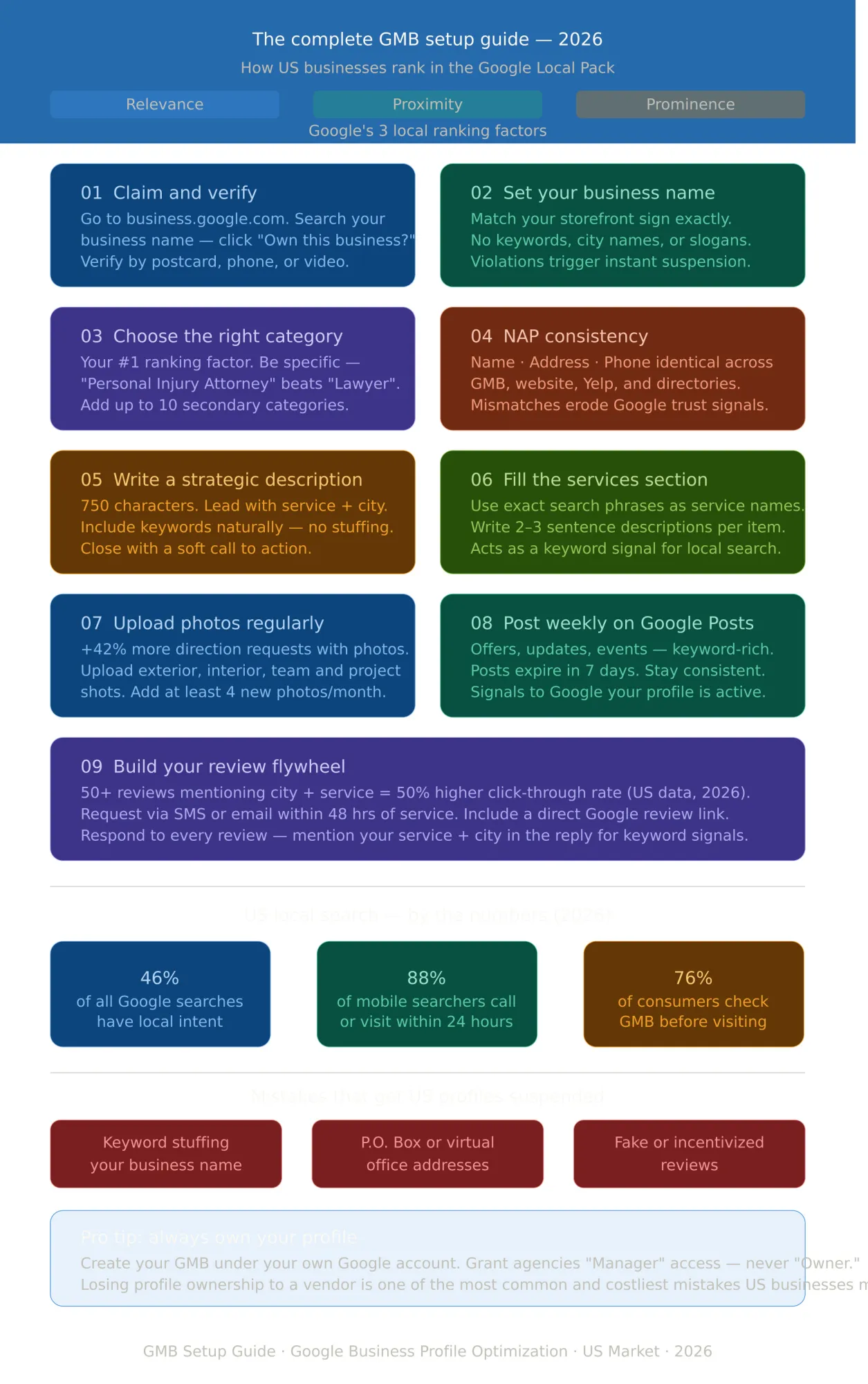
Here's a statistic that should stop you in your tracks: 46% of all Google searches have local intent. And when someone runs a local search on mobile, 88% of them visit or call a business within 24 hours.
Your website might be beautiful. Your Instagram might be thriving. But for local visibility, nothing comes close to a fully optimized Google Business Profile (GBP) — formerly known as Google My Business (GMB). It's the first thing a potential customer sees. It's what they judge you on before they ever click through to your site.
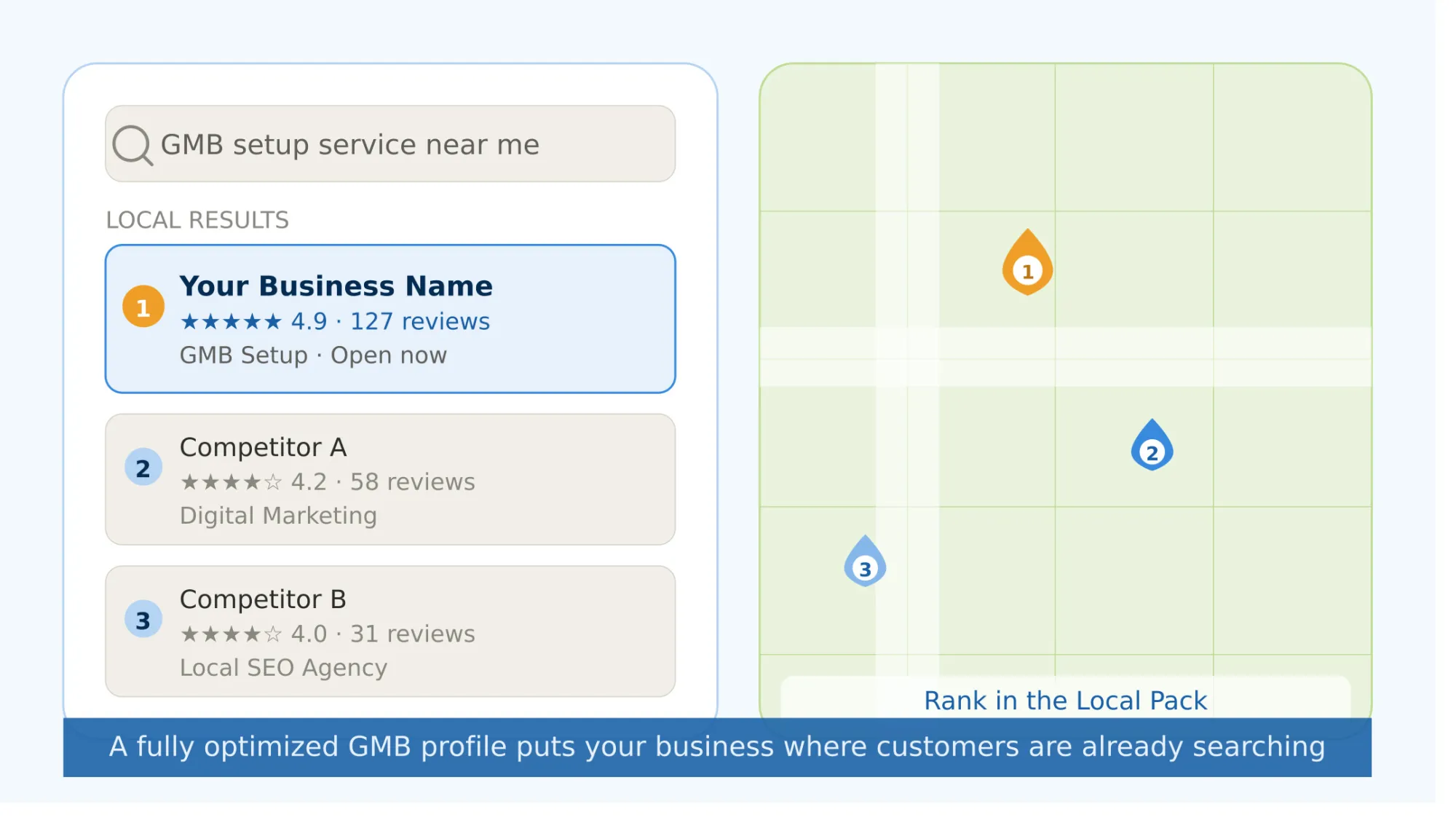
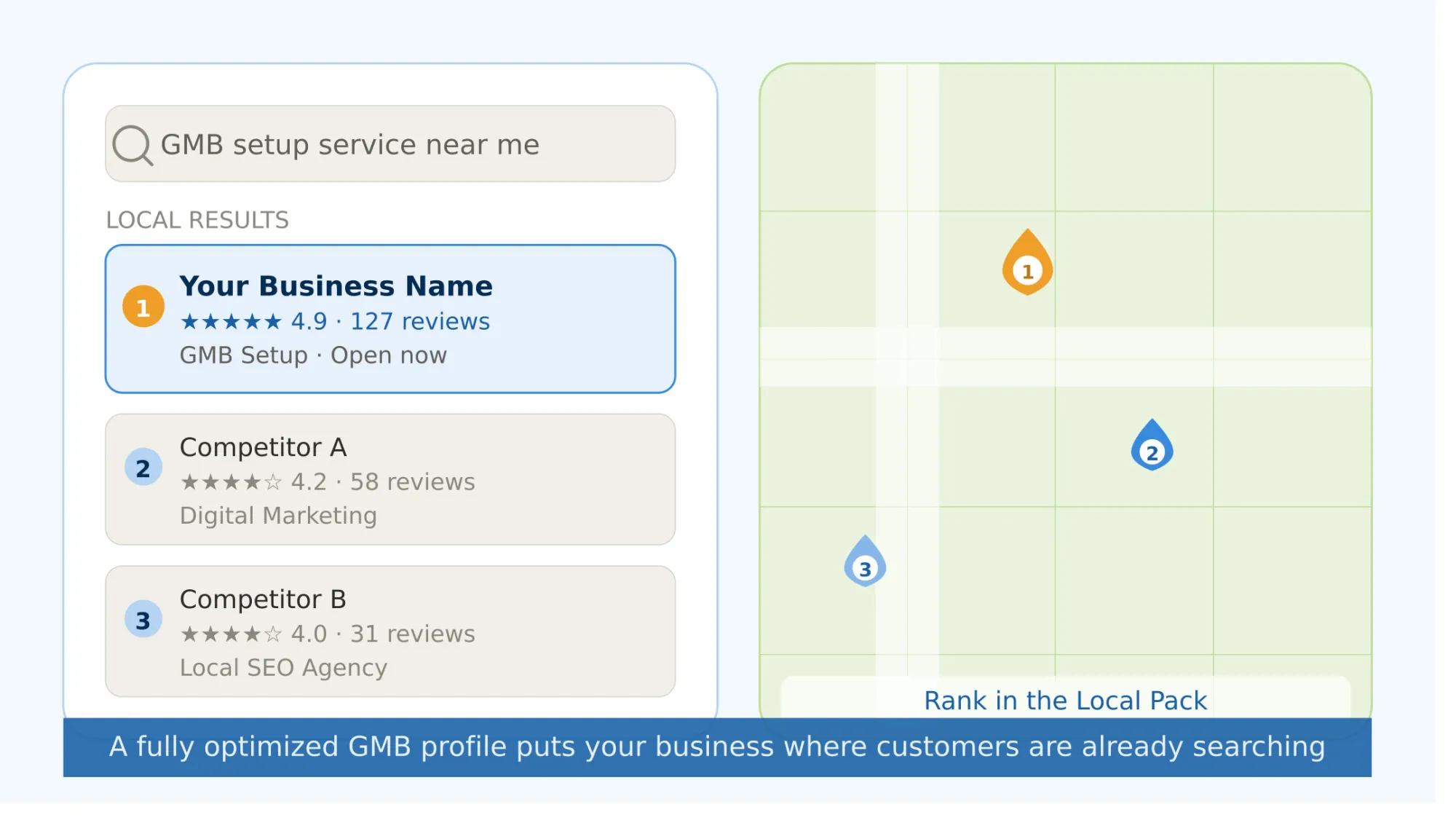
The Google Local Pack — those three business listings that appear above organic results — captures the lion's share of clicks for local queries. If your business isn't in it, you're effectively invisible to the most purchase-ready audience on the internet.
The question isn't whether GMB matters. It's how to set it up and optimize it in a way that actually works in 2026.
What Professional GMB Setup Services Actually Do (That You're Probably Missing)
There's a significant gap between a "completed" GMB profile and a strategically optimized one. Here's what separates them.
1. Entity Alignment — The Strategy Most Businesses Have Never Heard Of
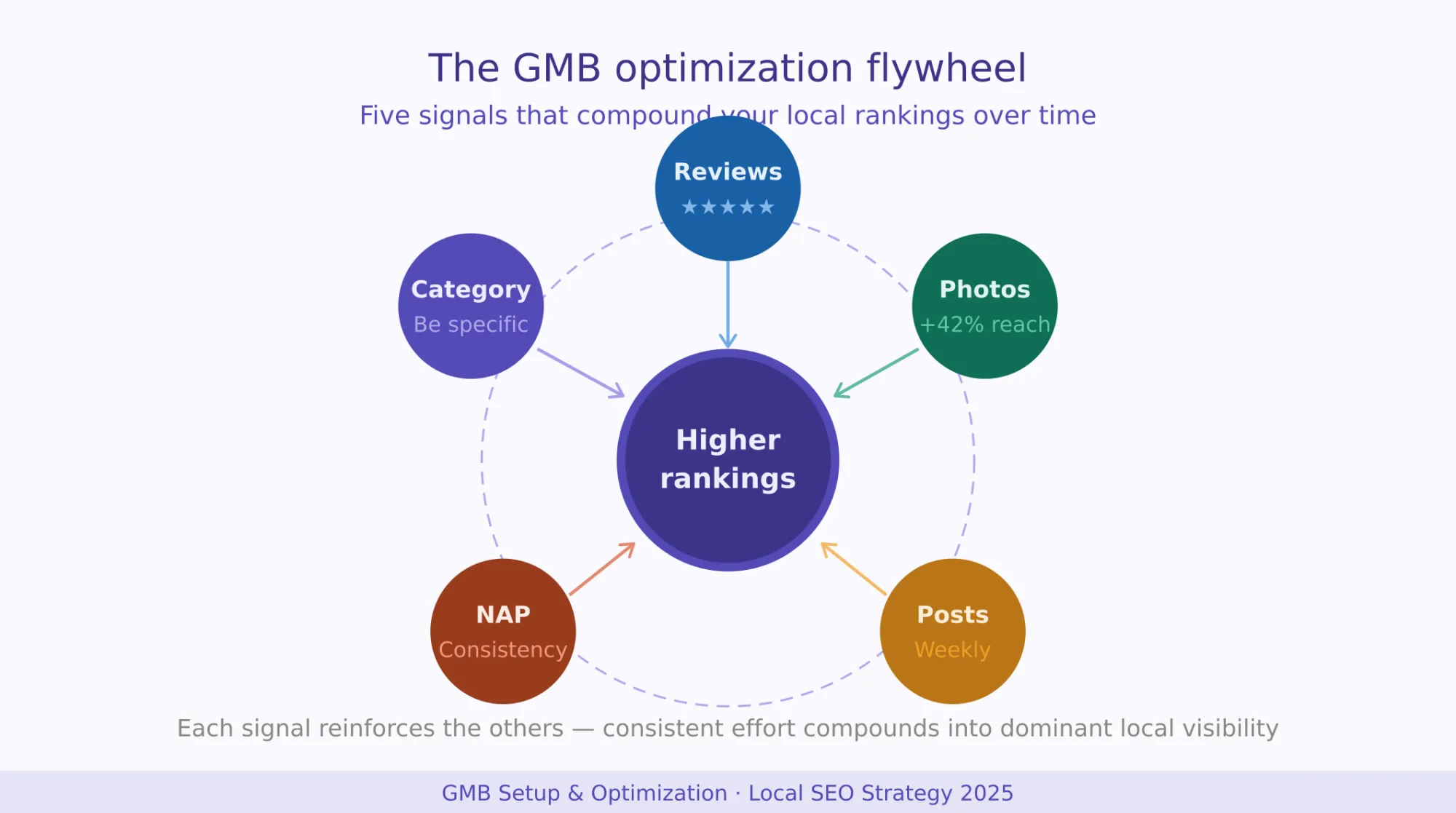
Google has evolved. It doesn't just index keywords anymore — it understands entities: distinct, recognizable people, places, and things. When your Google Business Profile, your website, and your local citations all describe the same entity (your business) with the same language, service descriptions, and location data, Google's Knowledge Graph treats you as a trusted, authoritative source.
Professional GMB setup services don't just fill in your address and hit submit. They audit your entire digital footprint — Yelp, Facebook, Apple Maps, local directories — and align every mention of your business around a consistent entity. Your business name is the same everywhere. Your phone number format matches. Your service descriptions use the same core language.
This is called NAP consistency (Name, Address, Phone), and it's one of the most powerful — and most ignored — ranking signals in local SEO.
The fix: Before you even touch your GMB profile, Google your business name and audit every listing across the web. Inconsistencies between platforms erode Google's trust in your data and directly suppress your local rankings.
2. Category Selection Is More Powerful Than You Think
Your primary business category is arguably the single most important field in your entire GMB profile. It tells Google what searches to show your business for. Choose it wrong, and no amount of optimization will save you.
Most businesses default to a broad category — "Restaurant" instead of "Italian Restaurant," "Lawyer" instead of "Personal Injury Attorney." The more specific your primary category, the more precisely Google can match you to high-intent searches.
Here's what the data shows: businesses using the most specific available category consistently outrank broader competitors in niche searches, even with fewer reviews.
You can also add secondary categories (up to 10), but use them carefully. Only add categories that genuinely reflect your services. Irrelevant categories can dilute your relevance signals.
3. The Business Description: Stop Wasting 750 Characters
Your GMB business description gives you 750 characters to tell Google and potential customers who you are and what you do. Most businesses write two generic sentences and call it done.
Here's what a strategic description actually does:
- Opens with your primary service and location (e.g., "We are a certified digital marketing agency providing GMB setup services, local SEO, and Google Business Profile management in New Jersey and across US.")
- Naturally incorporates service-based keywords — not stuffed, but woven in
- Mentions your differentiator (years in business, certifications, turnaround time, guarantee)
- Closes with a soft call to action
Note: Google does not make your description clickable with keywords for ranking purposes, but it does influence how well your profile converts visitors into leads — and user engagement signals (clicks, calls, direction requests) do influence your ranking.
4. Services Section: Your Hidden SEO Real Estate
The Services section in GMB is dramatically underused and is one of the most impactful areas for service-based businesses. Here's why it matters: each service you add acts as a keyword signal. When someone searches for "GMB setup service near me" or "Google Business Profile management," a profile with those services explicitly listed has an advantage.
Structure your services like this:
- Service Name: Use the exact phrase your customers search (e.g., "GMB Setup Service," "Google Business Profile Optimization," "Local SEO Management")
- Description: Write 2–3 sentences per service explaining what's included, who it's for, and what outcome it delivers
This section essentially acts as a mini landing page within Google's ecosystem.
5. Photo Strategy: Quality AND Frequency
Businesses with photos on their GBP receive 42% more requests for directions and 35% more clicks to their website than those without.
But here's what most guides miss: it's not just about having photos. It's about the type and frequency of photos you upload.
What to upload:
- Exterior shots (helps Google and customers verify your location)
- Interior shots (builds trust and sets expectations)
- Team/staff photos (humanizes your brand)
- Products or service deliverables in action
- Before-and-after photos (especially powerful for trades, aesthetics, and home services)
The frequency signal: Profiles that regularly add new photos signal to Google that the business is active. Aim for at least 2–4 new photos per month. This is one of the easiest "activity signals" you can send.
Bonus: Add geo-tagged photos when possible. Some local SEOs add location metadata to image files before uploading. Google often strips this data, but it doesn't hurt — and it may marginally reinforce your location signals.
6. Google Posts: Your Underutilized Ranking Amplifier
Google Posts appear directly in your Business Profile and are one of the few ways you can push fresh, keyword-rich content directly into Google's local search results without going through your website.
Think of them as micro-blog posts or social updates — but living inside Google. You can use them for:
- Offers: Limited-time promotions or seasonal discounts
- Updates: Business news, new hires, or service expansions
- Events: Workshops, open days, or webinars
- Products: Highlight specific services or packages
Posts stay active for 7 days (offers stay until expiry). The key is consistency — businesses posting at least once a week consistently outperform those that post sporadically. Use your target keywords naturally in the post body. It signals relevance for those search terms.
7. The Review Flywheel: Quantity, Keywords, and Recency
Reviews are one of the three core pillars Google uses to determine local rankings (alongside relevance and proximity). But it's not just about volume.
Recent research shows that profiles with 50+ reviews mentioning the city and service have a 50% higher click-through rate than those without. Why? Because Google's sentiment analysis reads those reviews and reinforces its understanding of what your business does and where you operate.
Here's how professional GMB management services approach reviews:
Build a review acquisition system, not a one-time push:
- Identify your review request trigger points (post-purchase, project completion, follow-up call)
- Create a direct review link (search your business on Google > click "Get more reviews" in your profile dashboard)
- Use SMS, WhatsApp, or email to follow up with customers within 24–48 hours of service delivery
- Respond to every review — positive and negative — within 48 hours
The response strategy matters: When you respond to reviews, naturally include your service name and location. For example: "Thank you for choosing our GMB setup service in New Jersey— we're thrilled the profile optimization improved your visibility so quickly!"
This response text is indexed by Google and reinforces your relevance signals.
8. Q&A Section: Take Control Before Someone Else Does
The Questions & Answers section of your GMB profile is publicly editable. Anyone — including competitors — can post questions AND answer them on your behalf. If you're not actively managing this section, you're leaving your reputation in strangers' hands.
Here's the professional approach:
- Pre-populate your Q&A section with the most common questions your customers ask (pricing, turnaround time, service areas, etc.)
- Answer each question yourself using your business Google account
- Vote up your own answers so they appear at the top
- Monitor the section weekly for new questions
This section is also a keyword opportunity. Frame your questions and answers to naturally include service terms and location names.
9. Verification: The Non-Negotiable First Step
You cannot optimize a profile you don't own. Verification is the mandatory first step in any GMB setup process.
If your business already appears on Google but hasn't been claimed, you'll see an "Own this business?" link in the search results. Click it and follow the verification flow.
Verification options include:
- Postcard by mail (most common — 5–14 business days)
- Phone verification (instant, not always available)
- Email verification (available for some accounts)
- Video verification (newer method requiring a recorded walkthrough of your premises)
- Live video call (for some categories requiring identity verification)
Critical ownership warning: If you're working with a GMB setup service or digital agency, ensure the profile is created under your business Google account. Grant the agency "Manager" access — never "Owner." Losing ownership to an agency is one of the most common and costly mistakes in local SEO.
The Three Ranking Factors Google Uses for Local Search
Google has publicly confirmed that local rankings are determined by three factors. Understanding them shapes everything about how you set up and manage your profile.
1. Relevance — How well your profile matches what the searcher is looking for. This is influenced by your business categories, description, services, and the keywords in your reviews and posts.
2. Proximity — How close your business is to the searcher. You can't change your location, but you can optimize for a service area and ensure your address data is accurate and consistent across the web.
3. Prominence — How well-known and authoritative your business appears online. This is influenced by your review count and rating, backlinks to your website, citations across directories, and your organic search ranking. Your website's SEO directly impacts your GMB prominence score.
Common GMB Mistakes That Lead to Profile Suspension
Google suspends profiles that violate its guidelines — and suspension means zero visibility. Here are the most common triggers:
- Keyword stuffing your business name (e.g., "Ahmed Plumbing | Best Plumber in New York" — never do this)
- Using a P.O. Box or virtual office address without a staffed location
- Duplicate listings for the same business
- Fake or incentivized reviews (against Google's terms and detectable by their AI)
- Inconsistent or inaccurate business information across platforms
If suspended, you'll receive an email with a reason code. Most suspensions are reversible through the reinstatement request process, but it requires thorough documentation and can take weeks.
Should You Hire a Professional GMB Setup Service?
Setting up a GMB profile is free. Setting it up correctly — with entity alignment, strategic category selection, keyword-informed descriptions, a review system, and ongoing management — requires time, technical knowledge, and consistent execution.
Professional GMB setup services typically deliver:
- Complete profile setup and verification support
- Competitor category analysis
- Keyword research for descriptions and services
- Citation building (getting your NAP listed across 50–100 authoritative directories)
- Google Posts calendar with keyword-optimized content
- Review acquisition system setup
- Monthly performance reporting (views, calls, direction requests, website clicks)
For small businesses, even a partially optimized GMB profile will outperform a completely ignored one. But if you're in a competitive market — legal, medical, hospitality, construction, digital marketing — professional management is the difference between appearing in the Local Pack and watching your competitors take every call.
Final Word: GMB Is a Living Asset, Not a One-Time Setup
The biggest misconception about Google Business Profile is that setup is a destination. It isn't. It's the starting line.
The businesses dominating local search in 2026 treat their GMB profile the way a top e-commerce brand treats its product pages, with ongoing optimization, fresh content, active review management, and data-driven adjustments based on performance analytics.
Set it up correctly. Optimize it strategically. Manage it consistently.
Or partner with a professional GMB setup service that does all three; so you can focus on running the business that the leads are coming to.


























Sign in to leave a comment.