
In the growing custom printing industry, businesses and creative professionals need equipment that delivers high-quality, vibrant, and durable prints. Custom apparel, promotional products, personalized gifts, and home décor items demand precision, consistency, and reliability. Traditional printing methods often fail to meet these standards, leading to fading, smudging, or uneven color reproduction. Investing in modern printing technology allows businesses to improve efficiency, reduce errors, and consistently produce professional-quality output. Reliable printing solutions also empower creative professionals to focus on design, expand product offerings, and meet client expectations without compromising on quality or turnaround times.
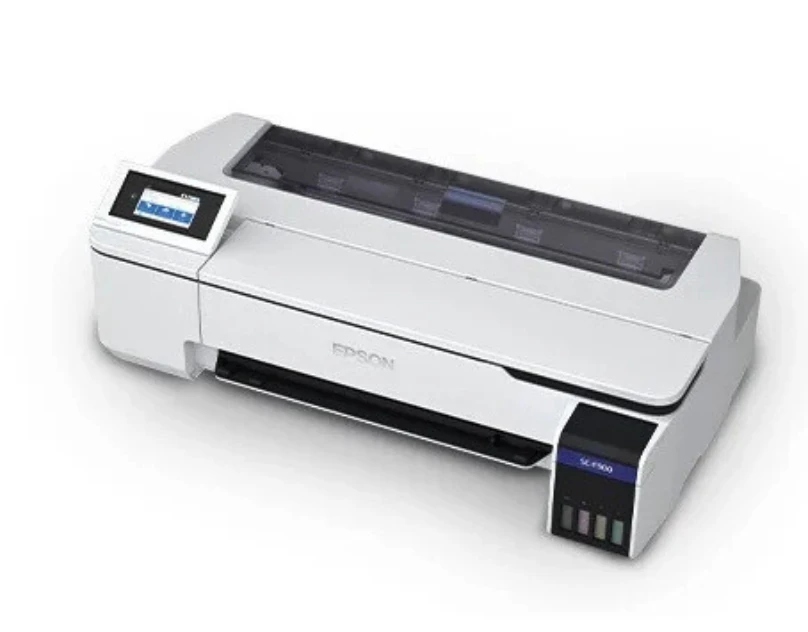
Among the most dependable solutions, Epson sublimation printers are widely recognized for their versatility, accuracy, and ease of use. Using advanced dye-sublimation technology, these printers transfer vivid, detailed designs directly onto fabrics and coated surfaces. Suitable for small businesses and large production facilities alike, Epson sublimation printers combine speed, precision, and intuitive software integration to deliver consistent, professional-grade results. Integrating these printers into workflows allows businesses to efficiently produce custom apparel, promotional merchandise, and personalized items while maintaining high-quality standards that strengthen customer satisfaction and brand reputation.
Key Features of Epson Sublimation Printers
High-Resolution Printing for Exceptional Results
Epson sublimation printers are engineered to produce sharp, high-resolution prints with vibrant and accurate colors. The dye-sublimation process converts ink into gas, which bonds with fabric fibers or coated surfaces, creating durable prints that resist fading, peeling, and smudging.
PrecisionCore technology ensures uniform ink distribution and nozzle accuracy, delivering consistent results across every project. From intricate logos to full-color photographic designs, Epson sublimation printers provide professional-grade output suitable for a wide range of applications.
User-Friendly Operation and Workflow Efficiency
Epson sublimation printers are designed for simplicity and efficiency. Many models feature touchscreen interfaces, automated maintenance routines, and smart media handling to reduce setup time and minimize errors.
Epson Edge Print software allows precise color adjustments, batch printing, and layout customization, streamlining workflow and enhancing productivity. These features make it easy for operators of all skill levels to consistently produce high-quality prints. By combining advanced hardware with intuitive software, Epson sublimation printers help businesses meet deadlines without compromising output quality.
Benefits of Epson Sublimation Printers
Investing in an Epson sublimation printer offers numerous advantages that improve efficiency, quality, and versatility:
- Vibrant, Long-Lasting Prints: Colors remain bright and designs durable even after repeated washing or prolonged exposure to sunlight.
- Versatile Applications: Suitable for fabrics, apparel, mugs, phone cases, and other coated surfaces, enabling businesses to expand their product offerings.
- Consistent Quality: Each print maintains uniform quality, essential for bulk orders, branding, and professional applications.
- Cost Efficiency: Optimized ink usage and minimal maintenance reduce operational costs and increase ROI.
- Scalable Production: Epson sublimation printers can handle small batch runs and large-scale production without compromising quality.
These advantages make Epson sublimation printers a valuable investment for businesses seeking reliable, professional-grade printing solutions.
Best Practices for Optimal Printing
To maximize the performance and longevity of Epson sublimation printers, businesses should follow these best practices:
- Use High-Quality Ink and Sublimation Paper: Premium materials ensure accurate color reproduction and durable results.
- Calibrate Regularly: Maintaining consistent calibration ensures precise color accuracy across multiple prints.
- Prepare Surfaces Properly: Pre-treat fabrics or use recommended coatings to optimize ink absorption and print vibrancy.
- Leverage Software Tools: Epson Edge Print enables batch printing, layout customization, and precise color management for efficient workflows.
- Perform Routine Maintenance: Regular cleaning of printheads and monitoring ink levels prevent downtime and maintain optimal printer performance.
Following these best practices ensures professional-quality output, minimizes errors, and improves workflow efficiency.
Why Epson Sublimation Printers Are Ideal for Businesses
Epson sublimation printers are more than just machines—they are essential tools for enhancing creativity, efficiency, and profitability. Their precision and reliability allow businesses to consistently produce professional-grade products while minimizing errors and waste.
Streamlined workflows enable companies to focus on design, expand product offerings, and scale production effectively. The versatility of Epson sublimation printers makes them suitable for a wide range of applications, from custom apparel to promotional merchandise and personalized gifts, providing a dependable solution for any printing business.
Conclusion
For businesses, creative professionals, and entrepreneurs seeking a reliable, high-quality, and efficient printing solution, Epson sublimation printers deliver outstanding performance. They produce vibrant, durable, and precise prints across fabrics and coated surfaces, making them ideal for apparel, promotional merchandise, and personalized items.
By using high-quality materials, maintaining proper workflow practices, and performing routine maintenance, users can achieve consistent professional results while minimizing errors and downtime. Investing in an Epson sublimation printer enhances productivity, supports creative freedom, and provides a dependable solution for businesses aiming to deliver exceptional products that impress customers and strengthen brand reputation.


























Sign in to leave a comment.