
In the era of technological marvels, the iPhone has undoubtedly carved its place as a ubiquitous companion in our daily lives. Amidst the plethora of features and functionalities, one aspect that demands our attention is battery health. In this comprehensive guest post, we delve into the intricacies of iPhone battery health, exploring its significance, maintenance, and addressing frequently asked questions.
Understanding iPhone Battery Health: The Foundation of Optimal Performance
Your iPhone's battery health is more than just a percentage displayed in the settings. It is the lifeline of your device, dictating how long it can last between charges and how well it performs under various conditions. Battery health refers to the capacity of the battery to hold and deliver charge over time. As a lithium-ion battery, its capacity naturally diminishes with each charging cycle, affecting the overall performance.
The Importance of Monitoring Battery Health:
Extended Lifespan:
Regular monitoring and maintenance of battery health can prolong the overall lifespan of your iPhone, ensuring it serves you well for years to come.
Optimal Performance:
A well-maintained battery contributes to smoother performance, faster load times, and reduced chances of unexpected shutdowns.
Maximized Battery Life:
By being aware of your battery health, you can adopt practices that maximize your device's battery life, reducing the need for frequent charging.
Checking Battery Health:Unveiling the Procedure
Checking your iPhone's battery health is a straightforward process that can be done directly through the device:
Navigate to Settings:
Open the Settings app on your iPhone.
Battery: Scroll down and tap on "Battery."
Battery Health:
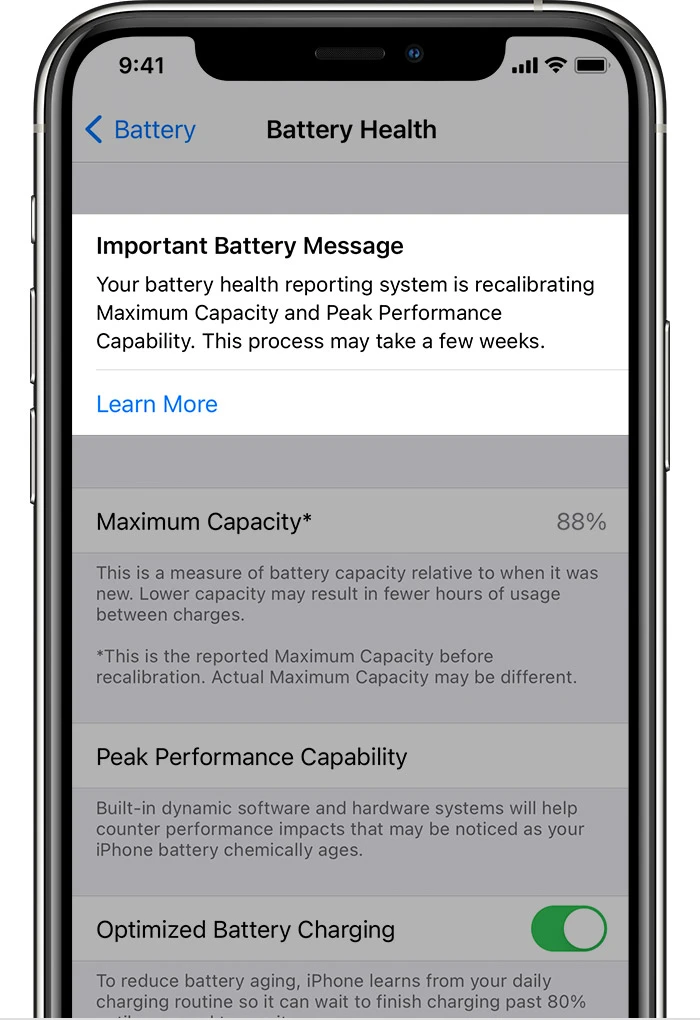
Select "Battery Health," and you'll see the Maximum Capacity percentage and the Peak Performance Capability status.
The "Maximum Capacity" percentage indicates how much charge your battery can hold compared to its original capacity when new. The "Peak Performance Capability" informs you whether your device can dynamically manage performance to prevent unexpected shutdowns.
Maintaining Optimal Battery Health: Best Practices
While it's inevitable that your battery's capacity will degrade over time, you can adopt habits that slow down this process and ensure your battery stays healthy:
Avoid Extreme Temperatures:
High temperatures can accelerate battery degradation. Avoid exposing your iPhone to excessive heat or cold.
Charge Wisely:
Avoid charging your phone to 100% every time. Instead, aim for a charge between 20% and 80% to minimize stress on the battery.
Use Original Chargers:
Using certified and original charging accessories can contribute to the overall health of your battery.
Update Software:
Regularly update your iPhone's software, as updates often include optimizations for battery performance.
Limit Background Processes:
Reduce the number of background processes and apps running to lessen battery drain.
Frequently Asked Questions about iPhone Battery Health:
Q1: Is it normal for my battery health to decrease over time?
A1: Yes, it's normal. As a lithium-ion battery, capacity naturally degrades with each charge cycle. Apple designs its batteries to retain up to 80% of their original capacity after around 500 complete charge cycles.
Q2: Will charging my iPhone overnight damage the battery?
A2: Modern iPhones are designed to prevent overcharging, so leaving it plugged in overnight isn't likely to cause significant damage. However, it's still a good practice to unplug your device once it's fully charged.
Q3: Does using third-party chargers harm battery health?
A3: While third-party chargers can be convenient, using non-certified chargers can potentially harm your battery and device. Opt for Apple-certified or reputable chargers to ensure the health of your battery.
Q4: How often should I check my battery health?
A4: Checking your battery health every few months is a good practice, especially if you notice a decline in performance or battery life.
Q5: Can a battery replacement restore my iPhone's performance?
A5: Yes, replacing the battery can significantly improve your iPhone's performance and battery life, especially if your battery health has dropped significantly.
Conclusion:
In the intricate ecosystem of smartphone usage, battery health holds a pivotal role. By understanding the significance of battery health, knowing how to check it, and implementing simple maintenance practices, you can ensure that your iPhone remains a reliable and efficient companion throughout its life cycle. In a world where our devices are integral to our daily routines, preserving their performance is an investment in convenience and peace of mind




























Sign in to leave a comment.