

An electrical estimator reads the plans for an electrical job and figures out, before anyone picks up a tool, what it will actually take to complete it: how much material, how many hours, and how much it should cost. That number becomes the bid. Get it wrong, and the contractor either loses the job or wins it and loses money. This guide is about what that work really looks like, why it's harder than it sounds, and how the tools estimators use have changed over the years.
Where This Story Starts
I'm Steve Griffin. I founded 1st Choice Electrical Estimating Software, or 1CEES, back around 1989. Most people know us now as Best Bid Electrical Estimating Software, which was never our official company name, just the product people kept calling us by until it stuck.
Our first product was the First Choice Budget Estimator. It was built for people who didn't know much about electrical estimating and needed a way to get a rough, affordable budget without a deep background in the trade. That product eventually got discontinued, but it taught us something important: there were a lot of people who needed estimating help, not just estimating software. That led us to build the 1CEES System for commercial work and the 1CEES Residential Estimator, one of the first pieces of bidding software made specifically for residential electricians. Neither of those products exists anymore. Everything we learned building them went into the Best Bid line we sell today.
I bring this up because it's really the whole answer to "What does an electrical estimator do?" The job itself hasn't changed since 1989. What's changed is how much of the repetitive work can now be handled by software, so the estimator's time goes toward thinking instead of retyping numbers.
What Does an Electrical Estimator Actually Do?
On a typical job, an estimator works through the plans, counts and measures everything that needs pricing, applies material and labor costs, adjusts for how hard the job will actually be to run, then puts together a proposal. Using Best Bid, a detailed, scaled estimate on a $100,000 to $200,000 job usually takes about 4 to 5 hours once specs are reviewed and quotes are in. A smaller job might take 1 to 2 hours.
Broken down, the work looks like this:
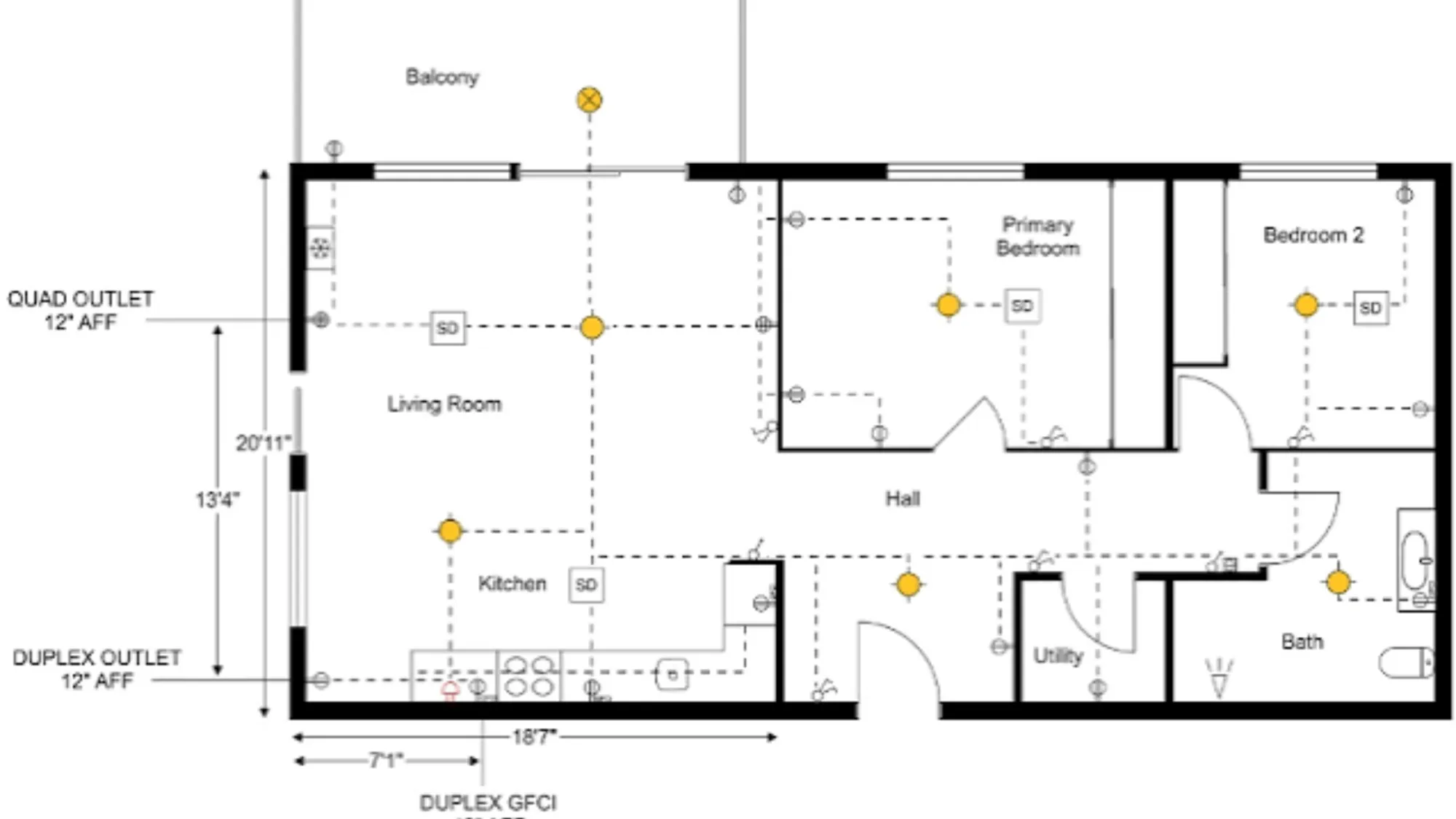
- Reading the drawings. Understanding scope from full-size plans or reduced sheets.
- Counting and measuring. Every receptacle, fixture, switch, panel, and length of conduit or wire.
- Pricing. Applying material cost and labor hours to what's been counted.
- Adjusting for difficulty. A cramped mechanical room takes longer to wire than an open warehouse ceiling, and the estimate needs to reflect that.
- Building the proposal. Turning the finished number into something the customer can actually read and sign off on.
What most beginners don't expect is how much of the job is catching mistakes before they happen. Miss a panel, forget a run of conduit, misread a spec, and that error rides all the way through to the job site.
Manual Estimating vs. Software: What's the Real Difference?
For a long time, this job meant printing full-size plans, highlighting every symbol by hand, adding it all up, and typing the totals into a spreadsheet. At every step there is a place a number can get lost, transposed, or missed altogether. That's the reason we built Best Bid the way we did: enter the numbers once, and let the software carry them through instead of asking the estimator to retype them at every stage.
| Task | Manual / Spreadsheet Estimating | Software-Based Estimating |
| Counting devices on a plan | Highlighted by hand on a printed sheet | Counted on-screen from an uploaded PDF |
| Measuring conduit and wire | Measured with a scale ruler | Measured on-screen after setting the scale between two points |
| Moving counts into the estimate | Retyped from the takeoff sheet | Pulled directly from the takeoff |
| Updating material pricing | Cross-checked against supplier sheets | Updated in-house or through a pricing subscription |
| Adjusting labor for difficulty | Recalculated by hand for each phase | Adjusted with a slider on each assembly |
| Building the proposal | Assembled in a word processor | Generated straight from the estimate |
None of this means the manual method is obsolete. Plenty of good estimators still work that way on smaller jobs, and there's nothing wrong with it. But every extra hand-off is a chance for something to go sideways, and that's the actual problem software was built to solve.
How Does a Bid Actually Come Together?
This is where the job gets technical. Most beginners underestimate how many steps sit between "here are the plans" and "here's your price."
Import the drawings. The plan set gets uploaded directly; no printing required.
Set the scale. Pick two known reference points on the drawing, enter the correct measurement, and the software scales the whole sheet from there.
Count and measure. Walk through the drawing on-screen, counting fixtures and devices, measuring conduit and wire runs as you go.
Apply assemblies. An assembly is a preset group of related items. Enter 10 receptacles, and the boxes, plates, and supporting material tied to that setup populate automatically. Nothing's locked in, though. Swap ½" EMT for ¾" EMT, or copper for aluminum, with one click if the specs call for it.
Price it out. Material and labor costs are already in the database, and the estimator adjusts either one to match current supplier pricing or the company's own labor rates.
Review the totals. Before anything goes out, check the worksheet for material, labor, and man-hour totals, then the summary page, where profit, overhead, and bonds get added.
Send the proposal. The final document goes to the customer with control over exactly what they see, including scope, exceptions, and terms.
Knowing these steps well enough to trust them, not just click through them, is what separates an estimator who catches a problem early from one who finds out about it after the bid is already in.
What Skills Does a Good Estimator Actually Need?
Software helps, but it doesn't do the thinking for you. A solid electrical estimator needs:
- Real knowledge of electrical work. You have to understand what a raceway run takes in the field to price it right.
- An eye for detail. One missed panel schedule can swing a bid by thousands of dollars.
- Comfort with specifications, not just drawings, since specs often set minimum raceway sizes or labor requirements the drawings don't mention.
- Basic pricing logic, including how burden, overhead, and profit stack on top of raw cost.
- Patience. Most new estimators try to run a live bid before they've had time to learn the tool, and that's usually where the frustration comes from.
This is why the Best Bid Online School for Electrical Estimating doesn't just teach button clicks. It starts with manual estimating, including how man-hours work and how to adjust them for difficulty, so a student understands what the software is doing before they start trusting it blindly.
What Should a Beginner Learn First?
Start with a sample project, not a live one. Learn how to open the software, create an estimate, import a PDF, set the scale, and begin counting. Get comfortable with those steps before moving into bigger territory like custom assemblies or multi-phase jobs. Once that foundation is solid, the rest of the workflow tends to click into place a lot faster.
Handling Bigger, More Complex Projects
Most beginners start with residential or small commercial work, but electrical estimators also take on industrial jobs, large commercial builds, and design-build projects. The process stays the same, count, measure, price, propose, but organization becomes a bigger deal as the job grows. On a large project, estimators break the bid into phases using name, phase, and location fields, so a bid for a hotel might separate "King Suite, First Floor" from "King Suite, Second Floor" for cleaner tracking later. If you're scaling up, our page on electrical estimating software for large contractors goes into more of what that looks like.
What Other Tools Does an Estimator Lean On?
Estimating software handles the counting and pricing, but it's not the only tool in an estimator's kit. Drawings aren't always clean. Sometimes a set of plans is outdated, poorly scanned, or missing details an estimator needs to price the job correctly. That's where a tool like AccuraCADD PDF Draw comes in. It lets an estimator create or modify PDF drawings directly, whether that's cleaning up a messy as-built drawing or building one from scratch when nothing usable exists.
Panel scheduling is another piece that gets overlooked until it doesn't. A clean, professional panel schedule matters both for the bid and for the crew that eventually installs the gear, and having a simple way to generate one saves a step most estimators used to do by hand.
Not every contractor has an estimator on staff, and that's fine too. We also offer freelance estimating and drafting, taking on the actual estimate or the drawings for another company when there isn't time or staff to handle it in-house. It's the same process described above, just done on someone else's behalf.
The Takeaway
At the end of the day, an electrical estimator's job is to turn a stack of drawings into a number a contractor can stand behind. Everything else, the software, the assemblies, and the pricing tools, exists to protect the accuracy of that number.
Key Takeaways
- An electrical estimator counts, measures, prices, and proposes electrical work before a bid ever goes to a customer.
- The steps are the same whether you're working by hand or in software; software just removes the hand-offs where mistakes tend to happen.
- A cramped mechanical room and an open warehouse ceiling don't take the same amount of labor, and a good estimate reflects that.
- Practicing on a sample project first, rather than learning the software in the middle of a live bid, saves a lot of frustration.
- Organization matters more as jobs get bigger. Phasing a large estimate keeps everything trackable once the job is won.
Frequently Asked Questions
- What's the difference between an electrical estimator and an electrical contractor? The estimator prepares the pricing and proposal. The contractor is the business performing the work. In smaller companies, one person often wears both hats.
- Do electrical estimators need to be licensed electricians?
Not necessarily, but field experience makes the job a lot easier. Understanding how a raceway actually gets installed helps you price it more accurately than working from drawings alone. - How long does it take to learn electrical estimating?
It varies by person, but most people pick up the core workflow fairly quickly once they know what they want the software to do for them. Small steps beat trying to absorb everything at once. - Can the same software handle both residential and commercial jobs?
Yes. Best Bid is built to cover everything from a residential service call to a large industrial project, so there's no need for separate tools depending on job type. - Where can I learn more about becoming an electrical estimator?
Our FAQ page covers common questions, the blog has practical how-to posts, and you're welcome to schedule a free consultation if you'd rather just talk it through.
About the Author
Steve Griffin founded 1st Choice Electrical Estimating Software (1CEES) and built it into what's known today as Best Bid Electrical Estimating Software. He's worked in electrical estimating since 1989 and built both the Best Bid software line and the Online School for Electrical Estimating to help contractors move away from manual estimating without losing their grip on where the numbers actually come from. Find Steve and Best Bid on LinkedIn, Facebook, or YouTube. Questions can go to [email protected] or through our contact page.





















Sign in to leave a comment.