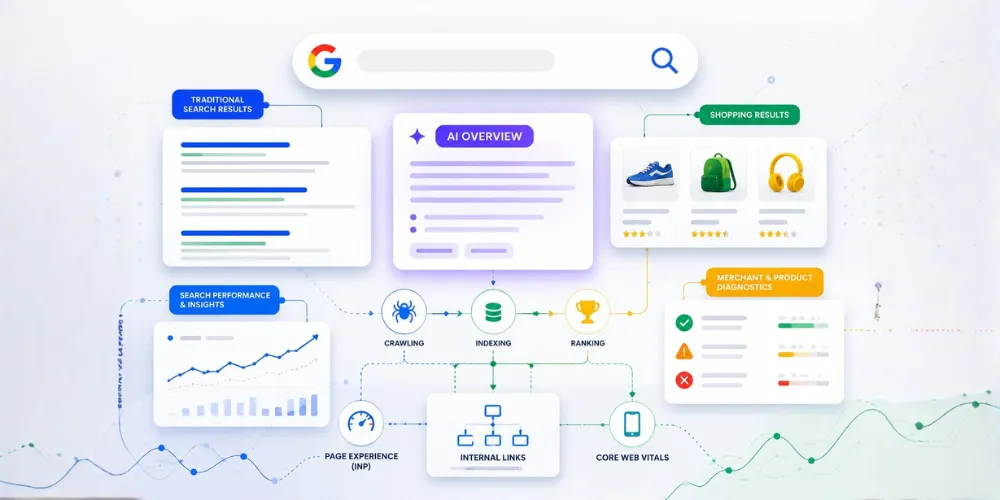

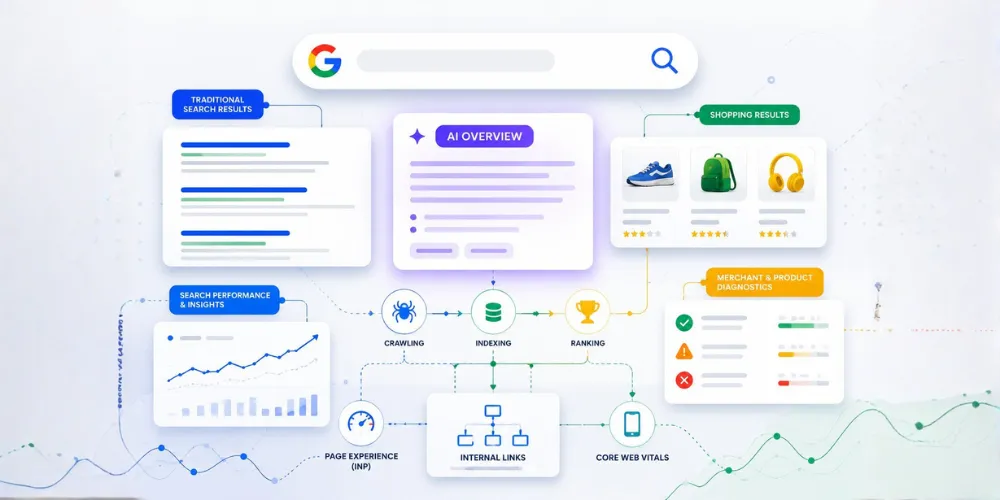
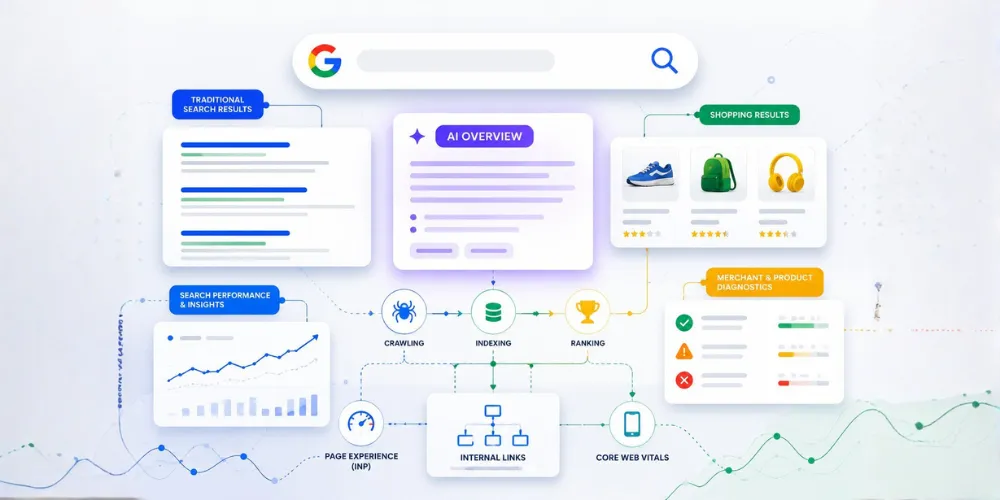
Google Search Console is one of the most valuable free SEO tools available today, yet many website owners only use a small part of what it offers.
Most people open Search Console to check clicks, impressions, and keyword positions. While these metrics are useful, they only represent a fraction of what the platform can actually do.
Behind these basic reports are powerful features that help identify indexing problems, improve website visibility, understand search behavior, and make better SEO decisions.
Whether you are managing a business website, blog, eCommerce store, or client projects, understanding these features can help you improve organic performance without depending entirely on paid SEO tools.
What Makes Google Search Console Important?
Google Search Console provides direct insights into how Google discovers, crawls, indexes, and displays your website in search results.
Unlike third-party SEO tools that estimate data, Search Console provides information directly from Google's search ecosystem.
It helps website owners understand:
- How often their pages appear in search results
- Which queries bring visitors to their website
- Which pages are indexed successfully
- Whether technical issues are affecting visibility
- How users interact with search results
The platform is designed to help website owners measure search performance, fix issues, and improve their presence on Google Search.
However, many useful features remain unnoticed because users mainly focus on the Performance report.
1. URL Inspection Tool: Understand How Google Sees Your Pages
One of the most useful but underused features in Search Console is the URL Inspection Tool.
When a page is not ranking or getting indexed, many marketers immediately assume they need more backlinks or better content.
But the actual problem could be technical.
The URL Inspection Tool helps you check:
- Whether a page is indexed
- When Google last crawled it
- Whether crawling is allowed
- The selected canonical URL
- Any indexing issues affecting the page
It is especially useful when publishing new content or updating important pages because you can verify how Google understands the URL and request indexing when required.
2. Performance Report: Go Beyond Clicks and Impressions
The Performance report is usually the first place people visit, but many don't explore its deeper insights.
Instead of only checking total clicks, analyze:
Search Queries
Your actual search queries reveal what users are looking for.
Sometimes your website receives impressions for keywords that were never part of your original strategy.
These unexpected queries can become opportunities for:
- New content ideas
- Existing page optimization
- Better keyword targeting
Click-Through Rate
A page ranking well but receiving fewer clicks may have:
- A weak title tag
- An unclear meta description
- Search intent mismatch
Improving CTR can increase traffic without changing rankings.
Page Performance
Comparing different landing pages helps identify:
- High-performing content
- Pages requiring optimization
- Content gaps
3. Page Indexing Report: Find Hidden SEO Problems
A website can have great content, but if Google cannot properly index it, visibility will suffer.
The Page Indexing report helps identify issues such as:
- Pages not indexed
- Crawled but currently not indexed pages
- Duplicate pages
- Pages blocked by robots.txt
- Pages with indexing restrictions
Regularly reviewing indexing reports allows SEO professionals to identify patterns and fix problems before they impact organic traffic. Search Console provides dedicated reports to help diagnose indexing and crawling issues across websites.
4. Core Web Vitals: Measure User Experience
SEO is not only about keywords and rankings.
Website experience also plays an important role.
The Core Web Vitals report helps monitor important user experience signals:
- Largest Contentful Paint (LCP)
- Interaction to Next Paint (INP)
- Cumulative Layout Shift (CLS)
These metrics highlight issues related to:
- Slow loading pages
- Poor responsiveness
- Unexpected layout changes
Improving these areas can create a smoother experience for visitors while supporting better website performance.
5. Links Report: Understand Your Website Authority
Internal linking and backlinks both influence how search engines understand website structure.
The Links report provides insights into:
- External websites linking to your pages
- Most linked pages
- Internal linking patterns
- Common anchor text
This information helps identify opportunities to:
- Strengthen internal navigation
- Improve important pages
- Understand which content attracts backlinks
6. Sitemap Monitoring
XML sitemaps help search engines discover important website pages.
However, simply submitting a sitemap is not enough.
The Sitemap report helps monitor:
- Submitted URLs
- Processing status
- Sitemap errors
- Discovery issues
A healthy sitemap ensures Google can efficiently discover your website content.
7. Search Appearance and Enhancement Reports
Google Search Console also provides reports related to enhanced search results.
Depending on your website type, these may include:
- Structured data issues
- Rich results
- Product information
- Breadcrumb markup
Monitoring these reports helps ensure your website is eligible for improved search appearances.
Common Mistakes Website Owners Make With Search Console
Even though Search Console provides valuable insights, many users make the same mistakes:
Checking Data Too Infrequently
SEO problems can develop slowly. Weekly monitoring helps identify issues earlier.
Focusing Only on Rankings
Rankings are important, but clicks, conversions, and user behavior provide a bigger picture.
Ignoring Indexing Reports
Many visibility problems begin with indexing issues.
Not Comparing Performance Trends
A single data point rarely tells the full story. Comparing time periods reveals meaningful patterns.
How to Use Google Search Console More Effectively
A simple workflow can make Search Console much more valuable:
- Review performance changes regularly.
- Check indexing reports for unexpected issues.
- Analyze pages with high impressions but low CTR.
- Monitor Core Web Vitals.
- Review internal and external linking opportunities.
- Connect insights with analytics and conversion data.
The goal is not to collect more data.
The goal is to make better SEO decisions.
Final Thoughts
Google Search Console is much more than a keyword tracking tool.
It is a complete SEO monitoring platform that provides valuable information about how Google understands your website.
By exploring features like URL Inspection, indexing reports, performance analysis, and Core Web Vitals, website owners can identify opportunities, solve technical issues, and improve organic visibility.
The best SEO strategies are built on accurate data. Google Search Console provides that data directly from the source.
If you want to explore these features in more detail with practical examples and a complete walkthrough, check out the original guide: Google Search Console Advanced Features Most SEOs Ignore



























Sign in to leave a comment.