Modern businesses often struggle with disconnected sales and accounting systems. When customer data, invoices, and payments live in separate platforms, teams waste time on manual updates and risk costly errors. Integrating Zoho CRM and Zoho Books creates a seamless bridge between sales and finance, ensuring real-time data flow, improved accuracy, and faster operations across departments.
Why Integrate Zoho CRM with Zoho Books?
Eliminate Data Silos
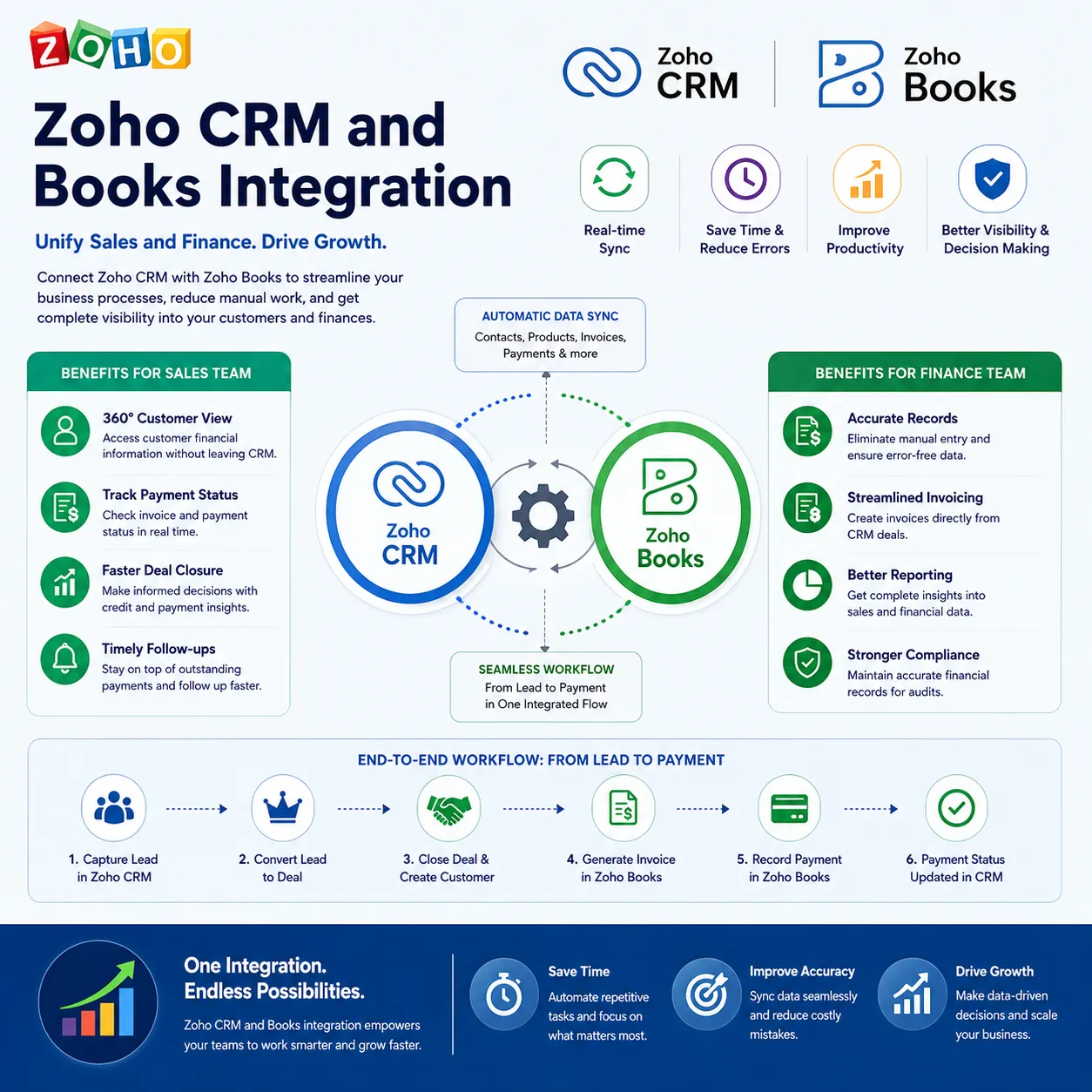
Sales teams manage leads, contacts, and deals in Zoho CRM, while finance teams handle invoices and payments in Zoho Books. Integration removes the gap between these systems, creating a unified business workflow.
Improve Operational Efficiency
Automatic syncing of customer and transaction data reduces repetitive tasks, saving time for both sales and accounting teams.
Enhance Customer Experience
With complete visibility into payment status and transaction history, teams can respond faster to customer queries and build stronger relationships.
Key Features of Zoho CRM and Books Integration
Real-Time Data Synchronization
Contacts, company details, products, pricing, and invoices sync automatically between both platforms. Any update in one system reflects instantly in the other.
Instant Invoice Creation from CRM
Once a deal is closed in Zoho CRM, users can generate invoices directly in Zoho Books without re-entering data. This speeds up the billing cycle and improves cash flow.
Payment Status Visibility in CRM
Sales representatives can check whether invoices are paid, pending, or overdue directly from the CRM dashboard, enabling timely follow-ups.
Unified Product and Pricing Information
Products created in Zoho Books can be accessed in Zoho CRM, ensuring consistent pricing and avoiding discrepancies in quotes and invoices.
Benefits for Sales Teams
Faster Deal Closure
With access to financial insights such as outstanding payments and credit limits, sales teams can make informed decisions during negotiations.
Reduced Administrative Work
Automation eliminates manual data entry, allowing sales reps to focus more on selling rather than paperwork.
Better Follow-Ups
Knowing the exact payment status helps sales teams follow up with customers at the right time, improving collection rates.
Benefits for Finance Teams
Accurate Financial Records
Since customer data flows directly from CRM, accounting teams avoid errors caused by manual entries.
Streamlined Invoicing and Payments
Invoices generated from CRM deals ensure alignment between what was sold and what is billed.
Clear Customer Transaction History
Finance teams gain full visibility into customer interactions, helping in audits and financial planning.
How the Integration Improves Business Workflow
From Lead to Payment in One Flow
- Lead captured in Zoho CRM
- Deal closed and customer finalized
- Invoice generated in Zoho Books
- Payment tracked and updated in CRM
This end-to-end visibility ensures no step is missed in the sales-to-payment cycle.
Better Decision-Making with Shared Data
Managers can analyze both sales performance and revenue data together, leading to smarter business strategies.
Use Cases Across Industries
Service-Based Businesses
Consultants and agencies can convert project deals into invoices instantly, ensuring timely billing.
Product-Based Companies
Businesses selling products benefit from synced inventory, pricing, and invoicing data.
Startups and SMEs
Small teams can manage both customer relationships and accounting without investing in multiple disconnected systems.
Setting Up the Integration
Simple Configuration
Zoho provides built-in integration settings where users can connect both applications with minimal technical effort.
Custom Field Mapping
Businesses can map custom fields to ensure specific data points sync correctly between CRM and Books.
Automated Workflows
Users can create workflows that trigger invoice creation or notifications based on deal stages.
Why This Integration Matters for Growth
As businesses scale, manual coordination between sales and accounting becomes a bottleneck. Zoho CRM and Books integration removes this friction, creating a system where teams collaborate efficiently using shared, real-time data. This not only improves internal productivity but also enhances customer satisfaction through faster, error-free processes.
Conclusion
Integrating Zoho CRM and Zoho Books transforms the way businesses manage sales and finance operations. By connecting customer management with accounting in a single ecosystem, organizations achieve better accuracy, faster billing, and improved collaboration. This integration is a powerful step toward building a streamlined, automated, and growth-ready business environment.



























Sign in to leave a comment.