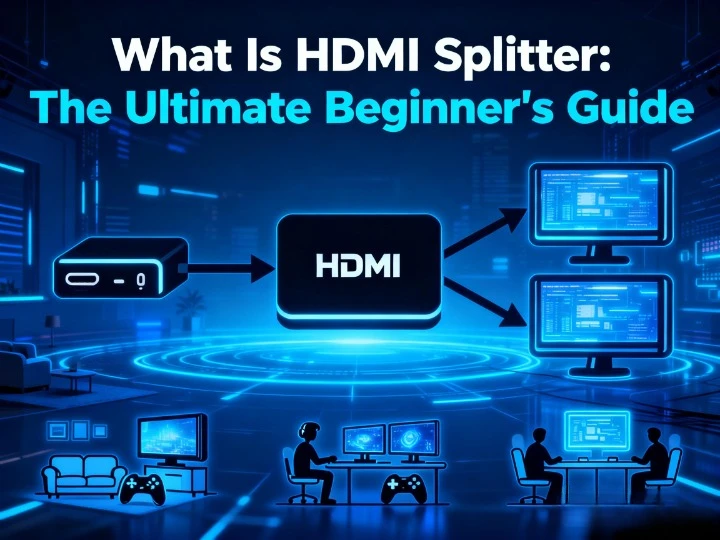

Have you ever wanted to watch the same movie from your Apple TV on both your living room TV and your bedroom TV at the same time? Or perhaps you need to display a presentation on multiple monitors in a conference room. If so, you’ve come to the right place. This guide will explain everything a beginner needs to know about HDMI splitters, helping you choose and use the perfect one for your needs.
What Is an HDMI Splitter?
An HDMI splitter is a simple but powerful device. It takes the audio and video signal from one source—like a gaming console, Blu-ray player, or laptop—and duplicates it to send to multiple displays simultaneously. Think of it as a photocopier for your video signal. It solves one core problem: how to get one signal onto several screens without degrading quality.
How Does an HDMI Splitter Work?
The process is straightforward. You connect your single source device (input) to the splitter. Then, you connect multiple displays (outputs) to the splitter’s other ports. The splitter receives the digital signal, actively amplifies it to prevent weakening, and sends an identical copy to each connected screen. A key thing to remember is that it mirrors the same content everywhere; it cannot show different content on each display.
HDMI Splitter vs HDMI Switch: What’s the Difference?
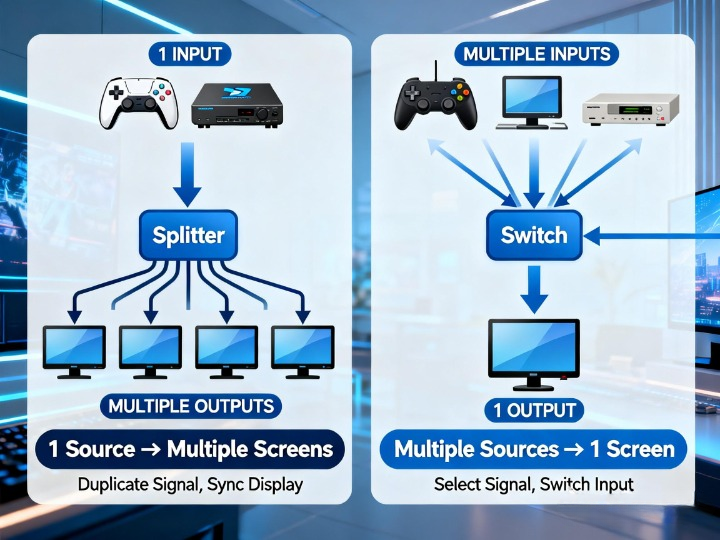
As shown in the comparison diagram, the data flow directions of the two are completely opposite. Just remember this simple rule: need to send one thing to many places? Get a HDMI splitter. Need to send many things to one place? Get a HDMI switch.
5 Common Use Cases for HDMI Splitters
HDMI splitters are incredibly versatile:
- Home Entertainment: Mirror your streaming stick, gaming console, or satellite box to TVs in different rooms.
- Conference Rooms: Display a laptop presentation on multiple wall-mounted TVs or projectors so everyone has a clear view.
- Digital Signage: Run the same promotional video or menu on several screens in a retail store or restaurant.
- Education & Training: Share an instructor’s screen with multiple monitors in a classroom or lab.
How to Choose An HDMI Splitter: Key Features to Look For
Don’t just buy the first splitter you see. Check these essential specs:
- Number of Outputs: Choose based on how many displays you have (e.g., 1×2 for two TVs, 1×4 for four monitors).
- Supported Resolution & Refresh Rate: This is critical. For modern 4K HDR content and gaming (PS5, Xbox Series X), ensure it supports 4K@60Hz or even 4K@120Hz. For basic Full HD (1080p) content, a 1080p@60Hz splitter will suffice.
- HDCP Compatibility: HDCP (High-bandwidth Digital Content Protection) is a copyright standard. Your splitter must support the same HDCP version as your source (currently HDCP 2.2 or 2.3 for 4K content) to play Netflix, Disney+, Blu-rays, etc. Without it, you’ll get a blank screen.
- Audio Format Support: If you have a surround sound system, check for support for formats like Dolby Atmos or DTS:X.
- Cable Distance & Power: For setups with long cables (over 15 feet) or multiple outputs, a splitter with an external power adapter is necessary to boost the signal and ensure stable performance.
How to Use An HDMI Splitter: Step-by-Step Setup Guide
- Power Down: Turn off all devices (source and displays).
- Connect: Plug your source (e.g., game console) into the splitter’s INPUT port. Connect HDMI cables from the splitter’s OUTPUT ports to each display.
- Power Up: If your splitter has a power adapter, plug it in. Turn on all displays first, then power on the splitter, and finally turn on your source device. This sequence helps avoid “handshake” issues.
- Configure (if needed): You may need to manually set your source device to a resolution that all your displays support (e.g., set a 4K console to 1080p if one TV is older).
HDMI Splitter Recommendations
Here are a few solid options for different needs:
For a Reliable 4-Way 4K Split: The SP-0104-H2 is a great choice. It splits one 4K/HDR or 1080p source to four displays, supports 4K@60Hz HDR video, and is fully compatible with HDCP 2.2 and multichannel audio. Perfect for home theaters or small business displays.
For High-End Home Theater & Gaming: The EXP-SP-0104-H2 offers premium performance. It supports advanced 4K@60Hz formats (4:4:4 chroma) for crisp text and graphics, along with HDR and the latest immersive audio like Dolby Atmos. Ideal for the best possible movie and gaming experience across multiple screens.
For a Simple Two-Screen Setup: The EXP-SP-0102-H2 has all the high-end features of the model above but for two outputs. It’s the perfect solution for connecting one game console to both a TV and a monitor, or for a dual-screen presentation setup.
Conclusion
An HDMI splitter is a simple, cost-effective solution for broadcasting one video source to many screens. By understanding your needs—how many displays, what resolution you require, and ensuring HDCP compatibility—you can choose the right model with confidence. Remember to follow the setup guide carefully to avoid common issues. Whether for movies, games, or work, the right splitter will seamlessly expand your viewing experience.
About WyreStorm
WyreStorm delivers professional-grade AV over IP solutions, HDMI matrix systems, and advanced wireless presentation and conferencing systems for seamless collaboration.
Its portfolio also includes high‑performance HDMI Extender and KVM Extender products designed for reliable, scalable signal distribution.
Explore more innovative solutions at WyreStorm.com and elevate your next project today.

























Sign in to leave a comment.