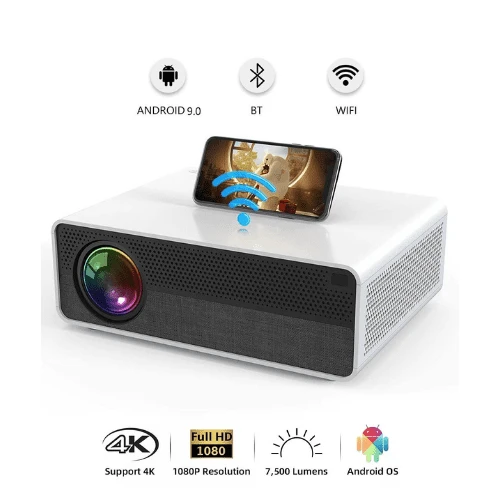

Do you want to know which thing to consider when buying a projector if you are confused don't worry we provide here the best business projector buying guide.
There are lots of different things to consider because many brands are available in the market if you are confused about which projector brand is best for my business Here you can check my guide's Best Projector for Office.
What's a projector?
A projector is an electronic device that projects images onto a screen or other surface. Projectors can be used for business presentations, home entertainment, and education. They come in different shapes and sizes depending on the size of your room (and budget).
How to buy the right projector for you:
When buying a projector, you should take into account several factors.
What size screen do you want?How much ambient light will be present when using the projector?Will the projected image be used in a room with dim lighting or bright daylight? If so, what kind of ambient light is available (natural sunlight vs. artificial office lights)? Is there enough space between the projector and its intended screen for proper projection distance?1. Resolution:
The resolution is the number of pixels a projector can display. It’s measured in horizontal pixels and vertical pixels, while the two are multiplied together to give you the full pixel count.
For example: 1080p has a resolution of 1920 x 1080, which translates to 1,920 x 1,080 total horizontal and vertical pixels.
The higher your resolution is, the sharper your image will appear on the screen (though this isn’t always true—more on that later).
Resolution is often referred to as “pixel count” because it refers to how many individual points of light make up each image displayed by a projector.
A resolution of 1080p means there are over 2 million such points making up each frame—and these points create every texture or detail in your picture.
The higher this number gets (4K Ultra HD has 4 times as many), the better quality everything becomes—though there comes a point where more isn’t necessarily better anymore!
2. Contrast ratio:
The higher the contrast ratio, the greater the difference between black and white.
The contrast ratio is the difference between the brightest color and the darkest color that can be displayed by a projector. The higher the contrast ratio, the better.
A good contrast ratio is measured in thousands of shades of color so instead of 3,000:1, it might be stated as 30,000:1.
It’s important to note that this doesn’t mean that you can display 30,000 shades of gray—instead, it shows how many different combinations of brightness there are for black and white images.
That may seem like a lot but remember: when you watch movies or play video games with high-contrast ratios, your eyes adjust to see greater details in shadows and highlights than if they were viewed under lower-contrast lighting conditions (such as fluorescent lighting).
3. Lumens:
In a projector, brightness is measured in lumens. The higher the lumens, the brighter it will be.
Lumens are measured using watts of light output by an individual bulb (the same way watts are measured for light bulbs). That being said, you can think of lumens as how much total power this bulb (or projector) has under its hood.
Lumens are critical when deciding which projector to buy because you’re going to want one that will work well in low-light environments and still provide enough brightness for viewing purposes.
4. Color accuracy and gamut:
We’ve talked a lot about resolution and brightness here, but there’s another factor that can affect the quality of your projected image: color accuracy.
You might have noticed that some projectors have a wider gamut than others, which means they can display more colors.
The gamut is defined as the range of colors that can be displayed by a certain device in the presence of additional factors like ambient light or viewing angle.
It is based on the color space, which is essentially how many shades of red, green, and blue (RGB) there are available for each pixel on your screen.
The wider this range is for each pixel, the better you can simulate real-world objects like skin tone or leaves in autumnal forests—and if you're using business presentations to woo clients or sell products at trade shows then this matters!
5. Throw ratio:
A projector's throw ratio describes how far away from the screen it needs to be to display a certain image size.
The throw ratio is the distance from the projector to the screen. It's expressed as a fraction and tells you whether or not you'll be able to see an image at that distance.
For example, if your throw ratio is 1:1 (1:1), that means that if you place your projector 8 feet away from your screen, then it will produce an image of 8 feet in size.
If you project 12 feet away from a 100-inch screen, then it will produce an image 24 feet wide by 100 inches tall (24 x 100 = 2400).
The throw ratio of a projector can vary depending on how far away from the wall (or other surfaces) they are placed while projecting onto it—so keep this in mind when considering what size screen would work best for its placement needs!
6. Connectivity and control options:
Look for projectors that have both HDMI and VGA ports, so you can accommodate new computers and old laptops alike.
If you're connecting your projector to a computer or laptop, it's best to look for projectors that have both HDMI and VGA ports.
HDMI is the go-to method of connecting a computer, many laptops still don't have an HDMI port.
Instead, they may only have VGA. This means that if you want to connect a new laptop while keeping compatibility with older ones, then it's good to get a projector that has both options.
7. Speakers:
Make sure your projector has built-in speakers or is easy to connect to an external speaker system if you plan to use it for either business presentations or home entertainment.
Make sure your projector has built-in speakers or is easy to connect to an external speaker system if you plan to use it for either business presentations or home entertainment.Built-in speakers are a nice feature, but they’re not as powerful as external ones. If you want better sound quality, you can opt for a projector that has an audio output port so that you can connect an external speaker system like a home theater setup or computer speakers and blast out the tunes at full volume.These options are typically more expensive and bulky than their built-in counterparts though, so if space is limited this may not be possible depending on what type of living situation you have;However, they do provide much more flexibility in terms of placement within the room and portability when traveling with them outside of one's home environment - meaning they're great options if being able to take advantage of such features matters greatly!8. Portability and setup ease of use:
Some projectors are easier to move than others, based on their size, weight, and connectivity options,
while all projectors differ in terms of just how easy or difficult they are to connect to a laptop or desktop computer, or other source device and start using immediately without fussing with cables or settings.
The portability and setup ease of use of a projector can be important factors in your buying decision because the portability factor will determine how easy it is to move the projector around and set up, while setup ease of use refers to just how “plug-and-play” any given model is when connecting it to an external source device.
Conclusion:
So, you see, there are indeed many things to consider before you choose a projector. You need to evaluate your needs and budget to find the right one that fits your needs. We hope this guide has been helpful in making your decision easier!
Are you in the market for a new projector? They're not just for film screenings and boardroom presentations anymore, so choosing the right one can be confusing.


















Sign in to leave a comment.