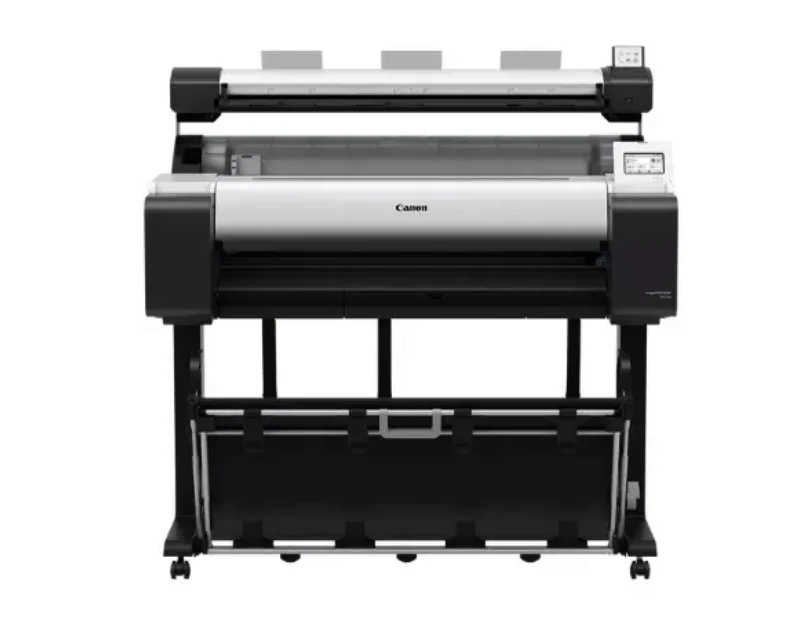
Large-format printing has become an essential requirement for many professional environments where accuracy, clarity, and efficiency are critical. Offices involved in architecture, engineering, construction, education, and marketing depend on wide-format documents to communicate ideas, technical information, and visual concepts. A dependable multifunction printer helps reduce manual workload, improves turnaround time, and ensures that large documents are produced consistently without quality loss. Choosing the right printer supports daily operations and helps teams meet demanding project timelines.
The Canon imagePROGRAF TM-350 MFP Lm36 is designed to address these practical needs by combining printing, scanning, and copying into a single wide-format solution. Built for everyday professional use, the Canon imagePROGRAF TM-350 MFP Lm36 focuses on reliability, consistent output quality, and user-friendly operation, making it suitable for offices that handle large-format documents regularly.
Large-Format Printing Capabilities
Clear and Accurate Output
The Canon imagePROGRAF TM-350 MFP Lm36 produces sharp and accurate prints suitable for technical drawings, diagrams, posters, and presentation materials. Line accuracy and consistent color reproduction are especially important for CAD drawings and construction plans, where even small details matter. The printer ensures that text remains readable and lines stay clean across different media types, supporting professional-quality results for daily printing needs.
Support for Wide Media Sizes
Supporting media widths up to 36 inches, the Canon imagePROGRAF TM-350 MFP Lm36 allows offices to print a wide range of document sizes without resizing or splitting files. This flexibility helps teams produce architectural layouts, engineering drawings, educational charts, and marketing visuals efficiently. The printer supports both roll media and cut sheets, allowing users to switch between different document types as needed.
Integrated Scanning and Copying
Large-Format Scanning Efficiency
Scanning large-format documents is often a challenge in offices without dedicated equipment. The Canon imagePROGRAF TM-350 MFP Lm36 includes integrated scanning that allows users to digitize drawings, maps, and posters accurately. High-resolution scanning preserves detail, making it easier to archive documents, share files digitally, or revise designs without quality loss.
Convenient Copy Functions
Copying large-format documents is simple with the Canon imagePROGRAF TM-350 MFP Lm36. Users can reproduce technical drawings and visual materials directly without transferring files between devices. This integrated functionality reduces handling time and helps maintain consistent document quality, especially in offices where large-format copying is part of daily operations.
Connectivity and Ease of Use
Multiple Connection Options
The Canon imagePROGRAF TM-350 MFP Lm36 offers USB, Ethernet, and wireless connectivity, allowing easy integration into existing office networks. Team members can send print jobs from desktops, laptops, or mobile devices, improving collaboration and reducing delays. Wireless support also enables flexible placement within the office environment.
User-Friendly Operation
Designed with ease of use in mind, the Canon imagePROGRAF TM-350 MFP Lm36 features intuitive controls that simplify everyday tasks. Clear menus and straightforward maintenance procedures allow staff to operate the printer without extensive training. This user-friendly approach reduces downtime and ensures smooth daily operation in busy professional settings.
Performance and Reliability
Consistent Daily Output
For offices that rely on continuous large-format printing, consistency is essential. The Canon imagePROGRAF TM-350 MFP Lm36 delivers dependable performance throughout the workday, helping teams maintain productivity. Stable operation reduces the risk of print errors, ensuring that documents are produced correctly on the first attempt.
Designed for Professional Workloads
The Canon imagePROGRAF TM-350 MFP Lm36 is built to handle regular workloads common in professional environments. Durable components support frequent use, while energy-efficient operation helps manage running costs. Automatic alerts and maintenance features help prevent interruptions, allowing offices to focus on project completion rather than equipment issues.
Use Cases Across Industries
Architecture and Construction
Architects and construction professionals rely on accurate drawings and plans. The Canon imagePROGRAF TM-350 MFP Lm36 supports clear blueprint printing, scanning of marked-up plans, and quick copying for on-site coordination, improving communication across project teams.
Engineering and Technical Offices
Engineering offices benefit from the printer’s ability to reproduce detailed schematics and diagrams. The Canon imagePROGRAF TM-350 MFP Lm36 ensures that fine lines and measurements remain clear, supporting accurate documentation and review processes.
Education and Corporate Environments
Educational institutions and corporate offices use large-format printers for presentations, research posters, training materials, and internal communication. The Canon imagePROGRAF TM-350 MFP Lm36 enables these organizations to produce professional documents in-house, saving time and improving consistency.
Conclusion
The Canon imagePROGRAF TM-350 MFP Lm36 is a practical multifunction large-format printer designed for everyday professional use. With reliable printing, accurate scanning, flexible media handling, and easy connectivity, it supports a wide range of office applications. The Canon imagePROGRAF TM-350 MFP Lm36 helps organizations improve workflow efficiency, maintain document quality, and manage large-format printing tasks with confidence.



























Sign in to leave a comment.