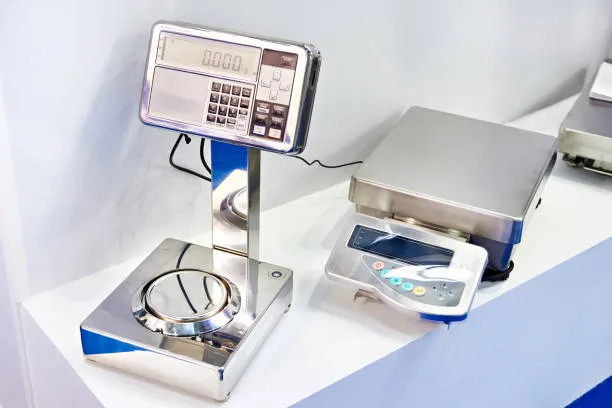

Digital scales are widely used across retail, warehouses, manufacturing, laboratories, healthcare, food processing, and other industries because they provide fast and accurate weight measurements. However, like any electronic equipment, digital weighing scales can sometimes display incorrect readings, fail to turn on, or behave inconsistently.
The good news is that many common digital scale problems can be identified and resolved with basic troubleshooting.
Most common digital scale issues, their possible causes, and practical ways to fix them:
1. Scale Will Not Turn On
One of the most basic digital scale problems is that the display does not turn on.
Possible causes
- Flat or incorrectly installed batteries
- Loose power connection
- Damaged power adapter
- Faulty power outlet
- Internal electrical fault
- Power switch failure
How to fix it
If your digital scale uses batteries, replace them with fresh batteries and check that they are installed with the correct polarity. For mains-powered scales, check the power cable, adapter and wall outlet.
If the scale still does not turn on, avoid opening the unit yourself. An internal electrical fault may require inspection by a qualified technician.
2. Inaccurate or Unstable Readings
A scale that produces inconsistent or incorrect measurements can cause problems in everything from stock control to production and trade transactions.
Possible causes
- Scale is not on a level surface
- Uneven or unstable flooring
- Dirt or debris under the weighing platform
- Excessive vibration or air movement
- Overloading
- Incorrect calibration
- Load cell problems
How to fix it
Place the scale on a firm, level surface away from machinery that creates vibration. Check that nothing is touching the weighing platform and remove any dirt or material underneath it.
Allow the scale to stabilise before taking a reading. If readings remain inaccurate, recalibration may be necessary.
For trade-approved scales, calibration and verification requirements can be particularly important. If the scale is used for commercial transactions, have it checked by an appropriately qualified service provider rather than relying only on basic troubleshooting.
3. Scale Shows a Zero Error
Sometimes a digital scale does not return to zero after an item is removed. You may see a reading even when the platform is empty.
Possible causes
- Debris beneath the platform
- Platform obstruction
- Scale was moved without being re-zeroed
- Incorrect calibration
- Load cell damage
- Environmental interference
How to fix it
Remove everything from the weighing platform and check underneath it for dirt, packaging material or other obstructions. Ensure the platform is correctly positioned and use the scale's zero or tare function if appropriate.
If the display continues showing a weight with an empty platform, the scale may require calibration or professional inspection.
4. Digital Scale Is Showing an Error Code
Many modern digital scales display error messages when they detect a problem.
The meaning of an error code varies between manufacturers and models. It could indicate overload, low battery, calibration problems, sensor faults or an unstable weighing condition.
How to fix it
Check the manufacturer's operating manual for the specific error code. If the message indicates an overload, remove the weight immediately and allow the scale to return to zero.
Do not continue using the scale if an error remains after basic troubleshooting. Persistent error codes can indicate a technical fault that requires servicing.
5. Scale Is Not Calibrated Correctly
Calibration ensures that a scale provides accurate measurements within its specified operating range. A scale can become inaccurate over time due to regular use, movement, temperature changes, overloads or mechanical damage.
How to fix it
Follow the manufacturer's calibration procedure and use the recommended calibration weights. The required procedure can vary significantly between digital scale models.
For applications requiring certified or trade-approved weighing, calibration should be performed in accordance with applicable Australian requirements and the equipment manufacturer's specifications.
Regular calibration and servicing can also help identify problems before they affect weighing accuracy.
6. Tare Function Is Not Working Properly
The tare function allows users to remove the weight of a container so that only the contents are measured.
For example, if an empty container weighs 500 grams, using tare should allow the scale to display the net weight of the product placed inside it.
Possible causes
- Scale has exceeded its tare capacity
- Platform is unstable
- Incorrect tare procedure
- Existing tare value has not been cleared
- Scale requires recalibration
How to fix it
Place the empty container securely on the platform and press the tare button according to the manufacturer's instructions. Confirm that the display returns to zero before adding the product.
If the tare function continues to behave incorrectly, consult the scale's manual or arrange professional servicing.
7. Weight Readings Fluctuate
Fluctuating readings are particularly frustrating when the object being weighed is stationary.
Common causes include:
- Vibrations from nearby equipment
- Wind or air movement
- Uneven surface
- Temperature changes
- Electrical interference
- Unstable load placement
Move the scale away from fans, open doors, vibrating machinery and other sources of disturbance. Make sure the scale is positioned on a stable surface and give the reading enough time to settle.
Laboratory and precision scales may require additional environmental controls because even small disturbances can affect their measurements.
8. Scale Is Overloaded
Every digital scale has a maximum weighing capacity. Placing a load above this limit can produce an overload warning and, in some circumstances, damage the weighing system.
How to fix it
Remove the excess weight immediately and check the scale's rated capacity before using it again.
For industrial applications, select a scale designed for the expected load rather than regularly operating close to its maximum capacity. Pallet scales, platform scales and heavy-duty industrial scales are available for larger loads.
9. Battery Drains Too Quickly
If batteries are constantly running flat, the problem may not simply be old batteries.
Possible causes
- Poor-quality or incorrect batteries
- Scale is left switched on
- Display or backlight settings consume excessive power
- Faulty internal components
- Rechargeable battery is reaching the end of its service life
Replace the batteries with the type recommended by the manufacturer. If the battery continues to drain unusually quickly, professional inspection may be required.
10. Scale Has Been Exposed to Water or Moisture
Moisture can damage electronic components, connectors and load cells. This is especially relevant in food processing, healthcare and other environments where cleaning is frequent.
If the scale is designed for wet environments, check its specified ingress protection rating and cleaning requirements.
Never assume that a scale is waterproof simply because it has a stainless-steel housing. Follow the manufacturer's cleaning instructions and prevent water from entering components that are not designed for exposure.
When Should You Call a Scale Technician?
Basic troubleshooting can resolve many digital scale problems, but some issues require professional attention.
Contact a qualified scale technician if:
- Readings remain inaccurate after basic checks
- The scale repeatedly loses calibration
- The load cell may be damaged
- The scale has suffered an impact or overload
- Error codes will not clear
- Electrical components appear damaged
- The scale is used for trade-approved weighing
- The equipment requires scheduled servicing or verification
Professional servicing can help restore accuracy and extend the operating life of your weighing equipment.
How to Prevent Digital Scale Problems
Preventive maintenance is often more effective than waiting for a scale to fail. Keep the weighing platform clean, avoid exceeding the rated capacity and position the equipment on a stable, level surface.
Regularly inspect cables, displays, batteries and mechanical components. Where required, schedule calibration, verification and servicing according to the scale's application and manufacturer's recommendations.
Businesses should also ensure employees understand correct weighing procedures, including how to use zero, tare and calibration functions.
Final Thoughts
Most common digital scale issues—from unstable readings and zero errors to battery problems and overload warnings—can be traced to environmental conditions, incorrect use, calibration or routine wear.
Start by checking the scale's power supply, surface, platform, load capacity and operating conditions. If the problem persists, professional servicing is the safest way to determine whether the issue involves the load cell, electronics or calibration system.
Choosing the right scale for the application and maintaining it properly can improve weighing accuracy, reduce downtime and help businesses get longer service life from their equipment.
For businesses in Australia, selecting the appropriate digital scales also means considering factors such as weighing capacity, accuracy, operating environment, NMI requirements and whether the equipment needs to be trade approved.




























Sign in to leave a comment.