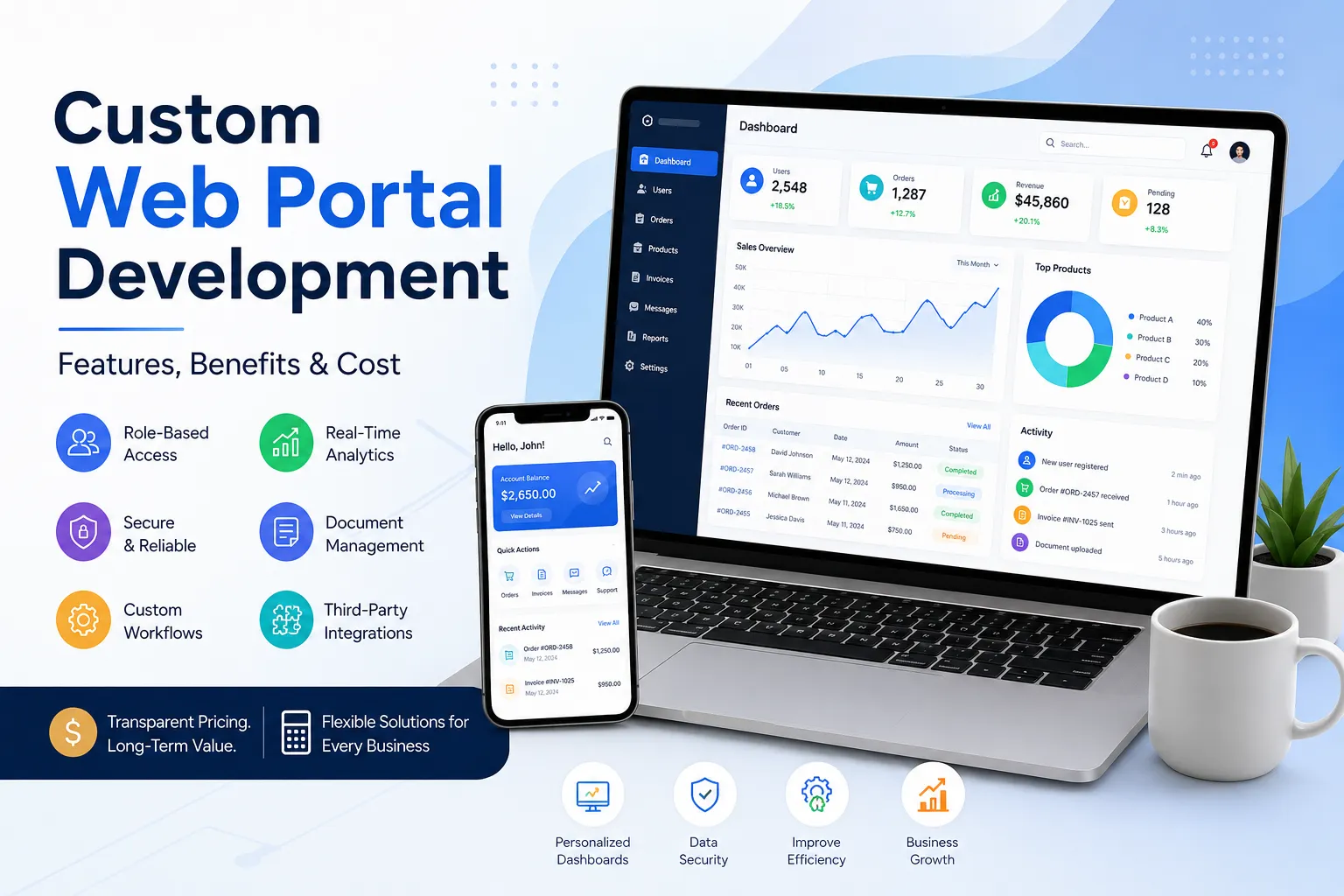

Businesses today need more than a standard website to manage customers, employees, vendors, partners, and internal operations. A custom web portal can bring these activities into one secure, centralized platform while giving users access to information and tools based on their specific roles.
Unlike a traditional website, which mainly provides information to visitors, a web portal is designed for interaction. Users can log in, access personalized dashboards, submit requests, manage documents, communicate with businesses, and perform other tasks through a browser.
For companies with unique workflows or growing digital requirements, custom web portal development can provide the flexibility needed to create a solution around existing business processes rather than forcing operations into a pre-built system.
What Is Custom Web Portal Development?
Custom web portal development is the process of designing and developing a web-based platform specifically for a business's requirements. The portal can include customized user roles, dashboards, workflows, integrations, databases, security controls, and administrative features.
A custom portal can serve different groups of users, including:
- Customers
- Employees
- Vendors
- Suppliers
- Business partners
- Members
- Administrators
- Service providers
Each user can receive access to specific information and functionality according to their role.
For example, a customer portal might allow users to view orders, download invoices, submit support requests, and update account information. A vendor portal could allow suppliers to manage products, receive purchase orders, update delivery information, and communicate with the business.
Custom Web Portal vs Traditional Website
A traditional business website generally focuses on presenting information such as services, company details, contact information, and resources.
A web portal is more interactive and application-oriented.
| Traditional Website | Custom Web Portal |
|---|---|
| Primarily informational | Interactive and transactional |
| Public visitors | Authorized users |
| General content | Personalized information |
| Basic contact forms | Advanced workflows |
| Limited user accounts | Role-based user access |
| Static pages | Dynamic dashboards |
| Basic integrations | Complex system integrations |
A business may need both. A website can attract visitors and generate leads, while a portal can provide customers, employees, or partners with a secure digital workspace.
Essential Features of a Custom Web Portal
The features required depend on the purpose of the portal. However, several capabilities are commonly included in successful portal projects.
1. User Registration and Login
Secure authentication allows authorized users to access their accounts. Registration, password recovery, email verification, and account management can be included according to business requirements.
For portals containing sensitive information, additional authentication measures can also be implemented.
2. Role-Based Access Control
Different users should not necessarily have access to the same information.
Role-based access control allows administrators to define what each user can view or manage.
For example:
- Customers can view their own orders.
- Vendors can manage their assigned products.
- Employees can access internal resources.
- Administrators can manage the complete platform.
This creates a more controlled and secure environment.
3. Personalized Dashboards
A dashboard can provide users with the most important information immediately after login.
Depending on the portal, a dashboard may display:
- Recent activity
- Orders
- Account information
- Notifications
- Tasks
- Reports
- Messages
- Documents
- Payments
- Support requests
A customized dashboard can make complex systems easier to navigate.
4. Document Management
Businesses often need to exchange contracts, invoices, reports, applications, certificates, or other documents.
A portal can provide secure document uploading, downloading, categorization, and management.
Permissions can determine which users can view, upload, edit, or download particular files.
5. Search and Filtering
As the amount of portal data increases, users need efficient ways to locate information.
Advanced search and filtering can help users find:
- Customers
- Products
- Orders
- Documents
- Transactions
- Tickets
- Records
- Reports
This is particularly valuable for portals with large databases.
6. Notifications
Notifications can keep users informed about important events.
A portal may provide notifications for:
- New orders
- Status changes
- Account updates
- Support responses
- Payment activity
- New documents
- Approvals
- Assigned tasks
Email and in-platform notifications can be integrated depending on requirements.
7. Payment Integration
Some portals require online payments or recurring billing.
Payment functionality can support activities such as:
- Invoice payments
- Membership fees
- Subscription payments
- Service charges
- Order payments
The appropriate payment gateway depends on the target market and business model.
8. Admin Dashboard
Administrators need centralized control over the portal.
An admin dashboard can provide tools for:
- User management
- Content management
- Role management
- Order management
- Reports
- Notifications
- Transactions
- System settings
- Activity monitoring
The administrative interface should be designed around the organization's actual workflows.
9. Third-Party Integrations
A custom portal can connect with existing business systems.
Common integrations include:
- CRM systems
- ERP platforms
- Payment gateways
- Accounting software
- Email services
- Marketing platforms
- Shipping systems
- APIs
- Cloud storage
- Analytics platforms
Integrations can reduce duplicate data entry and help different systems work together.
10. Reporting and Analytics
Business portals can collect valuable operational data.
Custom reports can help organizations monitor:
- Sales
- Orders
- User activity
- Customer requests
- Vendor performance
- Payments
- Operational metrics
Administrators can use this information to identify trends and make informed decisions.
Benefits of Custom Web Portal Development
Better Business Efficiency
A portal can bring multiple processes into one centralized platform. Employees and customers spend less time switching between systems or relying on manual communication.
Improved Customer Experience
Customers can access information whenever they need it instead of contacting support for every request.
A self-service portal can allow customers to check orders, download documents, submit tickets, and manage their accounts independently.
Greater Scalability
A custom portal can be developed with future growth in mind. New features, integrations, user roles, and workflows can be added as business requirements change.
Better Data Organization
Instead of maintaining information across spreadsheets, emails, and disconnected applications, a portal can centralize relevant data.
Stronger Security
Custom development allows security requirements to be incorporated into the architecture, including authentication, authorization, access control, encryption, and activity monitoring.
Process Automation
Repetitive tasks can often be converted into digital workflows.
For example, a portal could automatically:
- Receive a customer request.
- Assign it to the appropriate employee.
- Notify the customer.
- Update the request status.
- Record the activity.
- Generate a report.
This can reduce manual work and improve consistency.
Types of Web Portals Businesses Can Build
Custom portals can serve many purposes.
Customer Portal
Designed for customers to manage accounts, orders, documents, payments, and support requests.
Vendor Portal
Helps suppliers manage products, orders, invoices, deliveries, and communications.
Employee Portal
Provides employees with access to internal information, tasks, documents, HR resources, and company processes.
Partner Portal
Allows business partners to access shared resources, reports, documents, leads, or operational information.
Member Portal
Useful for associations, communities, clubs, training organizations, and subscription-based businesses.
B2B Portal
Designed to support business-to-business transactions, account management, product catalogs, orders, and communication.
How Much Does Custom Web Portal Development Cost?
The cost of custom web portal development varies significantly because every portal has different requirements. A simple portal with authentication and a basic dashboard will require a different development effort from a complex platform connected to multiple enterprise systems.
Several factors influence the total development cost.
1. Portal Complexity
More workflows, dashboards, user roles, and business rules generally require more development work.
2. Number of User Roles
A portal serving customers, vendors, employees, and administrators may require more complex permissions than a portal designed for one user group.
3. Custom Features
Advanced functionality such as reporting, automation, document management, messaging, payment processing, or workflow management can affect development effort.
4. Integrations
Connecting the portal with CRM, ERP, payment, accounting, or third-party APIs can increase project complexity.
5. UI/UX Requirements
A highly customized interface with personalized dashboards and advanced interactions can require additional design and development resources.
6. Security Requirements
Portals handling financial, customer, employee, or business-sensitive information may require stronger security architecture and testing.
7. Maintenance and Support
Ongoing updates, security improvements, monitoring, backups, and feature enhancements should also be considered when planning the overall investment.
For these reasons, a professional development team should evaluate the project requirements before providing an accurate estimate rather than relying on a generic fixed price.
Custom Web Portal Development Process
A structured development process can help reduce unnecessary delays and improve project outcomes.
Step 1: Requirement Discovery
The first stage is understanding the business, users, workflows, problems, and desired outcomes.
Step 2: Feature Planning
Required features are prioritized and organized according to business objectives.
Step 3: UI/UX Design
The portal's navigation, dashboards, forms, and user journeys are planned before development begins.
Step 4: Development
Developers build the frontend, backend, database, authentication, workflows, and integrations.
Step 5: Testing
The portal should be tested for functionality, usability, performance, responsiveness, security, and compatibility.
Step 6: Deployment
After testing and approval, the portal is deployed to the production environment.
Step 7: Maintenance and Improvements
Post-launch support can include bug fixes, security updates, performance improvements, monitoring, and new functionality.
When Should a Business Invest in a Custom Web Portal?
A custom portal can be worthwhile when a business:
- Has complex customer or employee workflows
- Needs secure user accounts
- Manages large amounts of business data
- Wants to automate repetitive processes
- Requires multiple user roles
- Needs integrations with existing software
- Has outgrown spreadsheets or manual processes
- Requires a personalized customer experience
- Needs functionality that standard software cannot provide
If your business processes are relatively simple, a standard website or existing SaaS platform may be sufficient. Custom development becomes more attractive when unique workflows, integrations, scalability, or control become important.
How to Choose a Custom Web Portal Development Partner
Before selecting a development company, evaluate more than technical skills.
Look for a team that can:
- Understand your business requirements
- Recommend an appropriate technology architecture
- Build scalable applications
- Implement secure authentication and permissions
- Integrate third-party systems
- Provide clear project communication
- Conduct thorough testing
- Offer post-launch support
- Explain technical decisions clearly
- Provide relevant development experience
Ask potential development partners to explain how they would approach your specific portal rather than simply presenting a list of technologies.
Final Thoughts
A custom web portal can transform the way a business manages customers, employees, vendors, partners, and internal processes. Instead of relying on disconnected tools and manual communication, organizations can create a centralized digital platform designed around their workflows.
The right portal should not simply contain more features. It should make important business processes easier, faster, safer, and more scalable.
The Fabcode IT Solutions LLP can be considered when a business needs a development partner to turn its portal requirements into a functional web-based solution tailored to its operational needs.
Frequently Asked Questions
What is custom web portal development?
Custom web portal development involves creating a web-based platform specifically for an organization's users, workflows, data, integrations, and business requirements.
How is a web portal different from a website?
A website primarily provides information to visitors, while a web portal generally provides authenticated users with personalized information, dashboards, tools, workflows, and account functionality.
How much does a custom web portal cost?
There is no universal price because development costs depend on the portal's complexity, features, integrations, user roles, security requirements, design, and ongoing support needs.
Can a web portal integrate with existing business software?
Yes. Depending on the available APIs and technical architecture, a custom portal can integrate with CRM, ERP, accounting, payment, communication, analytics, and other business systems.
Is a custom web portal scalable?
Yes. A well-planned portal can be designed to accommodate additional users, features, workflows, integrations, and data as the business grows.
How long does it take to develop a web portal?
The timeline depends on the scope and complexity of the project. A basic portal can require substantially less development time than a platform involving multiple user roles, integrations, automation, and advanced functionality.




















Sign in to leave a comment.