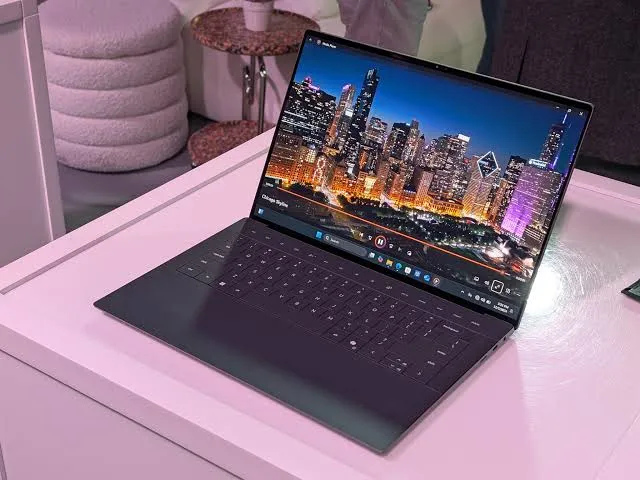

Dell Pro Max 16 Premium: The Ultimate Mobile Workstation for Professionals in 2026
If you build, render, edit, or model for a living, your laptop is not just a tool it's the difference between hitting a deadline and watching a progress bar crawl. That's exactly the gap Dell is trying to close with the Dell Pro Max 16 Premium, a 16-inch mobile workstation built for creators, engineers, and data professionals who need real desktop-class power without giving up portability.
In this article, we'll break down everything you need to know about the Dell Pro Max 16 Premium its processor options, display quality, battery life, storage, and how it compares to siblings like the Dell Pro Max 14 Premium and the Dell Pro 16 Plus. Whether you're deciding between configurations or simply want to know if this machine is worth the investment, you'll find the answers here.
What Is the Dell Pro Max 16 Premium?
The Dell Pro Max 16 Premium (model MA16250) sits at the top of Dell's professional workstation lineup. It's built for people who push their hardware 3D artists, video editors, CAD engineers, and data scientists and it's designed to be ISV-certified, meaning it's been validated to run professional software like AutoCAD, SolidWorks, and Adobe's creative suite without hiccups.
Unlike consumer laptops that prioritize style over substance, the Pro Max 16 Premium is engineered around sustained performance: strong thermals, workstation-grade graphics options, and enterprise security features that IT departments actually care about.
Key Specifications at a Glance
Here's what you're getting under the hood, based on Dell's official configuration options:
Processor
The laptop is available with several Intel Core Ultra (Series 2) H-class chips, all with 16 cores, 16 threads, and integrated NPUs delivering 13 TOPS of AI performance:
- Intel Core Ultra 7 255H (up to 5.10 GHz, 45W)
- Intel Core Ultra 7 265H vPro Enterprise (up to 5.30 GHz, 45W)
- Intel Core Ultra 9 285H vPro Enterprise (up to 5.40 GHz, 45W)
These "Core Ultra 2" chips are a meaningful step up from the previous generation, especially for CPU-bound workloads like compiling code, running simulations, or batch-processing files.
Memory and Storage
Memory options range from 16GB up to 64GB of LPDDR5x RAM running at 8400 MT/s in dual-channel mode all soldered onboard rather than user-upgradeable, so it's worth choosing the right amount at checkout. On the storage side, you can configure anywhere from a 512GB M.2 SSD up to a 2TB PCIe Gen4 SSD, with self-encrypting drive (SED) options available for security-conscious organizations. Notably, the system supports dual M.2 slots, giving power users the option to add a second drive for extra capacity or a fast scratch disk.
Display
This is where the Pro Max 16 Premium really shows its "premium" branding. Configurations include a 16-inch display with options up to OLED touch panels, VESA HDR TrueBlack 1000 certification, 100% DCI-P3 color coverage, and variable refresh rate (VRR) support. Entry configurations use a Full HD Plus (1920 x 1200) anti-glare panel with 500 nits of brightness — bright enough for most indoor and outdoor work environments.
Graphics
Depending on configuration, the laptop ships with integrated Intel Arc graphics or a discrete Intel Arc Pro GPU. For users who need heavier GPU-accelerated rendering, higher-tier Dell Pro Max models (like the Pro Max 16 Plus) step up to NVIDIA RTX PRO graphics, which deliver a significant jump in tasks like 3D rendering and AI image generation.
Design and Input
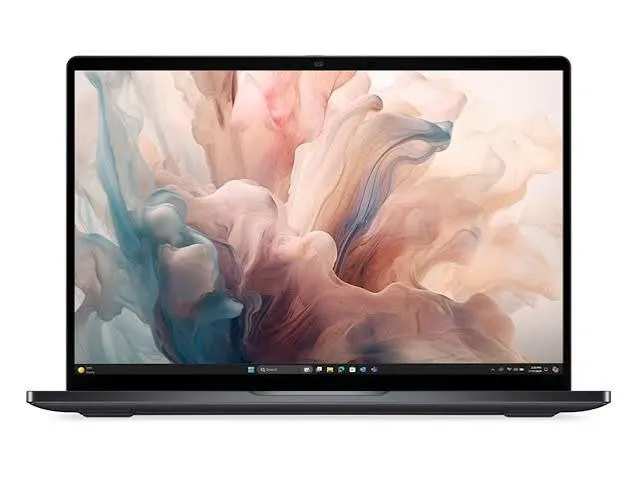
The keyboard uses Dell's "Zero-Lattice" layout with battery-saving Mini-LED backlighting, paired with a large haptic touchpad for precision input. For video calls, there's an 8MP RGB + IR camera with presence detection, an ambient light sensor, and Windows Hello support for password-free login. Audio comes courtesy of Cirrus Smart amps with dual tweeters and woofers, tuned with Dolby Atmos or Waves audio processing.
Connectivity and Security
The laptop includes Intel Wi-Fi 7 (BE201) with Bluetooth 5.4 for fast, stable wireless connections. On the enterprise side, vPro-equipped configurations add remote manageability and hardware-level security features that matter for IT-managed fleets.
Real-World Performance: What Reviewers Found
Independent testing from StorageReview.com gives us a clearer picture of how the Pro Max 16 Premium performs outside of spec sheets. Their review found that the Core Ultra 2 H-class processors keep everyday work and CPU-heavy tasks moving smoothly, while the optional OLED display delivers excellent color and contrast for creative review or client-facing presentations.
Battery life was a standout result. In PCMark's battery benchmark which simulates realistic work patterns rather than continuous stress the Pro Max 16 Premium lasted just over 10 hours, the longest result among the workstations tested in that review. For a machine packing this much processing power, that's a genuinely impressive result and means you can realistically leave the charger at your desk for a full workday of writing, browsing, and video calls.
Where the Pro Max 16 Premium falls behind is graphics-intensive AI and rendering work and that's by design, not by flaw. Because base configurations rely on integrated graphics rather than a discrete GPU, it showed noticeably lower scores in GPU-heavy image generation benchmarks compared to models with dedicated graphics, with the Pro Max 14 Premium's discrete GPU outperforming it by roughly three to five times depending on the specific test. If your workflow leans heavily on GPU rendering, AI image generation, or CUDA-accelerated software, you'll want to look at configurations with discrete graphics or step up to the RTX PRO-equipped Pro Max Plus models.
Dell Pro Max 16 Premium vs. Dell Pro Max 14 Premium
Choosing between the 14-inch and 16-inch Pro Max Premium models comes down to a trade-off between portability and screen real estate:
| Feature | Pro Max 16 Premium | Pro Max 14 Premium |
| Screen size | 16 inches | 14 inches |
| Display options | Up to OLED, HDR TrueBlack 1000 | Up to OLED touch |
| Graphics | Integrated Arc / Arc Pro (Plus config for RTX PRO) | Available with discrete GPU in more configs |
| Battery life | ~10 hours (tested) | Slightly shorter due to smaller chassis |
| Best for | Users who want a larger canvas for design, CAD, and multitasking | Users who prioritize portability without sacrificing much power |
If you spend your day switching between multiple windows a CAD model on one side, reference material on the other the extra screen space on the 16-inch model is genuinely useful. If you travel frequently or work from co-working spaces and cafes, the 14-inch model's smaller footprint may matter more than a few extra inches of display.
Dell Pro Max 16 Premium vs. Dell Pro 16 Plus
It's easy to confuse the Dell Pro Max 16 Premium with the Dell Pro 16 Plus, since both share a 16-inch form factor, but they're built for different audiences. The Pro Max line is Dell's true workstation-class offering, aimed at ISV-certified professional workloads and available with the highest-end discrete GPUs. The Pro 16 Plus, by contrast, sits a tier below in Dell's lineup a strong business laptop, but not positioned as a full workstation replacement for demanding creative or engineering software. If your work genuinely requires certified drivers and workstation-grade graphics, the Pro Max naming is the one to look for.
Case Study: Why This Matters for Creative and Engineering Teams
Consider a mid-sized architecture firm evaluating new laptops for its design team. Their software stack includes Revit, AutoCAD, and Twinmotion all of which benefit from ISV certification and strong sustained CPU performance for rendering walkthroughs. A machine like the Pro Max 16 Premium, configured with the Core Ultra 9 285H and a discrete GPU option, gives that team desktop-adjacent performance they can carry between the office and client site visits — with battery life long enough to survive a full day of site walkthroughs without hunting for an outlet.
Compare that to a freelance video editor who works primarily from cafes and client offices. For that user, the 14-inch sibling might make more sense trading a bit of screen space for a lighter bag and similar underlying performance.
Pros and Cons
Pros:
- Strong CPU performance from Intel's latest Core Ultra 2 (H-class) processors
- Excellent battery life for a workstation-class laptop over 10 hours in real-world testing
- High-quality display options, including OLED with HDR TrueBlack 1000 certification
- ISV certification for professional software compatibility
- Configurable up to 64GB RAM and 2TB of dual M.2 storage
- Enterprise-grade security and manageability with vPro configurations
Cons:
- Base configurations rely on integrated graphics, which limits GPU-heavy rendering and AI performance
- Memory is soldered and not user-upgradeable after purchase
- Premium components mean a higher price point than standard business laptops
- Some users have reported missing USB-A ports and occasional software-related slowdowns after updates
Frequently Asked Questions
Is the Dell Pro Max 16 Premium good for gaming? It's not designed as a gaming laptop. While base configurations with integrated graphics can handle light gaming, the machine is optimized for professional workloads rather than high frame-rate gaming performance.
What's the difference between the Pro Max 16 Premium and Pro Max 16 Plus? The Plus variant is positioned higher in Dell's lineup, with access to NVIDIA RTX PRO discrete graphics for significantly stronger GPU-accelerated performance, while the Premium focuses on display quality, portability, and CPU performance with optional discrete graphics.
How long does the battery actually last? In independent testing using realistic, cyclical workloads, the Pro Max 16 Premium reached just over 10 hours among the best results recorded for this class of machine.
Can I upgrade the RAM later? No. Memory is soldered onboard in configurations ranging from 16GB to 64GB, so it's important to choose the amount you'll need at purchase.
Does it support Windows and Linux? Yes. The Pro Max 16 Premium is available with Windows 11 Pro, Windows 11 Home, or Ubuntu Linux 24.04, giving IT teams and developers flexibility depending on their environment.
Final Verdict: Is the Dell Pro Max 16 Premium Worth It?
The Dell Pro Max 16 Premium earns its "Premium" name. It combines genuinely strong CPU performance, one of the better battery life results in its class, and display options that rival dedicated creative monitors all in a chassis built to meet professional certification standards. The main trade-off is graphics power in base configurations, so buyers doing heavy GPU rendering or AI work should plan to configure a discrete GPU option, or consider stepping up to the Pro Max Plus tier.
For professionals who need a workstation that can travel architects, engineers, developers, and content creators the Dell Pro Max 16 Premium is one of the more well-rounded options available in 2026.
What's your take? If you've used the Dell Pro Max 16 Premium (or are considering one over the Pro Max 14 Premium or Pro 16 Plus), drop a comment below with your experience and share this guide with a colleague who's shopping for their next workstation.





















Sign in to leave a comment.