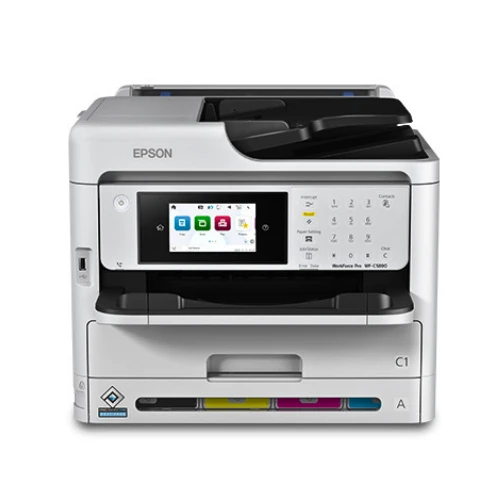
In the fast-paced environment of modern offices, reliability, speed, and efficiency are key to maintaining productivity. Many workplaces struggle with outdated or slow printers, which can cause workflow delays, higher operational costs, and employee frustration. Choosing a multifunction printer that delivers high-quality output and supports diverse office tasks is essential for maintaining smooth operations and ensuring professional results.
The Epson WorkForce Pro WF-C5890 Color MFP is designed to meet these demands. Combining printing, scanning, copying, and faxing in a single device, this multifunction printer offers a comprehensive solution for small to medium-sized offices. Featuring PrecisionCore Heat-Free technology and a Replaceable Ink Pack System, the Epson WorkForce Pro WF-C5890 Color MFP provides consistent performance, energy efficiency, and low maintenance. Offices in UAE, Dubai, and other regions can manage high-volume workloads, maintain document quality, and improve workflow efficiency with this versatile printer.
Advanced Printing Technology
PrecisionCore Heat-Free Printing
The Epson WorkForce Pro WF-C5890 Color MFP uses PrecisionCore Heat-Free technology, allowing fast and reliable printing without the delays common to conventional laser printers. This technology ensures immediate first-page output, supports high-volume printing tasks, and reduces energy consumption, making it both fast and environmentally friendly.
DURABrite Ultra Pigment Inks
With DURABrite Ultra pigment inks, the Epson WorkForce Pro WF-C5890 Color MFP produces sharp, smudge-resistant text and vivid color documents. Reports, presentations, and client-facing materials maintain professional quality, while long-lasting inks prevent fading over time, ensuring important documents remain clear and durable.
Multifunction Capabilities
All-in-One Device
The Epson WorkForce Pro WF-C5890 Color MFP combines printing, scanning, copying, and faxing in a single unit, eliminating the need for multiple machines. This not only saves space but also reduces equipment costs and simplifies office operations. Employees can complete all document-related tasks efficiently, boosting overall productivity.
Automatic Duplex Printing and Document Feeder
Automatic duplex printing supports double-sided output, conserving paper and lowering operational costs. The 50-page automatic document feeder allows fast scanning and copying of multi-page documents, streamlining workflow for departments that handle large volumes of paperwork.
Cost Efficiency and Productivity
Replaceable Ink Pack System
The Epson WorkForce Pro WF-C5890 Color MFP features a Replaceable Ink Pack System, enabling thousands of pages to be printed before requiring replacement. This reduces the cost per page, minimizes workflow interruptions, and allows employees to focus on tasks rather than maintenance.
High-Speed Printing
With print speeds up to 25 ISO pages per minute for both black and color documents, the Epson WorkForce Pro WF-C5890 Color MFP handles high-volume workloads efficiently. Its expandable paper capacity of up to 1,830 sheets ensures continuous operation without frequent refills, keeping office workflows smooth and uninterrupted.
Connectivity and Integration
Flexible Networking Options
The Epson WorkForce Pro WF-C5890 Color MFP supports wireless, Ethernet, and USB connectivity, making it easy to integrate into office networks. Employees can print from desktops, laptops, tablets, and smartphones, increasing accessibility and reducing wait times for shared printing tasks.
Enterprise Compatibility
Supporting PCL 5/6 and PostScript 3, the Epson WorkForce Pro WF-C5890 Color MFP integrates seamlessly with existing office systems. Epson Document Capture Pro software enables efficient scanning, organization, and storage, simplifying workflow management and document handling.
Paper Handling and Media Flexibility
The Epson WorkForce Pro WF-C5890 Color MFP supports multiple paper sizes and media types, including envelopes, labels, and specialty sheets. Its large, expandable paper capacity is ideal for offices with high-volume printing needs. The versatile media handling allows businesses to complete diverse projects without the need for multiple devices, saving time and resources.
Ideal Applications
Corporate Offices
Small and medium-sized businesses benefit from the Epson WorkForce Pro WF-C5890 Color MFP’s high-speed multifunction capabilities. Its reliable performance and cost-efficient ink system make it suitable for daily office tasks and high-volume document requirements.
Educational Institutions
Schools, universities, and colleges can efficiently handle assignments, administrative paperwork, and educational materials. Energy-efficient operation and durable ink packs make the Epson WorkForce Pro WF-C5890 Color MFP a cost-effective solution for institutions with heavy printing demands.
Professional Services
Accounting firms, law offices, and consultancy agencies require professional-quality documents. The Epson WorkForce Pro WF-C5890 Color MFP ensures that client reports, contracts, and internal communications are produced efficiently, maintaining high standards while streamlining workflow.
Maintenance and Reliability
The Epson WorkForce Pro WF-C5890 Color MFP is designed for easy maintenance, with accessible components and simple user-friendly tools. Routine upkeep, such as replacing ink packs and cleaning, ensures consistent performance. Epson’s support and warranty services reduce downtime, keeping offices productive and workflows uninterrupted.
Conclusion
The Epson WorkForce Pro WF-C5890 Color MFP is an excellent multifunction printer for offices seeking speed, reliability, and professional-quality output. With PrecisionCore Heat-Free technology, high-speed printing, multifunction features, and a cost-efficient Replaceable Ink Pack System, it delivers consistent results while improving workflow.
Ideal for offices, educational institutions, and professional services, the Epson WorkForce Pro WF-C5890 Color MFP provides efficiency, versatility, and dependable performance in one powerful device.


























Sign in to leave a comment.