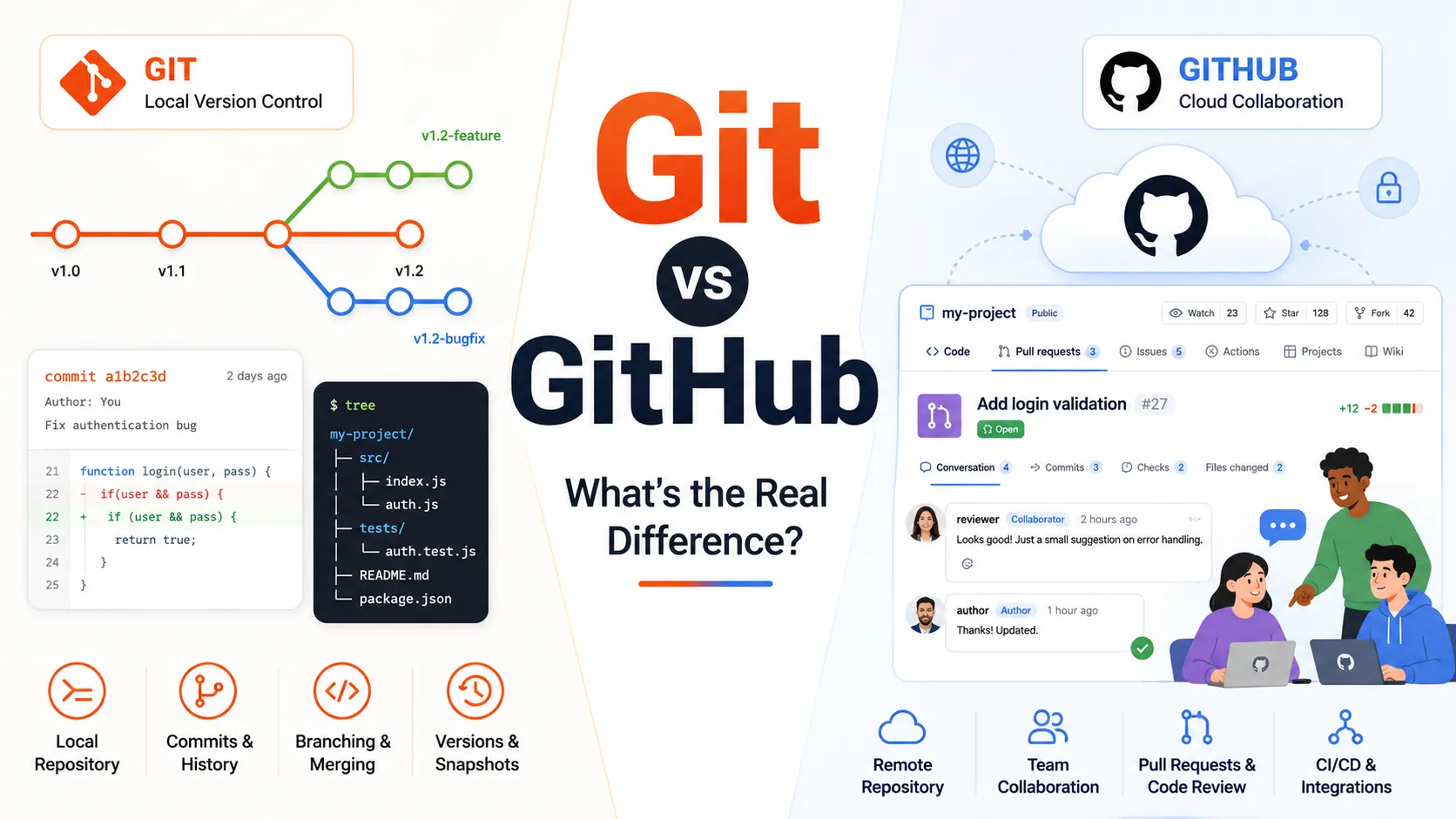

Git and GitHub are often mentioned together, which can make them sound like the same technology. They are closely connected, but they serve different purposes.
Git is a version control system that tracks changes in files and code. GitHub is an online platform that hosts Git repositories and supports team collaboration.
A simple way to understand the difference is this:
Git manages the history of your project, while GitHub helps you store, share, and collaborate on that project online.
Developers can use Git without GitHub. However, GitHub relies on Git for version control.
Understanding this distinction is important for software developers, DevOps engineers, testers, data professionals, and anyone working on collaborative technology projects.
What Is Git?
Git is a distributed version control system. It records changes made to project files and allows developers to return to earlier versions when necessary.
Git usually runs on a local computer. Once installed, it allows users to create repositories, save changes, create branches, compare versions, and merge updates without requiring a constant internet connection.
Common Git commands include git init for creating a repository, git add for preparing changes, git commit for saving a version, git branch for managing branches, and git merge for combining changes.
Git is especially useful when several people are working on the same codebase. It allows each contributor to work independently while preserving a complete history of project changes.
What Is GitHub?
GitHub is a cloud-based platform for hosting Git repositories.
It allows developers to upload local repositories, share projects, review code, report issues, manage tasks, and contribute to open-source software.
GitHub also adds collaboration and project management features that are not built directly into Git. These include pull requests, code reviews, issue tracking, team permissions, project boards, release management, and GitHub Actions.
While Git works as the version control engine, GitHub provides the online workspace where teams can collaborate around a Git repository.
Git vs GitHub: The Main Difference
The main difference between Git and GitHub is where and how they are used.
| Feature | Git | GitHub |
|---|---|---|
| Type | Version control system | Cloud-based collaboration platform |
| Primary purpose | Tracks file and code changes | Hosts and shares Git repositories |
| Usage | Installed on a local machine | Accessed online or through an app |
| Internet requirement | Not required for local work | Required for most hosted features |
| Repository location | Local computer | Remote cloud server |
| Collaboration | Managed through Git workflows | Simplified through pull requests and reviews |
| Ownership | Open-source technology | Platform owned by Microsoft |
In practical terms, Git handles version history, while GitHub makes that history accessible to other people.
How Git and GitHub Work Together?
A typical development workflow begins with Git on a local computer.
A developer creates or downloads a repository, makes changes, and records those changes through commits. The developer can then push those commits to GitHub.
Other team members can pull the latest version from GitHub, create branches, suggest improvements, submit pull requests, and review each other’s work.
For example, a developer may create a new branch for a feature, update the project files, commit the changes through Git, and push the branch to GitHub. A pull request can then be opened so other team members can review and approve the update before it is merged into the main project.
Git performs the version control operations throughout this process. GitHub provides the shared environment where collaboration takes place.
Can You Use Git Without GitHub?
Yes. Git can be used without GitHub.
You can create repositories, commit changes, manage branches, compare versions, and restore earlier files entirely on your local computer.
Git can also connect to other repository hosting platforms, such as GitLab and Bitbucket. This means GitHub is not required to use Git. It is simply one of the most widely used platforms built around Git repositories.
Can You Use GitHub Without Learning Git?
You can use some GitHub features without mastering command-line Git. For example, you can browse repositories, edit small files, report issues, and review pull requests through the GitHub website.
However, learning Git is important for professional software development. Without Git knowledge, it becomes difficult to manage branches, resolve merge conflicts, understand commit history, recover from mistakes, and work confidently with local and remote repositories.
GitHub becomes far more useful once you understand the Git operations working underneath it.
A Simple Real-World Example
Imagine that you are writing a book.
Git acts like a system that saves every important draft. It records what changed, when it changed, and who made the update. It also allows you to create a separate version for testing a new chapter without changing the main manuscript.
GitHub acts like an online workspace where writers, editors, and reviewers can access the manuscript. They can suggest changes, discuss issues, compare versions, and approve updates.
The version history comes from Git. The shared collaboration environment comes from GitHub.
GitHub Is Not the Same as Git
One of the most common misconceptions is that GitHub is simply another name for Git.
This is incorrect.
Git was created as an independent version control technology. GitHub was later developed as a hosting and collaboration service for Git repositories.
A developer may use Git with GitHub, GitLab, Bitbucket, a private organizational server, or only on a local computer.
Git is the underlying system. GitHub is one platform that works with it.
Which Should You Learn First?
You should learn Git before moving deeply into GitHub.
Start with repositories, staging areas, commits, branches, merging, merge conflicts, and the difference between local and remote repositories.
Once these concepts are clear, you can learn how GitHub supports collaboration through pull requests, code reviews, issues, permissions, and automated workflows.
Learning in this order helps you understand what is happening instead of memorizing commands or buttons without context.
Why Git Skills Matter in Modern Technology Careers?
Git is not limited to software development. It is also useful in DevOps, cloud engineering, data engineering, cybersecurity, web development, quality assurance, machine learning, infrastructure automation, and technical documentation.
Version control helps professionals work safely, track changes, collaborate with teams, and maintain reliable project histories.
A structured Git certification can also help learners demonstrate their understanding of commits, branches, merging, conflict resolution, remote repositories, and collaborative workflows.
However, a certificate is most valuable when combined with hands-on practice.
Learning Git and GitHub Through Coursera
Learners searching for Coursera Git training may benefit from a structured program that moves from basic version control concepts to practical collaboration workflows.
The Complete Git Specialization on Coursera is designed to help learners build practical Git skills through guided instruction and hands-on activities. It covers Git fundamentals, branching, merging, remote collaboration, merge conflict resolution, and workflows involving platforms such as GitHub, GitLab, and Bitbucket.
For people searching for Git courses on Coursera, this specialization provides a more organized alternative to learning isolated commands from different sources.
It can also support learners comparing Coursera GitHub training options because it explains how Git connects with remote repository platforms instead of teaching GitHub as a separate tool.
The course also helps learners strengthen skills related to version control, code review, DevOps workflows, release management, and software collaboration.
Is a Git Certification Worth It?
A Git certification can be useful for beginners, students, career changers, and professionals who want a structured way to validate their knowledge.
It can help learners build confidence with Git commands, understand professional workflows, strengthen their resumes, and prepare for software development or DevOps roles.
However, employers usually value practical ability alongside credentials. To increase the value of a certification, learners should create repositories, practice branching, resolve conflicts, contribute to projects, and maintain a visible portfolio of work.
Common Git and GitHub Mistakes
One common mistake is writing unclear commit messages. Messages such as “update” or “fixed” provide little useful context. A better commit message would explain exactly what changed, such as “Fix login validation for empty email fields.”
Another mistake is working directly on the main branch. Creating a separate branch reduces the risk of introducing unfinished or unstable changes into the main project.
Developers may also wait too long before pulling remote updates. Regularly retrieving changes from the shared repository helps reduce unnecessary merge conflicts.
Sensitive information is another major concern. Passwords, API keys, private certificates, and confidential configuration files should never be committed to a public repository.
It is also important not to treat GitHub only as a backup tool. GitHub stores repositories remotely, but its real value comes from collaboration features such as pull requests, code reviews, issues, discussions, and automation.
Final Thoughts
Git and GitHub solve related but different problems.
Git gives you control over the history of a project. GitHub gives you a place to store that project online and collaborate with other people.
You do not have to choose between them. In most modern development environments, they are used together.
Start by learning how Git tracks changes locally. Then use GitHub to share repositories, review code, manage contributions, and participate in team projects.
For learners who prefer guided instruction, practical exercises, and a recognized credential, the Complete Git Specialization on Coursera offers a structured path from fundamental Git concepts to professional collaboration workflows.























Sign in to leave a comment.