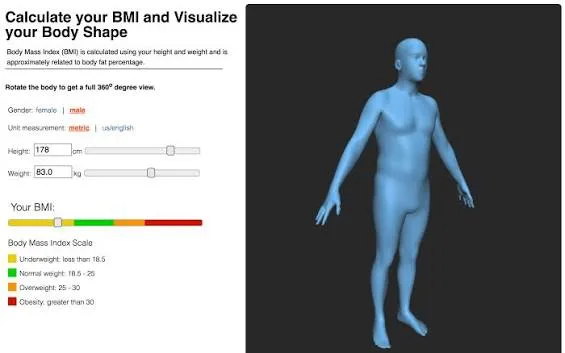

A height and weight simulator lets you enter your height and weight to see an instant visual representation of your body shape, rather than just a number on a BMI chart. By combining your measurements with average body proportions, the simulator generates a silhouette or avatar that shows what a given height-weight combination typically looks like, helping you understand your current shape or preview how you might look after gaining or losing weight. This makes the simulator especially useful for people who find raw BMI numbers hard to interpret, since two people with the same BMI can carry weight very differently depending on frame size, muscle mass, and distribution.
Most height and weight simulators pair the visual output with your BMI category (underweight, healthy, overweight, or obese) so you get both the number and the picture in one place, and many let you compare two weights side by side to see the difference before committing to a fitness or weight-loss goal. While these tools are a helpful motivational and educational aid, they rely on average body models and can't account for individual factors like bone structure, muscle-to-fat ratio, or where you personally store fat, so the visual result should be treated as an illustrative estimate rather than a precise or medical representation of your body. For an accurate assessment of your health and appropriate weight range, use the simulator alongside a proper BMI calculator and consult a GP or healthcare professional.


























Sign in to leave a comment.