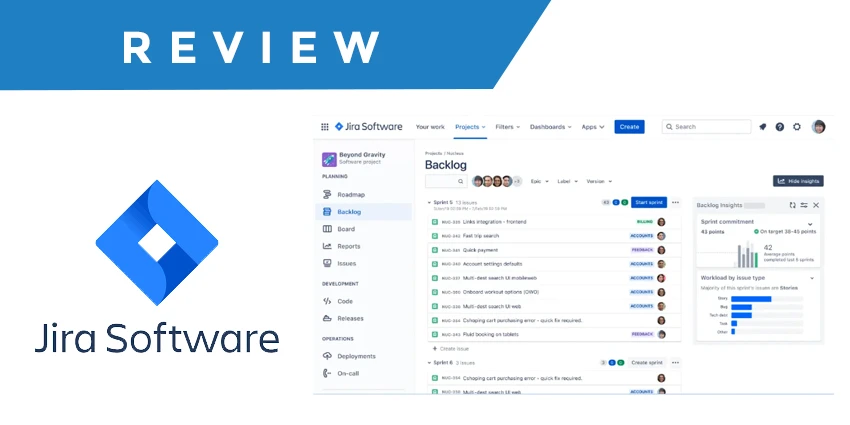

When it comes to project and issue management, Jira has long been recognized as one of the most powerful tools in the market. Whether you’re part of a software development team, a project manager, or an IT leader, reading Jira reviews gives you insight into what makes this tool both beloved and controversial. Over the years, Jira has grown from a simple bug-tracking system into a full-featured project management platform used by teams of all sizes. In this comprehensive review, we’ll break down Jira features, explore Jira pricing, highlight Jira user ratings, and examine the Jira software pros and cons to help you decide if it’s the right tool for your team.
What Is Jira and Why It’s Popular
Jira, developed by Atlassian, began as a tool focused on bug tracking and issue management. Today, it’s widely adopted for agile project management, supporting methodologies like Scrum and Kanban. Its adaptability and strong integration ecosystem make it a favorite for technical teams, especially those working on software development and agile delivery. Many Jira reviews highlight its robust customization capabilities and extensive plugin marketplace that help teams tailor the tool to their specific processes.
Key Jira Features You Should Know
Understanding the core Jira features is essential when evaluating the platform:
1. Issue Tracking
Jira excels at tracking bugs, tasks, and user stories. Teams can log detailed issue descriptions, attach files, add comments, and define statuses, which helps maintain a clear project backlog and audit trail.
2. Agile Boards (Scrum & Kanban)
One of the most praised aspects in Jira reviews is its support for agile workflows. Scrum boards help plan sprints and track progress, while Kanban boards provide visual workflow management.
3. Custom Workflows
Jira allows teams to design custom workflows that fit their processes — from development cycles to complex project handoffs. This flexibility helps teams structure their work exactly how they want it.
4. Reporting and Dashboards
Built-in reports like burndown charts, velocity charts, and dashboards give teams insight into sprint progress, team performance, and overall project health.
5. Integrations
Jira integrates seamlessly with tools like Confluence, Bitbucket, Slack, and hundreds of others via the Atlassian Marketplace, enhancing team collaboration and data flow.
6. Automation Rules
With built-in automation, teams can reduce repetitive tasks by configuring rules that trigger actions based on certain events, which saves time and improves consistency.
Overall, these standout features contribute to why many teams regard Jira as a powerful and adaptable tool across the project management landscape.
Jira Pricing: Plans and What They Include
When evaluating Jira pricing, it’s important to understand how the tiered plans differ in features and scalability. Jira offers multiple plans to suit teams of varying sizes and needs.
Free Plan
- Cost: $0
- Up to 10 users
- Core agile boards and basic reporting suitable for small teams or early adopters.
Standard Plan
- Starts around $8.15 per user/month
- Adds more storage, advanced permissions, and standard support.
Premium Plan
- Around $16 per user/month
- Includes advanced roadmaps, global automation, and enterprise features that help scale agile practices.
Enterprise Plan
- Custom pricing, best for organizations with large user bases and advanced admin needs.
Although many Jira reviews highlight the value of the free and standard plans for small to mid-size teams, pricing can become a concern for larger organizations or teams that require niche plugins or premium features.
Jira User Ratings: What People Are Saying
In terms of Jira user ratings, the platform generally scores well across multiple review sites and user bases. Aggregated data shows strong satisfaction in areas such as flexibility, customization, and comprehensive feature sets. For example, user ratings often hover around the 4.3–4.4 out of 5 range, indicating that many users are pleased with what Jira offers.
Users frequently praise its ability to manage complex projects, handle agile reporting, and support integrations with popular development and collaboration tools. However, they also point out that ease of use can be a challenge, especially for new users or those not steeped in agile methodologies.
Jira Software Pros and Cons
No software is perfect, and understanding the Jira software pros and cons helps set realistic expectations before adoption.
Pros
Highly Customizable: Teams can tailor workflows, permissions, and fields to match complex processes.
Agile-Friendly: Native support for Scrum and Kanban makes it ideal for software teams practicing agile development.
Strong Integration Ecosystem: Extensive plugin marketplace enhances functionality without major code changes.
Advanced Reporting: Built-in charts, dashboards, and analytics help teams track performance.
Cons
Steep Learning Curve: Many users note that Jira’s interface and setup can be complex, especially for non-technical users.
Cluttered Interface: With so many options, the UI can feel overwhelming.
Increasing Costs: Premium features and necessary add-ons can raise expected costs for teams as they grow.
Admin Overhead: Maintaining permissions, custom fields, and workflows may require dedicated administration.
These strengths and weaknesses frequently appear in many Jira reviews and help prospective users weigh whether the platform aligns with their needs.
Is Jira the Right Tool for You?
Ultimately, Jira’s powerful customization, agile support, and comprehensive feature set make it a compelling choice for teams that run technical projects, especially in software development and IT. Its flexible pricing provides entry points for small teams, while higher tiers support enterprise-level demands.
However, teams less familiar with agile practices or those seeking a lightweight task manager may find Jira’s learning curve and complexity challenging. Assessing your team’s workflow, project complexity, and willingness to invest in setup and training is crucial before committing.
Final Thoughts
Reading Jira reviews reveals a platform that is both powerful and nuanced. With deep customization options, strong agile support, and robust integrations, it continues to be a leader in project management solutions. Understanding Jira pricing, real-world Jira user ratings, and the Jira software pros and cons can help you make an informed decision that aligns with your team’s goals and workflow preferences.
Whether you’re a small startup or a large enterprise, Jira offers tools that can scale with your needs — but it’s best suited for teams ready to embrace its complexity and fully unlock its potential.






























Sign in to leave a comment.