

A few years ago, mobile application development trend lists were mostly about screen sizes and new gadgets. In 2026, the biggest changes sit inside the operating systems. Both Google and Apple now describe their platforms as places where AI runs on the device and apps plug into assistants that act for the user. This guide covers the mobile application development trends that matter this year, with the platform announcements behind them. For each one, you will see what is changing and what it means if you are planning an app or choosing a team.
The short version
Eight shifts stand out in 2026: on-device AI, apps that agents can use, hybrid AI inference, mature cross-platform tools, modern native UI toolkits, privacy built into the build, new device types and AI-aware testing. Most of them trace back to AI moving closer to the user.
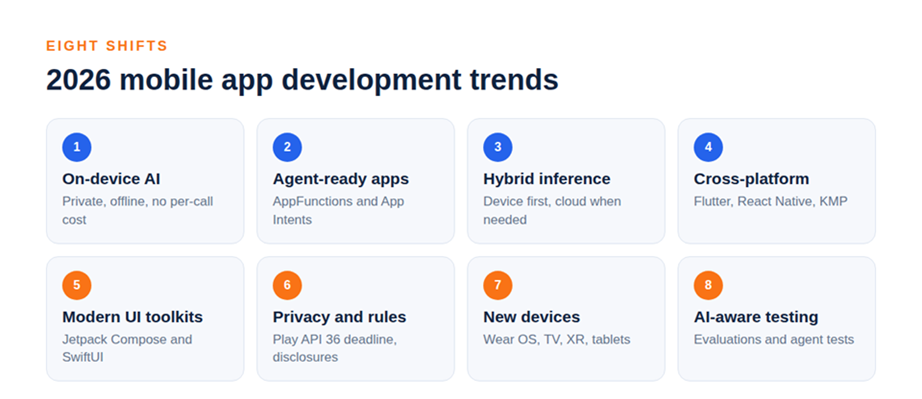
1. On-device AI becomes a normal feature
Running a model on the phone keeps data private, works offline and removes per-request cloud costs. Both platforms now push this hard.
At Google I/O 2026, Google announced a Gemini Nano 4 preview through AICore, with the Prompt API in ML Kit GenAI as the route to production on flagship devices (Android Developers, May 2026). Apple's iOS 27 gives apps direct access to the same on-device model that powers Apple Intelligence through the Foundation Models framework, and adds Core AI for running your own models with no server dependency (Apple Developer, WWDC26).
For product teams, the lesson is simple. Features such as summarizing, classifying and extracting from text or images no longer need a cloud bill. They need a good design and a fallback for older phones.
2. Apps become something agents can use
The second shift is about how people reach your app. Instead of opening it, they may ask an assistant to do something inside it.
On Android, App Functions lets an app act as an on-device server that shares its tools and data with the system and agents, and it is currently in experimental preview (Android Developers, May 2026). On iOS, App Intents now connect Siri to more of what people do in your app, with entity schemas feeding the Spotlight semantic index (Apple Developer, WWDC26).
The practical step is to decide which two or three actions in your app are worth exposing. Booking, reordering and searching are strong candidates. Teams planning for this should read our guide on AI agents vs chatbots and our breakdown of AI agent architecture.
3. Hybrid inference: on-device first, cloud when needed
Few apps will run entirely on the device or entirely in the cloud. Most will mix both. Firebase AI Logic now offers hybrid inference with modes such as prefer on-device, prefer cloud, only on-device and only cloud (Android Developers, May 2026). Apple's Foundation Models framework also supports cloud models from other providers.
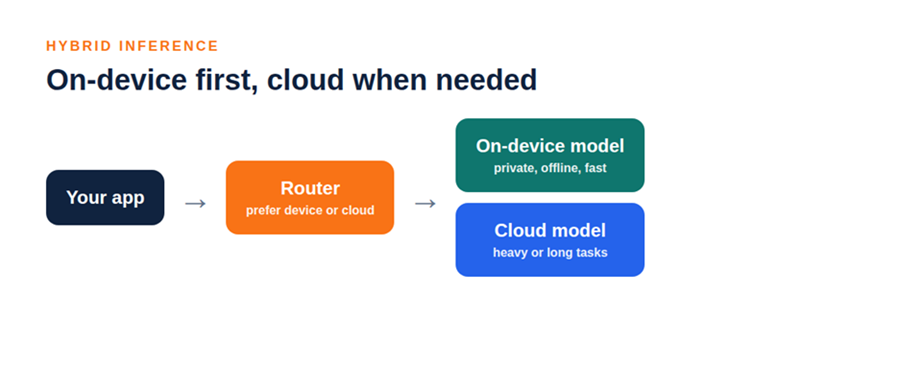
Alt text: Infographic: hybrid AI inference in a mobile app, routing requests between the on-device model and the cloud model | File: article6-hybrid.png
The decision rule is easy to remember. Keep sensitive and simple tasks on the device. Send heavy or long-context tasks to the cloud. Design the app so it still works when one path is unavailable.
4. Cross-platform tools keep maturing
Flutter, React Native and Kotlin Multiplatform now cover most business and consumer apps. For many teams, one codebase for both stores is the default, and native code is used where it earns its place, such as heavy graphics or very new platform features.
That does not make native obsolete. Teams that need the earliest access to platform AI features often write those parts natively. Our comparison of Flutter vs React Native helps you choose, and our post on what makes Flutter ideal for MVP development shows when Flutter is the faster route.
5. Modern native UI toolkits
Jetpack Compose on Android and SwiftUI on iOS are now the standard way to build native interfaces. Apple's iOS 27 release continues to expand SwiftUI with document-based apps, reorderable lists and lazily loaded subviews, along with refreshed materials and navigation bars (Apple Developer, WWDC26).
The benefit for teams is less code and faster iteration. If you are starting a new project, ask your partner whether the native layers will use these toolkits. Our overview of iOS frameworks covers the tools worth knowing, and our guide on Android app development fundamentals is a useful companion.
6. Privacy and platform rules shape the build
Stores keep raising the bar. From August 31, 2026, new apps and updates on Google Play must target Android 16 (API level 36), with an extension available to November 1, 2026 (Android Developers, 2026). Both stores also require privacy disclosures.
Treat these rules as part of the plan, not a release-week surprise. Build the data map early, collect only what you need and keep a person responsible for store compliance. On-device AI helps here because user data does not have to leave the phone.
7. New device types and screen shapes
Phones are no longer the only target. Google's publishing rules already name separate requirements for Wear OS, Android Automotive OS, Android TV and Android XR apps, and Apple's iOS 27 adds layouts that adapt for iPhone Mirroring.
You do not need to build for every surface. You do need a design system that scales, so adding a watch or a tablet later does not mean starting over. Teams doing android app development increasingly test across form factors from the start, and android application development partners should show you a device plan before you sign.
8. Testing catches up with AI features
AI features behave differently from normal code. The same prompt can produce different results, so unit tests alone are not enough. Apple's new Evaluations framework is designed to verify AI features across dynamic conditions, and Android's tooling includes a test agent for debugging AppFunctions in a simulated agent environment.
Plan for this in your budget. AI quality needs test sets, human review and monitoring after launch. Our guide on AI voice agents for business shows what that looks like in a live use case.
What these trends mean for your next app
Start small and keep the foundations clean. Choose a framework your team can support, put data protection into the first design and add one AI feature that solves a real problem before you add five. Mobile app development services that cover the app, the backend and the AI layer together make this much easier, and wider application development services keep the data side consistent.
If you are choosing a partner, look for people who have shipped on both platforms and can explain the trade-offs in plain language. Our guide to choosing an AI mobile app development company lists the questions to ask. When you are ready to hire mobile app developers, our notes on IT staff augmentation explain one fast route.
How DianApps builds for these trends
At DianApps, we build Android, iOS, Flutter and React Native apps with AI features designed in from the start, from on-device models to cloud agents. As a mobile app development company, we run design, development, QA and release with one team, so each trend becomes a decision with an owner, not a slide in a deck.
If you want to plan an app around these shifts, explore our custom mobile app development or send us your brief. We will tell you which trends are worth using now and which can wait. An app development agency should be able to say that plainly.
The takeaway
Mobile application development in 2026 is about putting AI where it helps, keeping data close to the user and building apps that assistants can reach. Pick two or three of these trends that fit your product, and ignore the rest until they do.
















Sign in to leave a comment.