

Introduction
Laptops have become an important part of daily life. Students use them for assignments and research. Professionals rely on them for meetings, communication, and project management. Business owners handle important tasks, while families use laptops for entertainment, shopping, and staying connected. Because laptops are used so frequently, they naturally experience wear and tear over time.
A laptop that once operated quickly can eventually become slow. Batteries lose their ability to hold a charge. Screens become damaged after accidental drops. Keyboards stop responding properly after years of use. Many users continue working through these issues until the device becomes difficult to use. However, addressing problems early can prevent expensive repairs and extend the lifespan of a computer.
Understanding common laptop issues and available repair solutions helps users make better decisions when problems arise. Professional repair services can restore performance, improve reliability, and help devices remain productive for years.
Warning Signs Your Laptop Needs Repair
Laptop problems often begin with small warning signs. Recognizing these symptoms early can prevent larger issues from developing.
Slow startup times are among the most common complaints. If a laptop takes several minutes to boot or applications load slowly, there may be hardware or software problems affecting performance.
Frequent freezing is another sign that something is wrong. A computer that stops responding regularly may be experiencing storage issues, memory limitations, overheating, or software conflicts.
Battery problems are also common. Many users notice that their laptop no longer lasts through a workday without charging. Batteries naturally wear out over time and eventually require replacement.
Unusual fan noise should not be ignored. Loud cooling fans often indicate overheating or excessive dust accumulation inside the system. If left untreated, overheating can damage sensitive internal components.
Keyboard problems can also interfere with productivity. Sticking keys, unresponsive buttons, and accidental double typing are signs that repair may be necessary.
Recognizing these warning signs early allows users to seek professional assistance before problems become more serious.
Why Laptop Problems Should Not Be Ignored
Many people postpone repairs because their device still functions. While this may seem practical in the short term, delaying repairs often creates additional complications.
For example, a failing battery can place extra stress on power management systems. Excessive heat caused by clogged cooling systems can shorten the lifespan of processors and storage drives. Small screen cracks can spread and affect visibility over time.
Performance issues may also worsen gradually. A computer that occasionally freezes today could become nearly unusable in a few months if the underlying cause is not addressed.
Early intervention often reduces repair costs and minimizes downtime. Professional diagnostics help identify the root cause of a problem before additional components become affected.
Common Laptop Repair Services
Professional technicians perform a variety of repairs designed to restore functionality and improve system reliability. Some services are requested more frequently because they address everyday problems faced by laptop users.
Screen Repair and Replacement
Laptop displays are vulnerable to accidental damage. A dropped device, pressure inside a backpack, or impact during transportation can crack the screen.
Even minor display damage can affect daily activities. Users may experience distorted images, dead pixels, flickering screens, or dark areas that reduce visibility.
Laptop screen repair restores image quality and allows users to work comfortably again. Depending on the extent of the damage, technicians may replace the display assembly with a compatible component that matches the device specifications.
A properly functioning display improves productivity, reduces eye strain, and enhances the overall user experience.
Battery Replacement Solutions
Laptop batteries gradually lose capacity after repeated charging cycles. As batteries age, they hold less power and require more frequent charging.
Laptop battery replacement becomes necessary when users notice rapid power loss, unexpected shutdowns, or warning messages regarding battery health.
Installing a new battery often restores mobility and convenience. Users can once again work, study, or travel without constantly searching for power outlets.
Battery replacement is one of the most effective ways to improve laptop usability and extend the life of a device.
Keyboard Repair Services
The keyboard is one of the most heavily used parts of any laptop. Over time, dirt, spills, and normal wear can affect key performance.
Some keys may stop responding entirely. Others may become stuck or produce multiple characters with a single press. These issues can significantly reduce productivity and create frustration during everyday tasks.
A keyboard repair service helps restore accurate typing and comfortable operation. Depending on the problem, technicians may clean, repair, or replace affected components.
Reliable keyboard performance is essential for students, professionals, and anyone who spends significant time working on a laptop.
Fixing Laptop Overheating Issues
Heat is one of the biggest threats to laptop performance and longevity. Internal components generate heat during operation, and cooling systems are responsible for maintaining safe temperatures.
Dust accumulation often blocks airflow and forces cooling fans to work harder. As temperatures rise, performance may decrease due to thermal throttling. In severe cases, excessive heat can damage internal hardware.
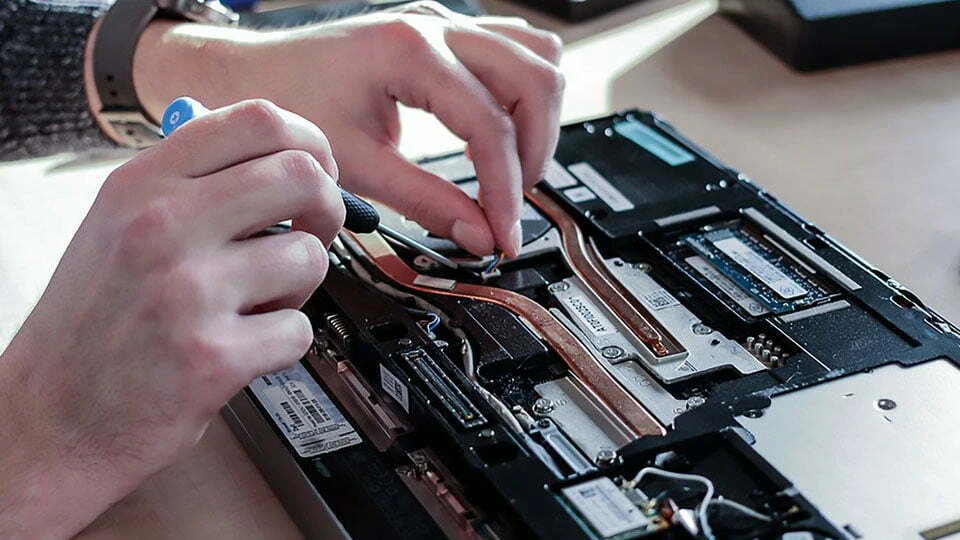
Professional maintenance addresses laptop overheating issues through cleaning, thermal management, and cooling system inspection. Removing dust from vents and fans improves airflow and helps maintain stable operating temperatures.
A properly cooled laptop performs more efficiently and experiences less long-term wear.
The Importance of Hardware Diagnostics
Laptop issues are not always obvious. A slow computer may result from storage problems, memory limitations, software conflicts, or failing hardware components.
Hardware diagnostics allow technicians to evaluate system health accurately. Specialized testing tools identify performance bottlenecks and detect hidden faults before they cause major failures.
Accurate diagnostics eliminate guesswork and ensure repairs target the actual source of the problem. This approach saves time and helps users avoid unnecessary expenses.
Professional evaluation is particularly valuable when multiple symptoms occur simultaneously. Thorough testing provides a complete understanding of device condition and repair requirements.
Data Recovery and File Protection
For many users, the most valuable part of a laptop is not the hardware but the information stored on it. Personal photos, business documents, financial records, and academic projects often reside on a computer for years.
When a storage device fails, important files may become inaccessible. This situation can create significant stress, especially if backups are unavailable.
Data recovery services help retrieve information from damaged or malfunctioning storage devices. Recovery specialists use specialized techniques to access files that may otherwise appear lost.
Although recovery success depends on the nature of the failure, professional assistance often improves the chances of retrieving valuable data.
Regular backups remain one of the best ways to protect important information. Combining backup practices with professional maintenance provides strong protection against unexpected data loss.
How to Extend Laptop Lifespan
Proper care plays a major role in maintaining laptop performance and reliability. Simple maintenance habits can reduce repair needs and improve long-term durability.
Keeping the device clean is one of the most effective strategies. Dust buildup restricts airflow and contributes to overheating. Regular cleaning helps cooling systems operate efficiently.
Software updates should be installed consistently. Updates often improve security, fix bugs, and optimize system performance.
Users should also avoid blocking ventilation openings while using their laptops. Soft surfaces such as blankets and cushions can restrict airflow and increase internal temperatures.
Proper storage is equally important. Transporting a laptop in a protective case reduces the risk of physical damage during travel.
Managing storage space can improve system responsiveness. Removing unnecessary files and unused applications helps maintain smooth operation.
These simple habits contribute to better performance and help laptops remain reliable over time.
Choosing the Right Repair Service
Selecting a qualified repair provider is important when dealing with laptop problems. Experience and technical expertise play a major role in repair quality.
Skilled technicians perform comprehensive diagnostics before recommending solutions. This process ensures repairs address the true cause of a problem rather than simply treating symptoms.
Quality replacement components are also important. Durable parts help maintain performance and reduce the likelihood of future failures.
Transparency is another valuable characteristic. Customers should receive clear explanations regarding repair options, expected timelines, and potential costs.
Reliable service providers prioritize customer satisfaction, accurate repairs, and long-term device performance.
Frequently Asked Questions
Why is my laptop running slower than before?
Slow performance can result from storage limitations, insufficient memory, software conflicts, overheating, or aging hardware components.
Can a damaged laptop screen be repaired?
Yes. Most cracked or malfunctioning displays can be restored through professional laptop screen repair or replacement services.
What causes laptops to overheat?
Dust buildup, blocked airflow, aging thermal materials, and heavy workloads commonly contribute to laptop overheating issues.
How often should laptop maintenance be performed?
Basic maintenance and cleaning should be performed regularly. Professional inspections are recommended when performance issues or overheating symptoms appear.
Is data recovery possible after a system failure?
In many cases, yes. Data recovery services can often retrieve important files from damaged or malfunctioning storage devices depending on the severity of the failure.
Conclusion
Laptops support education, business, communication, and entertainment, making dependable performance essential. Common issues such as slow operation, battery wear, display damage, overheating, and keyboard failures can affect productivity and create unnecessary frustration. Professional repair services provide effective solutions through hardware diagnostics, laptop battery replacement, screen restoration, cooling system maintenance, and data recovery services. Addressing problems early helps prevent additional damage and extends the useful life of a device. For users seeking experienced support and reliable computer repair solutions, Infinite Tech Repair helps restore laptop performance and keep devices operating efficiently for everyday needs.


























Sign in to leave a comment.