
Separating The Features That Change Results From The Ones That Just Look Good
RCS gets sold on its flashy extras: carousels, animations, rich branding. In practice, a small handful of features actually drive engagement, while the rest are pleasant but largely cosmetic. Knowing the difference matters if you are deciding where to focus your setup.
This guide breaks down which RCS messaging features genuinely move the needle, and which ones are worth having but rarely decide outcomes on their own.
What Is RCS Messaging ?
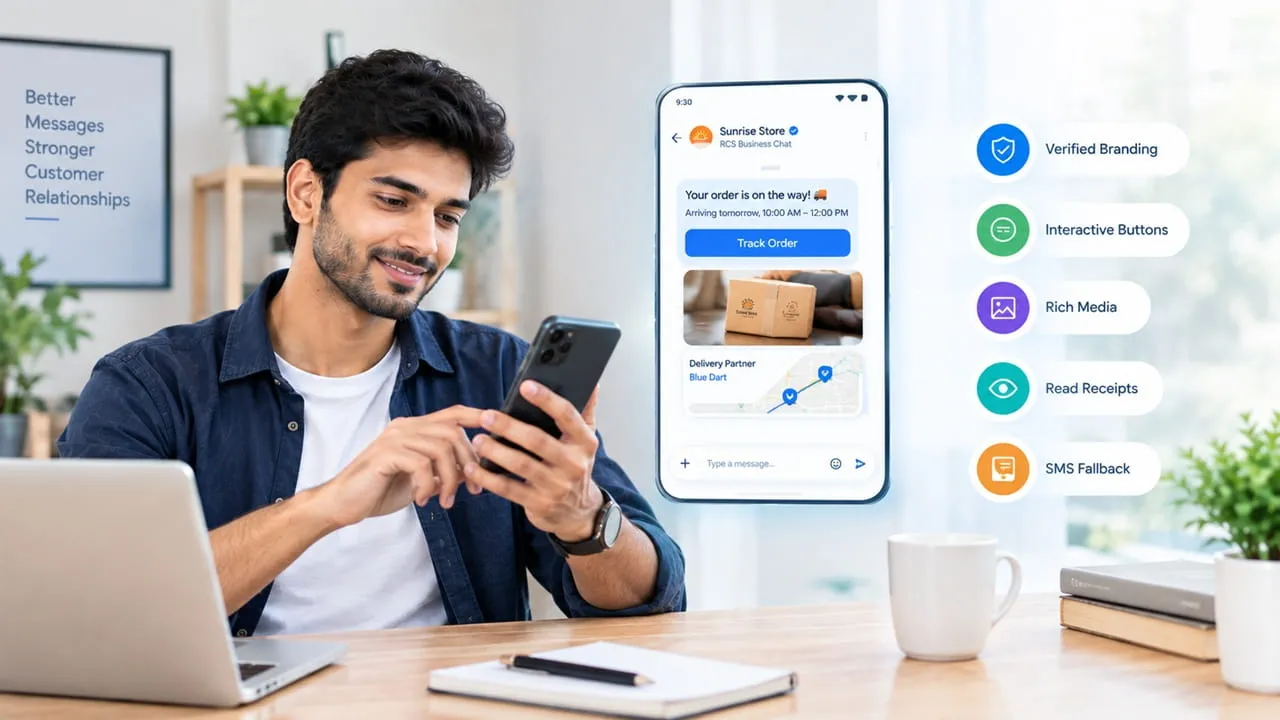
RCS messaging is an upgraded version of text messaging that supports rich media, interactive buttons, and verified branding, delivered through a phone’s existing messaging app.
Unlike older SMS, which only supports plain text, RCS messaging allows businesses to send images, product carousels, buttons customers can tap, and a verified business name and logo, all without requiring the customer to download anything new.
Why Does Verified Branding Matter More Than It Seems?
Verified branding matters more than it seems because it directly affects whether a customer trusts and opens a message in the first place.
What verified branding typically includes:
- Your business name displayed clearly, instead of an unfamiliar number
- Your logo shown alongside the message
- A visible verification mark confirming the sender is genuine
This solves a real problem. Customers increasingly ignore messages from unknown numbers, worried about scams. A verified, branded sender removes that hesitation immediately, which is often the single biggest reason RCS outperforms plain text on open and response rates.
Which RCS Messaging Features Actually Drive Interactive Messaging Results?
RCS messaging features that actually drive interactive messaging results are the ones giving customers something to tap, confirm, or respond to directly inside the conversation.
Interactive messaging works best when it replaces a task the customer would otherwise have to do elsewhere. Common uses:
- “Confirm” or “Reschedule” on an appointment reminder
- “Track Order” linking directly to live delivery status
- “Pay Now” on a payment reminder
- “Yes” or “No” for quick confirmations
This feature consistently ranks among the most impactful, because it removes friction at the exact moment a customer is deciding whether to act. A tap is a much lower barrier than typing a reply or navigating to a website separately.
Does Rich Media Genuinely Change Customer Response, Or Is It Just Decoration?
Rich media genuinely changes customer response when it replaces information the customer would otherwise need to ask for, rather than existing purely for visual appeal.
Where RCS rich media earns its place:
- Product images shown directly in a message, avoiding a separate click
- A delivery photo confirming a package was left safely
- A short video demonstrating how to use a product
- A map image showing a driver’s live location
Where it adds less value:
- Decorative banners with no functional purpose
- Animated elements that slow down loading without adding information
- Media used purely for branding with no relevance to the message content
The distinction is simple: media that answers a question earns its place. Media that just looks nice rarely changes whether the customer takes action.
How Important Is Read Receipt And Typing Indicator Visibility?
Read receipt and typing indicator visibility matters mainly for support conversations, where it reassures the customer that someone is actually responding.
This feature’s practical value:
- Reduces the anxiety of “did they even see my message”
- Signals an active conversation, which can reduce repeat messages
- Helps support teams manage expectations during back-and-forth exchanges
For one-way notifications like an order confirmation, this feature barely matters. For two-way support conversations, it noticeably improves the customer’s sense that they are being attended to, even before a reply actually arrives.
What Role Does Automatic Fallback To SMS Play?
Automatic fallback to SMS plays the role of a safety net, making sure a message still reaches the customer even if their device does not support RCS.
Why this matters:
- Not every phone or carrier supports RCS yet
- A message that would otherwise fail silently instead arrives as a plain text
- Businesses do not need to check device compatibility before sending
- Campaigns and critical alerts reach the full customer base regardless of device
This is one of the less visible features, since customers never notice it working. It matters enormously from an operational standpoint, because it guarantees delivery does not depend on assuming every customer has a fully updated, compatible device.
Which RCS Features Are Genuinely Optional For Most Businesses?
Features genuinely optional for most businesses include heavy animation, elaborate carousel designs, and extensive custom branding beyond a basic verified logo.
Worth deprioritizing unless you have a specific reason:
- Complex animated transitions between message elements
- Long product carousels with more items than a customer will realistically scroll through
- Highly customized visual themes that take significant design time to build
These are not without value, but they rarely change whether a customer engages compared to the fundamentals: verified branding, functional buttons, and useful media. Businesses just getting started with an RCS messaging platform get more return focusing on those basics first.
Final Thought
Choosing which RCS features to prioritize is really about matching effort to impact. Verified branding and functional buttons tend to do the heavy lifting, while richer extras add polish once those basics are working. Providers like Arihant Global usually set up business messaging in exactly that order, focused on what actually moves engagement before layering on anything decorative.
Frequently Asked Questions
Q1. Do customers need a special app to receive RCS features?
No. RCS works through the default messaging app already installed on most modern smartphones, so no download is required.
Q2. What happens if a customer’s phone does not support RCS?
A good RCS platform automatically falls back to sending a standard text message, so the customer still receives it.
Q3. Which RCS feature should a business set up first?
Verified branding and simple interactive buttons tend to deliver the most noticeable improvement with the least setup effort.
Q4. Is RCS more expensive than plain text messaging?
It can cost slightly more per message due to the added features, though the improved response rates often offset that difference for the messages that matter most.

















Sign in to leave a comment.