

Service workers are helpers that work behind the scenes in your browser. They are placed between your web app and the network and they monitor events even when you close the page. They accelerate the opening of apps and increase their stability by managing network requests and caching files. Service workers are the magic sauce in Progressive Web Apps (PWAs) that enable fast startup, buttery smooth performance, and offline.
This blog is going to discuss service workers in PWA and how they create an offline-first architecture. We are going to discuss their life cycle, caching strategies, use cases, testing tips, and look into the future of these powerful scripts. Every section contains two distinct paragraphs to make it easy and beneficial to read. At the end of this, you will learn why service workers are the core of contemporary web applications.
Well-researched read: Progressive Web Apps: Features, Architecture, Pros & Cons
What Are Service Workers?
A service worker is a JavaScript code that your web page registers. After registration, it operates in a separate thread and can capture network requests of the page it owns. In contrast to regular scripts that terminate when you navigate away a page, service workers remain alive and wait to receive events such as fetch, push, or sync. This enables them to serve as a proxy that can be customized between your app and the network.
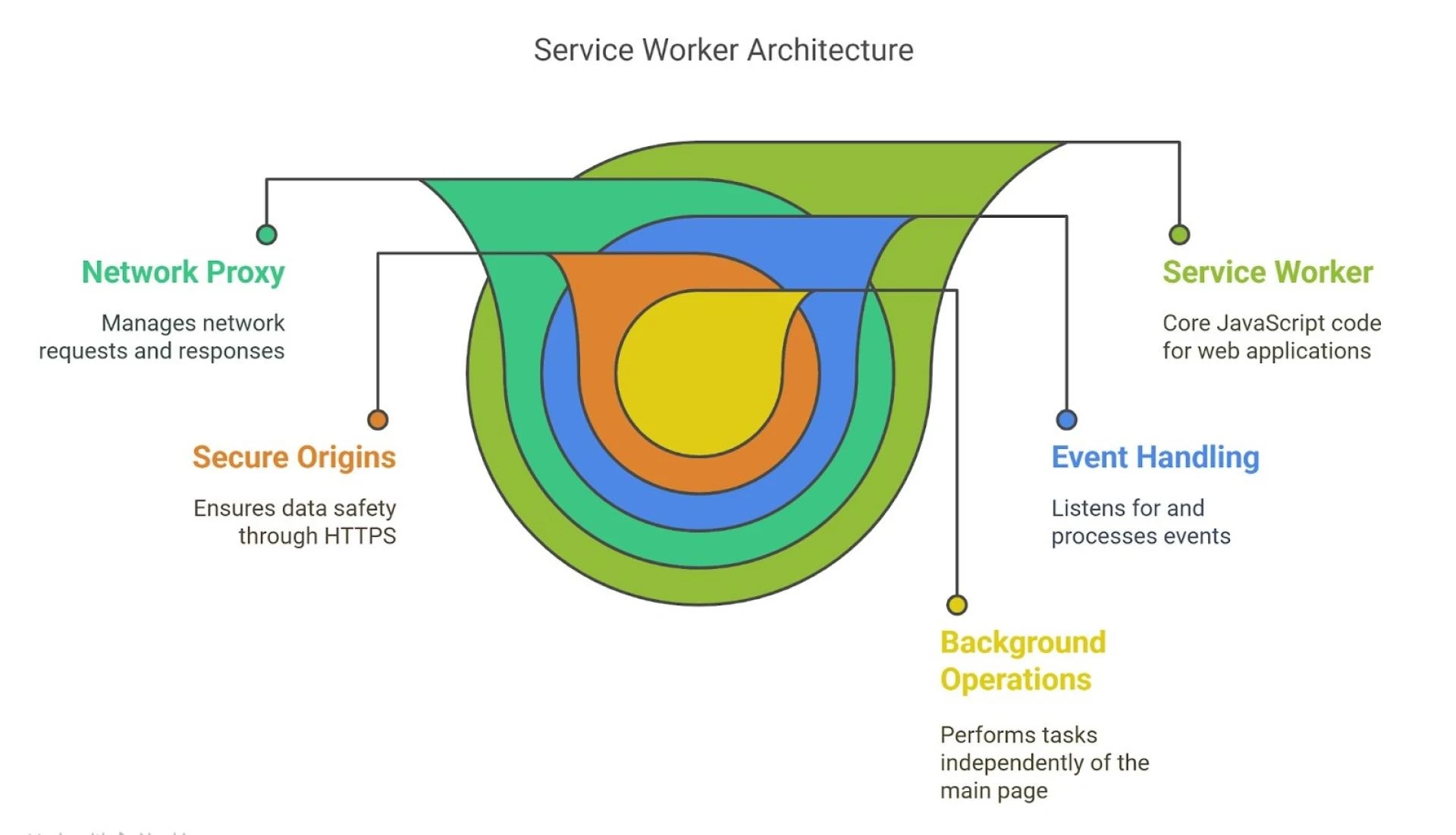
The service workers are only used on secure origins (HTTPS) to maintain the safety of data. They are loaded independently of the main page, and therefore do not have direct access to the DOM. Rather, they communicate on pages using messages. This division makes them safer and dependable. Service workers can be used by developers to cache files, manage push notifications, and synchronize data in the background.
How Service Workers Work Behind the Scenes
The first time a user accesses a PWA, the service worker script is downloaded by the browser and installed. The service worker tends to employ a technique known as pre-caching during installation to pre-cache critical files such as HTML, CSS, and images in a cache storage. This means that the app shell will be preloaded to load fast on subsequent visits, even when the network is slow or absent.
When the installation completes, the service worker becomes activated. It can then seize the pages within its scope. At this stage, all network requests on those pages are passed through the fetch event listener of the service worker. The service worker has the choice of returning a cached response, making a network request, or executing custom logic, allowing smart routing and offline capability.
When the installation completes, the service worker becomes activated. It can then seize the pages within its scope. At this stage, all network requests on those pages are passed through the fetch event listener of the service worker. The service worker has the choice of returning a cached response, making a network request, or executing custom logic, allowing smart routing and offline capability—core features of modern Digital Transformation Services.
Caching Strategies for PWAs
The appropriate choice of caching strategy will assist in striking the balance between speed and data freshness. A typical strategy is cache-first, in which the service worker searches the cache and then attempts to use the network. This ensures that repeat visits are very quick since resources are served locally. It is, however, able to serve stale files in the event of a change in the site.
Another option is network-first, in which the service worker attempts the network and only fails to the cache when the network is down. This is perfect on pages that require updated information, e.g. news feeds or social posts. Hybrid techniques, such as stale-while-revalidate, are also possible, in which the worker responds with the cache as soon as possible and updates it in the background to be used later.
Enabling Offline-First Architecture
Offline-first architecture implies developing apps so that they can run without an internet connection or with a bad connection. This is facilitated by service workers who cache all the assets and data to render pages. When the network is lost, the service worker provides cached files to enable users to browse, fill forms, or read.
To take it a step further, API responses can be cached by the developers. As an example, a service worker stores a copy of the list of items when it is fetched. It uses the data saved on later visits or when offline. This method maintains the interactions between the user to be smooth and does not break the pages. PWAs are reliable and fast in any circumstances because they think offline-first.
Struggling to manage offline data sync? Automate cache strategies with AI Automation Services.
Service Worker Lifecycle
There is a definite lifecycle of service workers: install, activate, and fetch. The worker caches files during the install event. When it is activated, it removes old caches to ensure that storage does not become excessive. Lastly, during the fetch stage, it delivers cache or network responses, depending on your logic.
When you change the service worker script, the browser installs the new one in the background without breaking open pages. The new employee does not activate until all the pages with the old version are closed. Developers can also append self.skipWaiting() to trigger the new worker to run immediately and clients.claim() to claim pages, but these are to be applied with caution to prevent abrupt interruptions.
Common Use Cases of Service Workers
Service workers excel at offline support and caching, but that is not their only strength. They allow push notifications, which allow your PWA to send alerts even when the app is closed. This keeps the user active with up-to-date offers and updates that appear like native app messages.
Background sync is another application. Service workers can reattempt to send data that the user entered when offline when the network becomes available again, when the user fills out a form or posts data. This will make sure that actions are not lost and that the app will be able to deal with intermittent connections. Performance can also be measured by recording load times in the worker and adjusting future requests by the developer.
Debugging and Testing Service Workers
Special attention should be paid to the testing of service workers. In Chrome DevTools, the Application tab allows inspecting registered workers, viewing the cache storage, and simulating offline mode. You can simulate what happens when your app is offline by switching the network panel to Offline.
Service worker logs are shown in the Service Worker section of the console. You are able to de-register and re-register workers to test updates. Caching and routing rules can be simplified by using tools such as Workbox, which provides you with built-in tests. Testing edge cases, such as corrupted cache or unsuccessful network requests, is important to provide a smooth user experience.
Confused by complex caching logic? Optimize performance using TensorFlow Development Services.
Best Practices and Tips
With service workers, cache as little as possible to prevent long install times. Organize the group assets by type or version to make the updates easily. Put semantic versioning in your cache names so that you can clear out old caches in the activate event.
Treat errors in fetch handlers. In case of network and cache failure, display an amiable offline page or retry button. Do not make service workers do heavy computation; make them lean to avoid delays in starting up. Lastly, track performance and storage to maintain your PWA fast and efficiently.
Security Considerations
HTTPS is used to secure data in transit by running service workers on top of it. This avoids man-in-the-middle attacks that may interfere with the scripts or data. Always check the integrity of the important assets prior to caching and you can use Subresource Integrity (SRI) tags on third-party libraries.
Do not expose sensitive data to cache storage. Use caches as public storage and never put personal user data or tokens in plaintext. Audit your service worker code and cache content on a regular basis to make sure that you do not save anything sensitive by mistake.
Advanced Patterns and Tools
Libraries such as Workbox offer pre-packaged libraries to make typical caching and routing patterns easier. Workbox enables you to create service workers with very little code, manage versioning, and include more advanced capabilities such as background sync with just a few lines of configuration.
The other trend is custom logic runtime caching. As an example, you could cache images on demand or give priority to text over media on slow connections. Writing custom event listeners in your service worker allows you to handle each request in a way that suits you and dynamically adjust to the conditions of the user.
The Future of Service Workers
Browsers are still enhancing service worker features. New APIs, such as the Periodic Background Sync, enable workers to wake up periodically to update caches or request new data. This implies that PWAs can be up to date even when they are not open.
In future years, service workers can be granted access to additional functionality of the device, e.g. Bluetooth, file system access, or camera controls. With the evolution of standards, service workers will fill the gap between web and native apps, which will make the web platform even more powerful.
Facing challenges in background sync? Enhance reliability with Golang Development Services.
Conclusion
Offline-first architecture is a reality because service workers are the backbone of PWAs. They manage network requests, cache files, provide push notifications, and synchronize data-empowering apps to run smoothly in any conditions. Through service workers in PWA, developers are able to provide quick, dependable, and captivating experiences.
Service workers make web apps feel app-like and robust with the proper caching strategy, a well-managed lifecycle, and good testing. Service workers will continue to be vital in the development of the next generation of web applications as browser support and standards increase.





















Sign in to leave a comment.