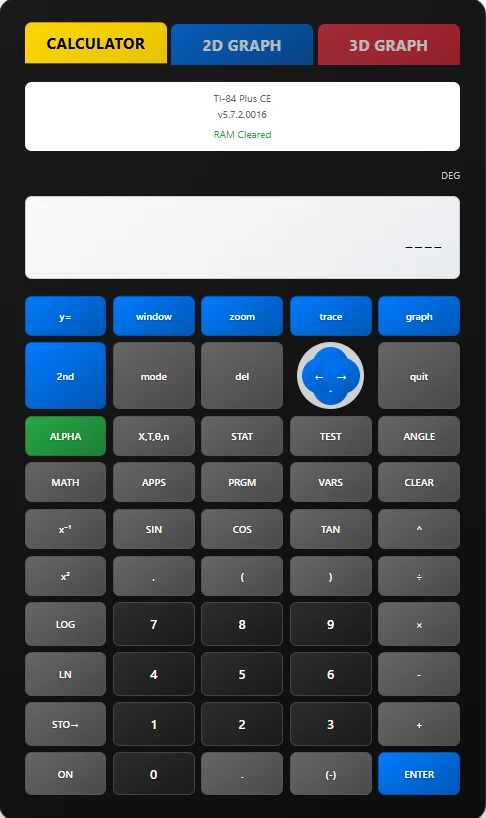

If you’ve taken a math or science class in the last 20 years, chances are you’ve used or at least seen the TI 84 graphing calculator. Known for its durability and versatility, the TI 84 has been a trusted tool for algebra, trigonometry, calculus, and even programming. But times are changing. Today, you don’t need to purchase or carry around the physical device — you can access an Online TI 84 Graphing Calculator right from your browser. And one of the best places to do it is
In this guide, we’ll explore why online graphing calculators are so useful, how they compare to traditional models, and why T184Pro stands out as a leading platform.
Why the TI 84 Remains Iconic
Before diving into the online version, it’s worth recognizing why the TI 84 is still a household name in education:
- Versatility: It handles basic arithmetic, advanced functions, statistics, and graphing.
- Durability: A physical TI 84 can last years, even decades.
- Standardization: Many textbooks and teachers use the TI 84 as their reference tool, so students learn its specific interface.
- Exam Approval: Physical TI 84 calculators are often approved for standardized tests like the SAT and ACT.
The online version exists to replicate these strengths — while adding new benefits.
The Benefits of an Online TI 84 Graphing Calculator
So, why go digital instead of sticking with the handheld device? Here are some clear advantages:
- Access Anytime, Anywhere
- Whether you’re on a Chromebook at school, a tablet at home, or your smartphone on the go, the online TI 84 works across devices.
- No Batteries, No Hassle
- Physical calculators rely on AA batteries or charging cables. An online version simply runs in your browser — as long as you have Wi-Fi, you’re good to go.
- Free or Low-Cost
- Instead of spending $100+ on hardware, platforms like T184Pro make powerful graphing tools available to everyone, reducing financial barriers.
- Automatic Updates
- No firmware installs or hardware replacements. Features and fixes roll out instantly online.
- Enhanced Features
- With tools like 3D graphing and AI assistance, the online TI 84 often offers more than the physical version.
Why T184Pro is the Best Choice
There are many online calculators out there, but T184Pro offers one of the most complete and accessible TI 84 experiences. Here’s what makes it special:
- No Login Required
- Jump straight into graphing without creating an account or filling out forms. Instant access saves valuable time.
- Multiple TI 84 Versions
- Whether you’re familiar with the TI 84 Plus CE, the Python Edition, or the latest “2025 Edition,” T184Pro lets you explore different models.
- Advanced Graphing
- Beyond standard function plotting, you can rotate, zoom, and visualize graphs in 2D and 3D. This makes it easier to understand complex math relationships.
- Extra Tools
- With a built-in AI Math Assistant and a step-by-step math solver, T184Pro isn’t just a calculator — it’s a full math learning platform.
- Familiar Interface
- The online design mirrors the physical TI 84 layout. This is perfect for students practicing for exams, since they’ll encounter the same menus and key sequences on the handheld version.
Who Benefits From the Online TI 84?
- Students: From algebra homework to AP calculus, the online TI 84 is a must-have study companion.
- Teachers: Demonstrate concepts in real time during lessons, whether in-person or online.
- Parents: Help kids with homework without needing to buy an expensive calculator.
- STEM Professionals: Use it as a quick and reliable tool for calculations, graphs, and analysis.
- Math Enthusiasts: Explore functions and programming just for fun, without buying hardware.
How to Use T184Pro’s Online TI 84
Getting started is straightforward:
- Go to t184pro.com.
- Select your desired calculator model (TI 84 Plus CE, Python Edition, or others).
- Enter equations in the Y= menu.
- Adjust graphing windows and use zoom tools to explore different views.
- Use trace and intersect functions to analyze results.
- Experiment with the additional features like the math solver for extra help.
Because the layout is nearly identical to the physical TI 84, anyone who’s used the handheld model will feel right at home.
Comparing T184Pro to Alternatives
- Texas Instruments’ Official Online Calculator
- TI does offer an official TI 84 online version, but it often requires a paid subscription. T184Pro provides free access and extra features like AI assistance.
- Other Graphing Tools
- Many websites provide generic graphing calculators, but they don’t replicate the TI 84 interface. For students preparing for classes and exams, that familiarity matters.
- Downloadable Emulators
- Some users download emulators, but they require installation and can be tricky on certain devices. T184Pro works instantly in your browser.
A Few Things to Keep in Mind
- Internet Required: You’ll need Wi-Fi to use it.
- Exam Policies: Most exams require a physical calculator, so check rules before test day.
- Performance: While T184Pro runs smoothly on most devices, older hardware may struggle with complex 3D graphs.
Final Thoughts
The online TI 84 graphing calculator is more than just a convenient alternative — it’s the future of accessible math learning. Platforms like this provide students, teachers, and professionals with powerful, flexible, and free tools to explore math without limits.
Whether you’re plotting your first parabola, running statistics for a science project, or diving into calculus, T184Pro gives you the full TI 84 experience — anytime, anywhere.
Stop worrying about batteries, cost, or forgetting your calculator at home. With T184Pro, your TI 84 lives in the cloud.





























Sign in to leave a comment.