
In the ongoing pursuit of smarter, more efficient, and automated industrial operations, integrating the right computing technology is no longer optional—it’s essential. As businesses across manufacturing, logistics, energy, and even healthcare sectors pivot toward digital transformation, the need for rugged, high-performance computing solutions has grown exponentially. In this context, choosing the right Industrial Touch Screen Computer can make or break the success of your automation project.
At ValanoIPC, we understand that the right industrial computer is more than just a display. It becomes the interactive hub for process control, data collection, systems monitoring, and real-time decision-making on the factory floor. As Industry 4.0 continues evolving with the rise of IoT, machine learning, and cyber-physical systems, having a reliable, intuitive, and rugged interface is critical. That’s exactly what Industrial Touch Screen Computers are built for.
However, with a wide range of models, specifications, and form factors available today, selecting the most suitable solution can be overwhelming—even for seasoned engineers. Your project may require fanless operation for a cleanroom environment, waterproof enclosures for food processing, or extended temperature tolerance for outdoor use.
What Is an Industrial Touch Screen Computer?
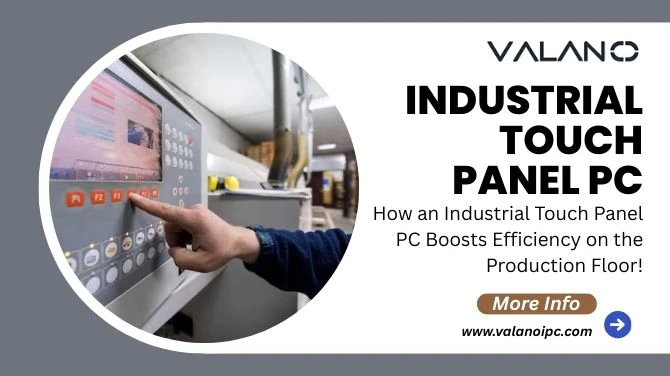
An Industrial Touch Screen Computer is a ruggedized computing device designed specifically for demanding operational environments. Unlike consumer-grade devices, these computers combine durable hardware with advanced input capabilities and are built to work reliably around the clock—regardless of heat, moisture, vibration, or dust.
They also serve as HMIs (Human-Machine Interfaces), enabling operators to control machines, view data dashboards, enter instructions, or interact with control software through a robust and intuitive touchscreen interface.
Common Applications:
- Factory automation
- Process control systems
- Food and beverage production
- Oil and gas monitoring
- Mining and heavy machinery control
- Smart buildings
- Transportation systems
- Healthcare monitoring equipment
Why are they important? They help bridge the gap between complicated machinery and human interaction by providing a responsive, digital interface that simplifies system operations while boosting productivity.
Key Considerations When Choosing an Industrial Touch Screen Computer:
Environmental Conditions: Know Your Operational Environment
Evaluate the environment where the Industrial Touch Screen Computer will be deployed. Key questions include:
- Will it be exposed to dust, debris, heavy moisture, or chemicals?
- Is it subject to extreme temperatures or humidity levels?
- Will it be used outdoors or in direct sunlight?
Important Specs to Check:
- Operating Temperature Range: Some units operate from -20°C to +70°C
- IP Ratings: IP65–IP69K for dust and water protection
- NEMA Ratings: For waterproof and washdown environments
- Material Enclosure: Stainless steel for hygiene or aluminum for heat dissipation
Pro Tip: Select a model that exceeds your current requirements to account for future environmental changes.
Processing Power and Performance Needs
Match computing power to your software and workflow requirements. Will the system run lightweight apps, or are you integrating a heavy SCADA platform with video streaming analytics?
Processor Options:
- Intel Atom for entry-level data input/output tasks
- Intel i5/i7 for multitasking, machine learning, or video analysis
- ARM-based CPUs for low-power Android platforms
Also consider:
- RAM: 4GB to 16GB, depending on application
- Storage: SSD vs. eMMC; size based on OS and workload
- Graphics: Required for CAD rendering or 3D monitoring software
Operating System Compatibility
Consider software compatibility—especially for automation systems.
- Windows (most industrial software is built for Windows)
- Linux (great for open-source tools and engineers comfortable with it)
- Android (ideal for custom mobile-style applications at a lower cost)
At ValanoIPC, we provide a wide range of OS support, optimized builds, and long-term system updates.
Mounting Options and Flexibility
How and where the computer will be mounted is another key aspect.
- Panel mount: Flush with enclosures
- VESA mount: Compatible with brackets and arms
- Wall, desk, or pole mount: For warehouses or mobile carts
Flexible mounting ensures safety and convenience for operators.
Connectivity and Expansion
Your Industrial Touch Screen Computer must integrate seamlessly with other automation equipment.
Look for:
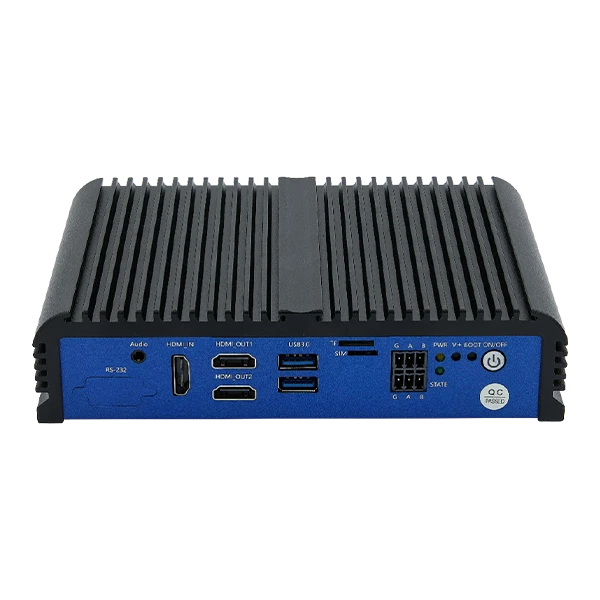
- RS232/RS485 and CAN for legacy machine interfaces
- USB 3.0/2.0 and HDMI
- Ethernet (1G/10G)
- Optional wireless: Wi-Fi, Bluetooth, LTE
- GPIO for triggering alarms or events
Optional Expansion Slots:
- PCIe or mini-PCIe slots for additional cards
- SD card readers
- NVMe-enabled sockets
Durability and Maintenance
Opt for systems that are:
- Fanless: Reduces breakdown from dust or vibration
- Cable-less design: Minimizes wear and simplifies maintenance
- Long-Term Availability: Supports product lifecycle continuity
ValanoIPC units are designed for operation 24/7, minimizing downtime and maintenance.
Matching the Right Touch Screen Computer to Your Automation Use Case
Let’s look at several scenarios and the ideal configuration.
Factory Floor Machine Interface
- Screen: 10.4” capacitive
- OS: Embedded Windows
- CPU: Intel i3/i5
- Connectivity: RS-485, Modbus, Ethernet
- IP Rating: IP66 front bezel
Cleanroom or Food Processing
- Screen: 15.6” stainless steel, projected capacitive
- Enclosure: Fully sealed IP69K
- OS: Linux or Windows
- Features: Anti-bacterial coating, glove support
Outdoor Field Application
- Screen: High brightness (1000 nits), anti-glare
- Temperature: -20°C to +70°C
- Power: DC input with surge protection
- Mount: VESA + outdoor enclosure
Common Mistakes to Avoid
- Choosing based on price alone: Always match features with the application.
- Ignoring software compatibility: Ensure your control software runs natively.
- Underestimating environmental challenges: A desktop panel won’t last long exposed to oil or vibration.
- Neglecting the availability of support components (like mounting kits, cables, sealants)
- No plan for OTA updates or remote troubleshooting
Why Choose ValanoIPC for Your Industrial Touch Screen Computer?
At ValanoIPC, we specialize in tailored computing for industrial use. Every system we build is tested under real-world conditions with a focus on:
- Long-term availability
- Comprehensive configurability
- Certified components
- Global support infrastructure
- Custom branding & OEM solutions
We also offer consultation services to guide clients in choosing the perfect configuration based on project scope, performance expectations, and environmental factors.
Build a Smarter Factory from the Interface Up
Your automation project’s success starts with a seamless interface between machine and operator. The Industrial Touch Screen Computer is that interface—a critical hub blending reliability, connectivity, and intuitive interaction.

Frequently Asked Questions (FAQ)
Q1: Can I run PLC software directly on an Industrial Touch Screen Computer?
Yes. Our systems support most major PLC software, such as Siemens TIA Portal, Rockwell Automation, and Omron CX-One. Compatibility depends on the OS and CPU configuration.
Q2: Are Industrial Touch Screen Computers fanless?
Most ValanoIPC models are fanless by design for enhanced durability in dusty or vibration-heavy environments. They use passive cooling via aluminum or steel housing.
Q3: Can I customize the enclosure for my brand or industry?
Absolutely. We offer OEM and ODM options, including custom enclosures, logo engraving, and private-label boot screens.
Q4: How do I update software across multiple devices?
Our devices support over-the-air (OTA) updates via central server management protocols. We also offer MDM (Mobile Device Management) services for Android/Linux builds.
Q5: What’s the lifespan of an Industrial Touch Screen Computer?
Typically, 5–10 years for most models, with extended support options available. We provide lifecycle management to ensure part availability and minimal disruption.
Q6: Is remote monitoring possible?
Yes, with remote access tools or integrated platforms, you can supervise device health, performance, and connectivity from anywhere in the world.






















Sign in to leave a comment.