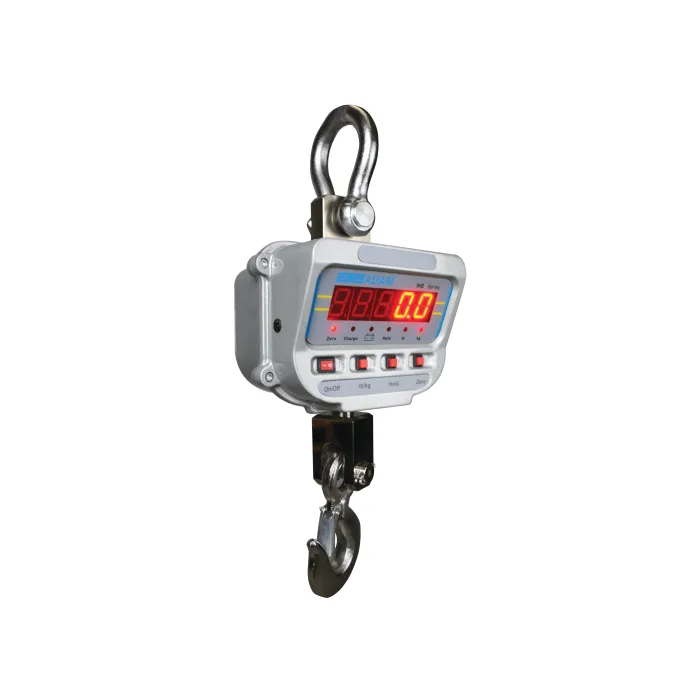

The Adam Equipment Crane Scale IHS series is designed for demanding industrial environments where accurate suspended weighing is essential. Commonly used in warehouses, manufacturing plants, shipping yards, and heavy-duty logistics operations, the IHS crane scale delivers reliable performance even under tough conditions.
However, because crane scales operate in high-load and dynamic environments, occasional issues can arise due to overload, environmental stress, or setup errors. The good news is that many of these problems can be resolved quickly with simple troubleshooting steps.
Most common issues with the Adam Crane Scale HIS & quick fixes:
1. Crane Scale Not Turning On
A scale that refuses to power on is one of the most common and frustrating issues in busy operations.
Possible Causes:
- Battery is fully discharged
- Faulty charger or power adapter
- Loose charging connection
- Internal power board issue
Quick Fixes:
- Fully recharge the internal battery before use
- Inspect the charging cable for damage or wear
- Try an alternative compatible charger if available
- Ensure the power switch is functioning correctly
In many cases, crane scales that appear “dead” simply need a full recharge cycle.
When to Call Support:
If the unit does not power on after a full charge and verified adapter, there may be an internal battery failure or power circuit fault requiring servicing.
2. Unstable or Fluctuating Weight Readings
Unstable readings are particularly common in suspended weighing systems like crane scales due to movement and environmental conditions.
Possible Causes:
- Load is swinging or not stable
- Wind or air movement affecting suspension
- Overloading or near-capacity usage
- Worn or damaged load cell
- Electrical interference in industrial environments
Quick Fixes:
- Allow the load to fully stabilise before recording weight
- Reduce swinging by using stabilising techniques or slower lifting
- Ensure the scale is not exceeding its maximum capacity
- Move away from strong airflow or vibration sources
- Re-zero the scale before each reading
When to Call Support:
If readings remain unstable even with a stationary load, the load cell or internal sensor may be damaged and require professional replacement.
3. Display Shows Error Codes (e.g., ERR, OL, Lo, UNST)
Error codes on the Adam Scale are designed to quickly alert users to system issues.
Possible Causes:
- Overload condition (OL)
- Low battery (Lo)
- Unstable load detection (UNST)
- Calibration or sensor error
Quick Fixes:
- Remove the load immediately if overload is indicated
- Recharge or replace the battery if “Lo” appears
- Ensure the hook and load are properly secured
- Restart the scale after resetting the load
- Recalibrate if necessary, using certified weights
When to Call Support:
If error codes persist after reset and recalibration, internal electronics or firmware may require inspection.
4. Scale Not Holding Zero (Zero Drift)
Zero drift is when the scale does not return to zero after removing a load.
Possible Causes:
- Load cell stress or damage
- Environmental temperature fluctuations
- Mechanical strain from overloading
- Improper calibration
Quick Fixes:
- Turn the scale off and restart
- Ensure no weight is attached during zeroing
- Perform recalibration in a stable environment
- Allow the scale to warm up before use
When to Call Support:
If zero drift continues repeatedly, it often indicates load cell fatigue or structural deformation requiring servicing.
5. Slow or Delayed Response
A delayed response can impact efficiency in fast-paced industrial operations.
Possible Causes:
- Low battery power
- Internal processing lag
- Overloaded memory or system fault
- Damaged display or control board
Quick Fixes:
- Fully charge the battery
- Turn the scale off and restart
- Remove any unnecessary load or attachments
- Avoid rapid repeated weighing cycles
When to Call Support:
If response delay continues after a full reset and charge, internal circuitry may need diagnostic testing.
6. Calibration Failure or Inaccuracy
Accurate calibration is critical for crane scales used in regulated or commercial environments.
Possible Causes:
- Incorrect calibration weights used
- Calibration performed in unstable conditions
- Load cell degradation
- User error during calibration steps
Quick Fixes:
- Always use certified calibration weights
- Ensure the load is fully removed before calibration
- Perform calibration in a vibration-free environment
- Follow the manufacturer’s calibration procedure precisely
- Allow warm-up time before starting calibration
When to Call Support:
If calibration repeatedly fails or cannot be stored, internal memory or sensor components may be faulty.
7. Remote Display or Signal Issues (If Applicable)
Some IHS configurations include remote display or wireless communication features, which may occasionally fail.
Possible Causes:
- Signal interference in industrial environments
- Weak battery or power supply
- Faulty cable or wireless module
- Pairing or configuration errors
Quick Fixes:
- Check and reconnect all cables securely
- Replace or recharge batteries
- Re-pair wireless connections if applicable
- Move away from high-interference machinery
When to Call Support:
If communication issues persist after reconfiguration, the transmitter or receiver module may need replacement.
8. Physical Damage or Hook Issues
Crane scales operate under heavy load conditions, making them vulnerable to physical stress.
Possible Causes:
- Dropping heavy loads suddenly
- Hook deformation or wear
- Impact damage during handling
- Overloading beyond rated capacity
Quick Fixes:
- Inspect hook and housing for visible damage
- Stop using the scale immediately if damage is detected
- Replace worn hooks if possible
- Ensure correct lifting procedures are followed
When to Call Support:
Any structural damage or deformation requires immediate professional inspection to ensure safety and compliance.
When to Contact Professional Support
While many issues can be resolved quickly on-site, certain problems require expert servicing to prevent further damage or inaccurate readings.
You should contact support if you experience:
- Persistent error codes after reset
- Repeated calibration failure
- Load cell damage or instability
- Zero drift that cannot be corrected
- Power system failure
- Physical damage to hook or housing
- Communication system malfunction
Attempting internal repairs on crane scales is not recommended due to safety risks and calibration sensitivity.
Preventive Maintenance Tips for Adam Crane Scale IHS
To reduce downtime and improve long-term performance, follow these best practices:
- Avoid overloading beyond rated capacity
- Allow load stabilisation before recording readings
- Store the scale in a dry, controlled environment
- Recharge batteries regularly
- Perform routine calibration checks
- Inspect hooks and fittings before each use
Preventive care significantly extends the lifespan and accuracy of your crane scale.
Final Thoughts
The Adam Crane Scale IHS is built for rugged industrial use, but like all precision weighing instruments, it requires proper handling and maintenance. Most common issues—such as unstable readings, power failures, or calibration errors—can be resolved quickly with basic troubleshooting.
However, when problems persist or involve internal components like load cells or electronics, professional servicing is essential to ensure safety, compliance, and accuracy.
With the right maintenance practices and timely support, your Adam crane scale can deliver consistent, reliable performance even in the most demanding environments.
























Sign in to leave a comment.