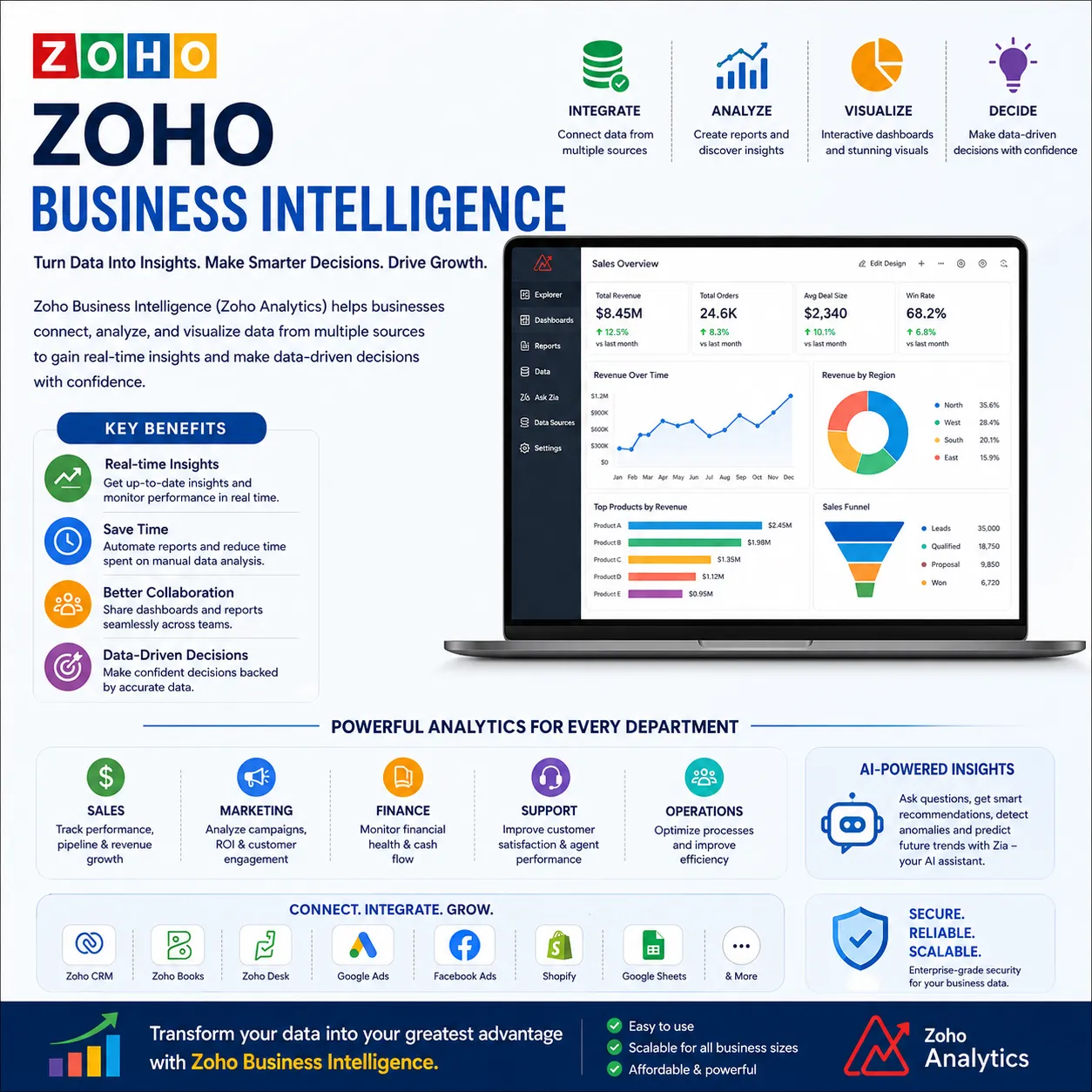

In today’s data-driven world, organizations generate vast amounts of information across sales, marketing, finance, support, and operations. However, without the right tools to interpret this data, it becomes difficult to transform numbers into meaningful insights. This is where Zoho Business Intelligence empowers businesses to make informed, strategic decisions through powerful analytics and reporting capabilities.
Zoho’s BI tools help companies centralize data, visualize performance, and gain actionable insights in real time. By connecting data from multiple Zoho apps and third-party platforms, businesses can create a unified view of their operations and performance metrics.
What is Zoho Business Intelligence?
Turning Data into Actionable Insights
Zoho Business Intelligence refers to the advanced analytics and reporting capabilities offered primarily through Zoho Analytics. It enables organizations to:
- Collect data from various sources
- Transform raw data into visual dashboards
- Generate detailed reports
- Identify trends and patterns
- Make data-backed decisions
Instead of relying on spreadsheets and manual reports, businesses can automate the entire reporting process and access real-time information through intuitive dashboards.
Key Features of Zoho Business Intelligence
Unified Data Integration
Zoho BI connects seamlessly with:
- Zoho CRM
- Zoho Books
- Zoho Desk
- Zoho Projects
- Third-party apps like Google Ads, Facebook Ads, Shopify, and more
This integration provides a 360-degree view of business performance without switching between platforms.
Advanced Data Visualization
With drag-and-drop report builders, businesses can create:
- Charts and graphs
- KPI dashboards
- Pivot tables
- Trend analysis reports
These visual tools make complex data easy to understand for teams and decision-makers.
AI-Powered Insights
Zoho BI includes AI assistance that can:
- Predict trends
- Suggest reports
- Identify anomalies
- Answer data-related questions in simple language
This reduces dependency on data analysts and speeds up decision-making.
Benefits of Zoho Business Intelligence for Organizations
Improved Decision-Making
Leaders can access real-time dashboards showing sales performance, marketing ROI, customer behavior, and financial health, enabling faster and smarter decisions.
Increased Operational Efficiency
Automated reports eliminate manual data entry and reduce human errors. Teams spend less time creating reports and more time acting on insights.
Enhanced Team Collaboration
Shared dashboards allow multiple departments to work with the same data, ensuring alignment across sales, marketing, finance, and support teams.
Customizable Reports for Every Role
Zoho BI allows role-based dashboards. Executives, managers, and team members can each view reports relevant to their responsibilities.
Use Cases of Zoho Business Intelligence
Sales Performance Tracking
Sales managers can monitor:
- Lead conversion rates
- Pipeline status
- Revenue forecasts
- Sales rep performance
Marketing Campaign Analysis
Marketing teams can measure:
- Campaign ROI
- Traffic sources
- Customer engagement
- Cost per acquisition
Financial Monitoring
Finance teams can track:
- Profit and loss
- Expense analysis
- Cash flow trends
- Invoice and payment status
Customer Support Insights
Support managers can analyze:
- Ticket resolution time
- Customer satisfaction
- Agent performance
- Issue trends
How Zoho Business Intelligence Enhances Zoho Ecosystem
Seamless Integration with Zoho Apps
One of the biggest advantages of Zoho BI is its deep integration with the Zoho ecosystem. Data from CRM, Books, Desk, and other apps flows automatically into analytics dashboards without complex setup.
Real-Time Data Synchronization
As soon as new data is added to Zoho apps, dashboards and reports update automatically, ensuring teams always work with current information.
Steps to Implement Zoho Business Intelligence
Data Source Identification
Identify where your business data resides—CRM, accounting software, marketing tools, or spreadsheets.
Data Integration Setup
Connect all data sources to Zoho Analytics for centralized reporting.
Dashboard Creation
Design dashboards based on departmental needs and KPIs.
Report Automation
Schedule automated reports to be shared with stakeholders regularly.
Continuous Optimization
Refine dashboards and reports as business needs evolve.
Why Businesses Prefer Zoho Business Intelligence
Zoho BI stands out because of its affordability, ease of use, powerful integrations, and AI-driven analytics. Small businesses and enterprises alike can leverage its capabilities without investing in expensive BI platforms or technical teams.
It simplifies complex data analytics into user-friendly dashboards that anyone in the organization can understand and use.
Conclusion
Zoho Business Intelligence transforms the way organizations use data. By integrating information from multiple sources, automating reports, and providing AI-powered insights, it helps businesses make faster, smarter, and more confident decisions. Whether tracking sales, analyzing marketing campaigns, managing finances, or improving customer support, Zoho BI provides the clarity needed to drive growth and efficiency.
Adopting Zoho Business Intelligence is not just about reporting—it’s about unlocking the true potential of your business data.



























Sign in to leave a comment.