

In dusty plants, outdoor enclosures, or vibration‑heavy production lines, the weakest link in your automation system is often not the sensor or the PLC—it’s the PC. Fans clog, bearings fail, dust builds up on heat sinks, and suddenly your “industrialized” office machine is the reason a line is down and a shift is idle.
This is exactly the problem a Fanless Industrial MINI PC is designed to solve.
At ValanoIPC, we see the same pattern again and again: environments full of dust, fibers, metal shavings, oil mist, or temperature swings are brutal on traditional computers. However, when those systems are replaced with compact, sealed, fanless units, the number of PC‑related failures drops dramatically—and uptime goes up.
In this article, you’ll learn why a Fanless Industrial MINI PC is often the ultimate solution for dusty, harsh environments, how the engineering behind “fanless” actually works, and what to look for when you evaluate systems for your own applications.
What Is a Fanless Industrial MINI PC?
Before exploring why it’s so effective in challenging conditions, it helps to be clear on what we mean by a Fanless Industrial MINI PC.
In simple terms, a Fanless Industrial MINI PC is:
- Industrial‑grade: Built specifically for 24/7 operation in demanding environments—not just a consumer mini PC in a metal box.
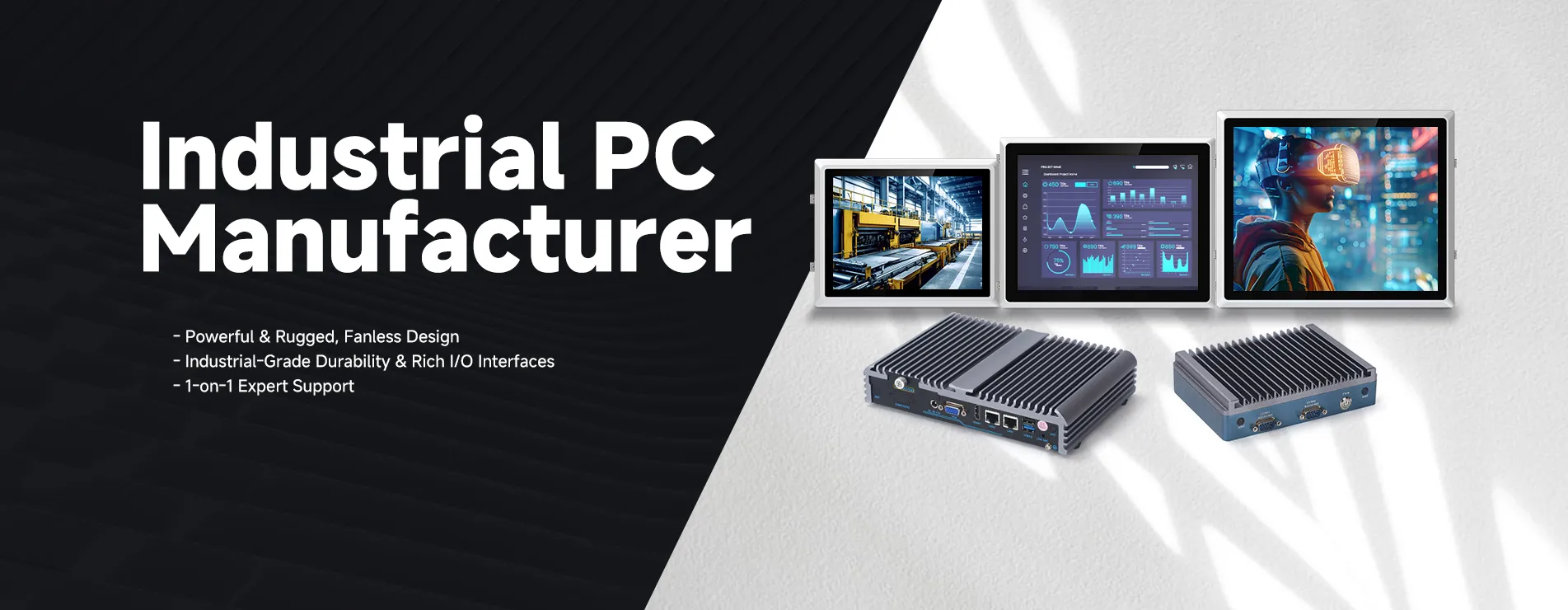
- Fanless: Uses passive or conduction cooling instead of spinning fans, eliminating a major point of failure and a key path for dust ingress.
- Mini / compact: Small form factor, typically mountable on DIN rail, in control cabinets, behind displays, or on machines where space is at a premium.
- Rugged: Designed to handle vibration, shock, power fluctuations, and extended temperature ranges better than standard office PCs.
In short, harsh environments attack all the weak points of typical PC design: fans, moving parts, open vents, and consumer‑grade components.
How a Fanless Industrial MINI PC Solves These Problems?
A Fanless Industrial MINI PC directly addresses these failure modes through its architecture and component choices.
1. Sealed, Fanless Design Keeps Dust Out
By removing fans entirely, no forced airflow that pulls dust into the chassis. Instead, heat is dissipated through:
- Conduction: Heat transfer from the CPU, GPU, and chipsets to the case
- Convection and radiation: From the external surface into the surrounding air
- Because of this, the case can be:
Fully or semi‑sealed against dust and debris
Equipped with carefully designed I/O gaskets and sealed connectors
Rated to specific IP standards (e.g., IP50, IP65, depending on model)
Therefore, dust buildup on internal components is vastly reduced, and sensitive electronics remain protected for significantly longer.
2. No Moving Parts = Higher Reliability
In addition to eliminating fans, most Fanless Industrial MINI PC designs also:
- Use SSD (solid‑state drives) instead of spinning hard drives
- Use industrial‑grade memory with robust mechanical retention
- Minimize or eliminate internal cabling that could shake loose
- Consequently, the system has far fewer mechanical failure points.
3. Designed for Wider Operating Temperatures
Most fanless industrial systems are:
- Engineered around low‑power CPUs (such as embedded Intel® or ARM® processors) that produce less heat
- Validated to run within wider temperature ranges than office PCs
- Equipped with industrial‑temperature components (RAM, SSDs, etc., when required)
4. Compact Form Factor for Flexible Mounting
Because these systems are small, they can be:
- Mounted directly on DIN rail inside compact control panels
- Attached behind monitors or in control cabinets (VESA mounting)
- Integrated into machines or kiosks where space and airflow are limited
- This not only saves footprint, but it also allows the PC to be placed
- Closer to the sensors, cameras, or control elements, it manages
In sheltered locations inside enclosures that are already protected
Moreover, shorter cable runs and simpler wiring can lower installation costs.
5. Lower Maintenance and Total Cost of Ownership
Although a rugged Fanless Industrial MINI PC may cost more upfront than a consumer mini PC, the long‑term economics often favor the industrial design:
- Fewer failures mean less unplanned downtime
- No fan or HDD replacements reduce maintenance work
- Longer lifecycle and part availability avoid frequent redesigns
- When you factor in the cost of line stoppages, service calls, and repeated hardware swaps, fanless industrial systems are often the more economical choice over their lifecycle.
Key Design Features to Look for in a Fanless Industrial MINI PC:
Not all fanless PCs are created equal. Some are simply consumer devices with small heatsinks and no fan; others are engineered from the ground up for industrial use.
When evaluating a Fanless Industrial MINI PC for dusty, harsh environments, consider the following design aspects.
1. Thermal Design and Case Construction
Look for:
- Rugged metal enclosure (often aluminium) with finned surfaces for effective heat dissipation
- Direct thermal coupling between the CPU, chipset, and the chassis via heat spreaders or pipes
- Validated thermal performance under full load at the upper end of the temperature range
- A well‑designed thermal system ensures the PC can run at full performance, even in hot, poorly ventilated cabinets.
2. Sealing and Ingress Protection
Depending on your environment, pay attention to:
- IP rating of the chassis (e.g., dust‑tight, splash‑resistant)
- Gasketed or sealed connectors for critical interfaces
- Optional IP65/IP67 front panels when integrated into panel PCs
- In very dusty or washdown environments, these details significantly impact longevity.
3. Industrial Components and Power Design
A true industrial Mini PC should feature:
- Wide‑range DC power input (e.g., 9–36 V or 12–48 V), tolerant of fluctuation
- Over‑voltage, over‑current, and ESD protections
- Industrial‑grade RAM and SSD options for extended temperature and higher endurance
- This makes the system more resilient to the realities of industrial power and usage cycles.
4. Vibration and Shock Resistance
If your application involves mobile equipment or machinery, ask about:
- Vibration and shock testing to standards like IEC or MIL‑STD
- Secure mounting options (DIN rail clips, panel brackets, etc.)
- Lockable or screw‑down connectors for critical interfaces
- These details help prevent intermittent problems that are notoriously hard to trace.
5. I/O Flexibility and Expansion
Even in a compact form factor, you should evaluate:
- Available serial ports (RS‑232/422/485) for legacy industrial devices
- Digital I/O for triggers and simple control
- Multiple Ethernet ports, often including PoE for IP cameras or sensors
- USB (industrial, locking, or Type‑C if needed)
- Expansion options such as mini‑PCIe, M.2, or PCIe slots for wireless, fieldbus, or custom cards
- A well‑balanced I/O set ensures the PC can integrate smoothly with your existing infrastructure.
6. Long‑Term Availability and Lifecycle Support
In industrial contexts, systems often need to be supported for 5–10+ years. Therefore, it’s crucial to consider:
- How long will the exact model or core platform be available?
- Whether the manufacturer offers form‑fit‑function compatible successors
- The stability of drivers and OS images over time
At ValanoIPC, for example, lifecycle and support planning are treated as primary design constraints, not afterthoughts, because frequent hardware redesigns can be more disruptive than occasional replacements.
While specific models and specs vary, some common principles guide our Fanless Industrial MINI PC designs:
- Thermal engineering first: We start with the expected environment—ambient temperature, mounting method, cabinet constraints—and design the thermal path around that reality
- Industrial power and I/O: Wide‑range power input and robust industrial I/O (serial, digital, multiple Ethernet, etc.) are standard considerations, not add‑ons
- No‑surprises longevity: We select embedded or industrial CPU platforms with clear roadmaps and provide guidance around lifecycle and migration
- Customization options: Many applications need custom I/O, storage, or mounting; modular designs and configurable builds help address this without lengthy custom engineering cycles.
By aligning the PC design with actual environmental and application needs, a Fanless Industrial MINI PC becomes not just a rugged box, but a stable platform for your long‑term automation and data projects.

FAQs About Fanless Industrial MINI PCs for Dusty, Harsh Environments
1. What exactly makes a Fanless Industrial MINI PC “industrial”?
An industrial Fanless Industrial MINI PC differs from consumer fanless mini PCs in several key ways:
It uses industrial‑grade or embedded components designed for long operating hours and extended temperature ranges.
The power input, I/O, and protection circuitry are designed for noisy, less predictable industrial power systems.
The chassis and mounting options are built to withstand vibration, shock, and harsh handling.
The manufacturer typically offers longer lifecycle support, documentation, and service suitable for industrial projects.
2. Can a Fanless Industrial MINI PC really run 24/7 in a dusty plant?
Yes—provided you choose a system whose specifications match your environment. A properly designed Fanless Industrial MINI PC:
Operates without fans, so it doesn’t constantly draw in dust.
Uses a sealed or semi‑sealed housing to prevent particulate ingress.
Has a cooling design validated at full load within the specified temperature range.
However, it’s still important to consider:
The ambient temperature inside your control cabinet
Airflow around the chassis
Whether you need additional cabinet cooling in very hot environments
A reputable industrial computer partner, such as ValanoIPC, can help you estimate the thermal conditions and choose the right model.
3. Are Fanless Industrial MINI PCs powerful enough for modern applications?
Modern fanless systems are much more capable than many people assume. Depending on the model, a Fanless Industrial MINI PC can:
Run full Windows or Linux operating systems
Handle HMI/SCADA workloads, database logging, and PLC communications
Support multiple IP cameras for basic machine vision or monitoring
Perform edge analytics or gateway functions for IIoT systems
For very compute‑intensive workloads (e.g., heavy AI inference, complex 3D rendering), active‑cooled or specialized GPU systems may be necessary. However, for a wide range of industrial control and monitoring applications, a well‑specified fanless unit is more than sufficient.
4. How long does a Fanless Industrial MINI PC typically last?
Lifespan depends on many factors, including temperature, workload, and power quality. Nonetheless, in harsh environments a Fanless Industrial MINI PC will generally:
Outlast a comparable fan‑cooled consumer mini PC
Require less frequent maintenance (no fan or HDD replacements)
Maintain consistent performance over time
In practice, many industrial deployments aim for 5–10 years of service from a system, with periodic storage replacements if needed. Choosing SSDs with sufficient endurance and using proper surge and power protection further extends life.
5. Do I still need an enclosure if I use a Fanless Industrial MINI PC?
Often, yes—but it depends on your environment.
In mildly dusty environments, mounting the Fanless Industrial MINI PC directly on DIN rail or a panel may be sufficient.
In very dusty, wet, or corrosive environments, the PC is usually mounted inside a rated enclosure (e.g., NEMA or IP‑rated cabinet) that offers additional protection.
The advantage of fanless design is that the PC will not be pulling enclosure air through itself. Therefore, the combination of a sealed PC and a suitable enclosure provides multiple layers of protection.
6. Can I retrofit an existing system with a Fanless Industrial MINI PC?
In many cases, yes. A Fanless Industrial MINI PC can often replace:
Desktop or tower PCs currently installed in control rooms or on the floor
Aging industrial PCs with obsolete interfaces
Embedded controllers that no longer meet performance or OS needs
You’ll need to review:
Required operating system and application compatibility
I/O requirements (serial ports, network interfaces, USB devices, fieldbuses)
Space and mounting options in your existing panels or machines
ValanoIPC frequently assists customers in mapping legacy systems to modern fanless replacements with minimal disruption.
7. What operating systems can run on a Fanless Industrial MINI PC?
Most Fanless Industrial MINI PC platforms support common OS options such as:
Windows (e.g., Windows 10/11 IoT or Pro, depending on hardware/driver support)
Linux distributions often used in industrial contexts (Ubuntu, Debian, Yocto‑based systems, etc.)
Some designs may also support real‑time operating systems or specialized embedded OS options. The key is to verify driver support (especially for specialized I/O or wireless modules) before deployment.
8. How do I choose the right Fanless Industrial MINI PC for my application?
You can follow a structured approach:
Define the environment: Dust level, temperature range, vibration, moisture, and mounting constraints.
List performance needs: CPU performance, memory, storage, graphics, and any real‑time requirements.
Specify I/O and networking: Number and type of serial ports, Ethernet ports (and PoE), USB, digital I/O, fieldbus, or expansion cards.
Consider lifecycle: How long you need the system supported, and any regulatory or validation implications of platform changes.
Plan for serviceability: How easily units can be replaced, imaged, or monitored in the field.
Working through these steps with a specialist like ValanoIPC helps ensure the Fanless Industrial MINI PC you select is not just rugged on paper, but also a precise fit for your real‑world workload.





























Sign in to leave a comment.