

Support teams often already have the answers customers need.
These answers may exist inside product demos, troubleshooting videos, training sessions, webinars, and internal walkthroughs. The problem is that finding the exact answer can take too much time.
A support agent may know that a video explains the issue, but still needs to open the recording, scan the timeline, and watch several minutes before reaching the relevant section. Customers face the same problem when they try to solve an issue on their own.
Searchable video knowledge makes this existing content faster and easier to use.
The Problem With Traditional Support Videos
Support videos are useful because they show users exactly what to do.
They work well for product setup, technical troubleshooting, configuration, software workflows, and installation problems.
However, most video libraries are organized only by titles, folders, and playlists. This makes it difficult to find a specific answer inside a long recording.
A 30-minute video may contain the exact fix a customer needs, but the useful part may only be one or two minutes long. Without transcript search or direct links to the right moment, the user must scan the full video.
This increases resolution time for support agents and creates frustration for customers.
The Answer Often Already Exists
Many support teams already have valuable video content.
They may have troubleshooting recordings, product training sessions, setup guides, technical webinars, feature demonstrations, and recorded support calls.
The problem is not always a lack of content. The problem is that the existing content is difficult to search and reuse.
An agent may remember that a solution was explained in an older webinar but not remember the title or timestamp. Because finding it takes too long, the agent may explain the same process again.
Searchable video knowledge helps teams use the content they already have more effectively.
Faster Answers for Support Agents
A searchable video library allows agents to search the spoken content inside recordings.
Instead of searching only by title, they can search for the actual customer problem.
For example, an agent may search:
“Why is the device not connecting after installation?”
The system can identify the relevant explanation inside a troubleshooting video, even when the video has a broader title.
The agent can then open the correct section or share a link to the exact moment with the customer.
This reduces the time spent watching long recordings and helps agents respond faster.
Better Customer Self-Service
Customers often prefer to solve simple problems without contacting support.
However, self-service only works when the answer is easy to find.
A customer is unlikely to watch a 40-minute webinar to find one troubleshooting step. If the answer is difficult to reach, they will create a support ticket.
Searchable video knowledge allows customers to ask a direct question and move to the part of the video that shows the solution.
This is useful for product setup, configuration issues, error messages, installation problems, and common account workflows.
Visual Guidance Is Easier to Understand
Some support issues are difficult to explain through text alone.
A written article may describe the process, but a video can show the exact screen, button, device, or physical step.
This is especially important for technical products, software workflows, equipment installation, and field support.
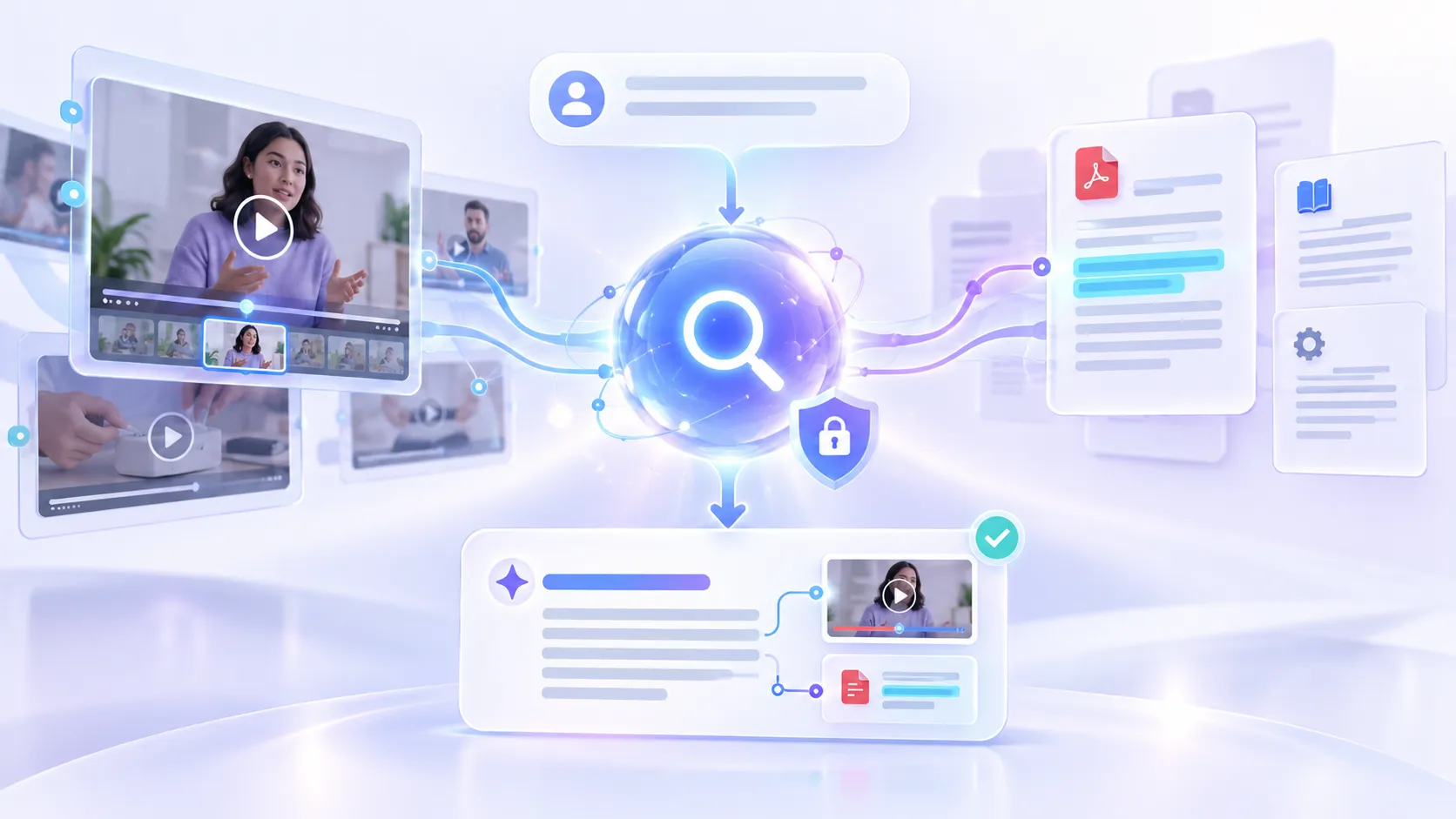
Searchable video knowledge combines fast retrieval with visual guidance. Users can find the answer quickly and then watch the exact section where the solution is demonstrated.
Less Repetitive Work
Support teams often answer the same questions repeatedly.When existing videos are difficult to find, agents may write the same explanation again or arrange another walkthrough.
Searchable video knowledge makes it easier to reuse previous explanations. Agents can find the correct source, confirm the answer, and share the relevant video moment with the customer.
This improves response consistency and reduces repetitive support work.
Faster Onboarding for New Agents
Experienced agents may remember where useful videos are stored. New agents usually do not.They may not understand the folder structure, internal naming system, or which recording contains the best explanation.
A searchable library allows new agents to search by customer problem instead of knowing the exact video title. This makes training and troubleshooting content more useful during onboarding and daily support work.
Connecting Videos and Documents
Support knowledge often exists in more than one format.
A troubleshooting video may be supported by a technical guide, checklist, manual, or help article.A useful knowledge system should allow users to search across these resources together.
The video can show how the solution works, while the document provides exact steps, settings, or technical details.This gives agents and customers a more complete answer without requiring them to search several systems.
Tools for Searchable Video Support
Traditional knowledge-base tools are useful for written help articles and FAQs. Customer support platforms help teams manage tickets and conversations.Video knowledge platforms focus on making video and document content easier to search and retrieve.
Cincopa is one example. It allows teams to organize support videos through Galleries, hosted Pages, and portal-style environments. Its VideoGPT capability can answer questions across videos and documents and direct users to the relevant moment in a recording.
This can be useful for support teams that already have troubleshooting videos and training content but need a faster way to find the exact answer.
Cincopa can also be used alongside an existing help center or support platform. Written articles can remain the main source for simple instructions, while searchable video provides visual guidance for more complex issues.
Finding Gaps in Support Content
Search activity can also show support teams what information is missing.
If agents or customers repeatedly search for a topic and do not find a useful answer, the team can identify a content gap.
They may need to update an old video, create a shorter troubleshooting clip, add a supporting document, or improve the title and transcript.
This helps support teams decide what to create based on real customer questions rather than assumptions.
Conclusion
Support teams do not always need more content. In many cases, the answer already exists inside a video. The real problem is that finding the correct section takes too long.
Searchable video knowledge helps agents and customers search spoken content, reach the exact moment that explains the solution, and reuse existing support material more effectively.
This can reduce resolution time, improve self-service, support new agents, and make valuable video content easier to use.

























Sign in to leave a comment.